Otter.ai vs Read AI: which suits your team?
Verdict: For a team of up to five, I'd start with Otter: it's cheaper, it charges in Australian dollars and it plays back the audio on the free plan, though you may need to type in who does each task yourself. Read AI suits a team of six or more, where its Pro plan costs less than Otter's Business plan. It named the right people, but it dropped half the due dates, playback needs Enterprise, and its joining and sharing settings need changing before a client call.
Who each one suits
- Otter.ai: teams of one to five that mainly meet online and want cheap notes they can check against the audio on the free plan
- Read AI: teams of six or more that want task owners named in the notes and will check every due date
How it was tested
I used my AI review agent to put both through the same tests, then checked several of its findings myself.
The main test was the same for both. I played a pre-recorded weekly meeting of a fictional Newcastle landscaping business into one Google Meet call with seven AI notetakers listening, and each one's notes were checked against the script. The five-minute meeting has four speakers, nine tasks, 18 figures and two corrections, where someone gives a date and then fixes it. All the voices came through one connection, so the test doesn't show how well either tool identifies different meeting participants. Only Google Meet was tested. What each tool does on Zoom, Teams and its phone and desktop apps comes from the vendor's own pages.
Key differences
| Otter.ai | Read AI | |
|---|---|---|
| Task owners right in the test | 0 of 6 | 6 of 6 |
| Due dates right in the test | 8 of 8 | 4 of 8 |
| Play the audio to check a line | Free plan | Enterprise only |
| Checkout currency | Australian dollars | US dollars |
| Seats on the Pro plan | Up to 5 | No limit stated |
| Calendar auto-join when switched on | You pick from five options | All events, any participants |
| Guest removes the bot from chat | "stop otter" (help page) | "Opt Out" (tested) |
Accuracy of the notes
Neither tool's notes could go to a client or the team without checking, and the checking falls in different places. With Otter, the job is typing in who does each task. With Read AI, it's checking every due date and adding any task it folded into another.
| Shared test result | Otter.ai | Read AI |
|---|---|---|
| Tasks found (of 9) | 8, plus 1 partly | 5, plus 3 partly |
| Owners right (6 named aloud) | 0 | 6 |
| Due dates right (of 8) | 8 | 4 |
| Corrections used (of 2) | 2 | 2 |
| Figures right (of 18) | 18 | 18 |
| Names right (of 18) | 10 | 11 |
| Made-up details | 2 | 1 |
| Word error rate | 4.9% | 3.7% |
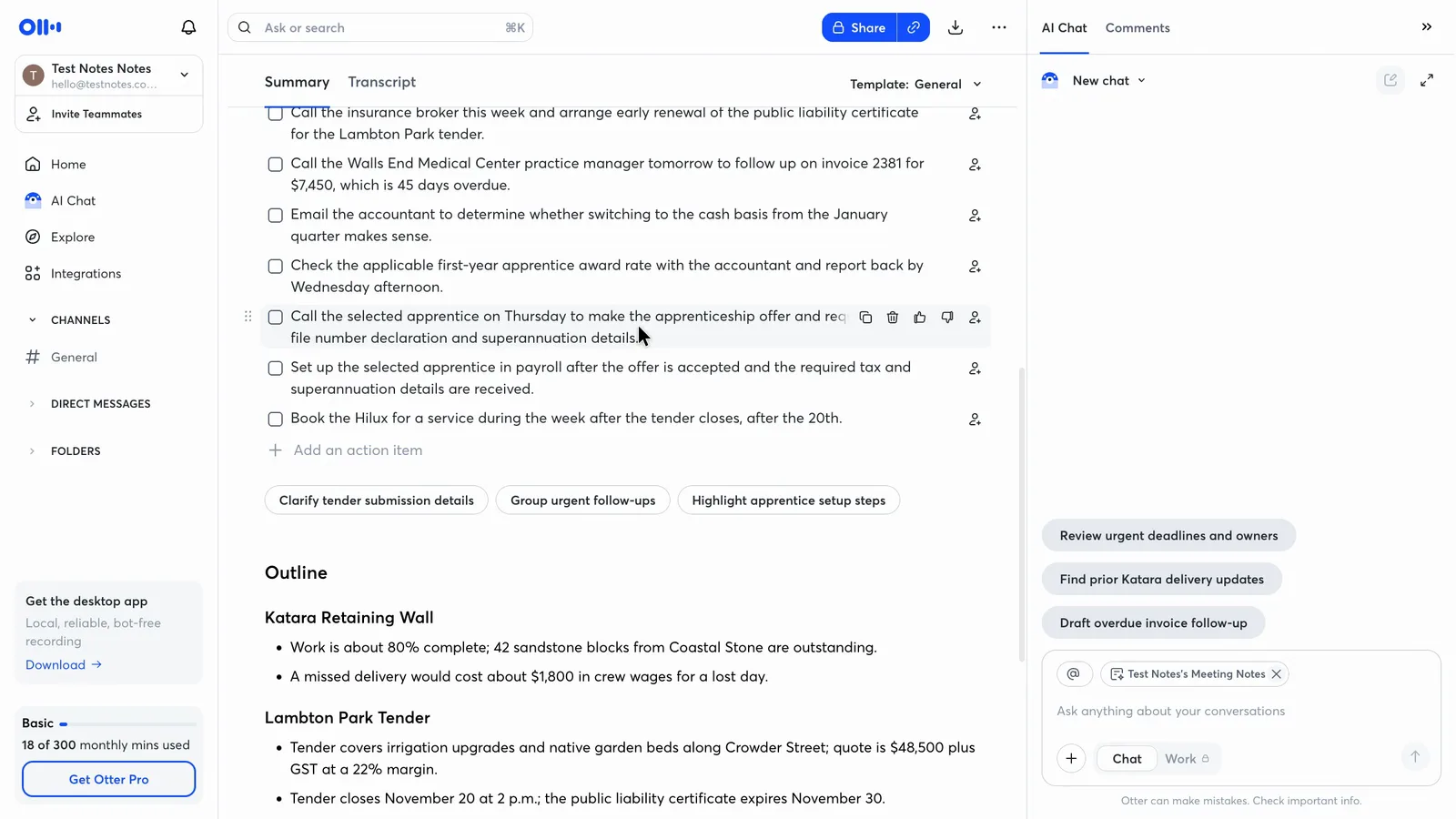
Otter's task list has every due date right, but not one task has an owner, even where someone was given the job by name. Each row has an empty button to assign someone. Otter was the only one of the seven notetakers to name no owners at all.
 (enlarge)
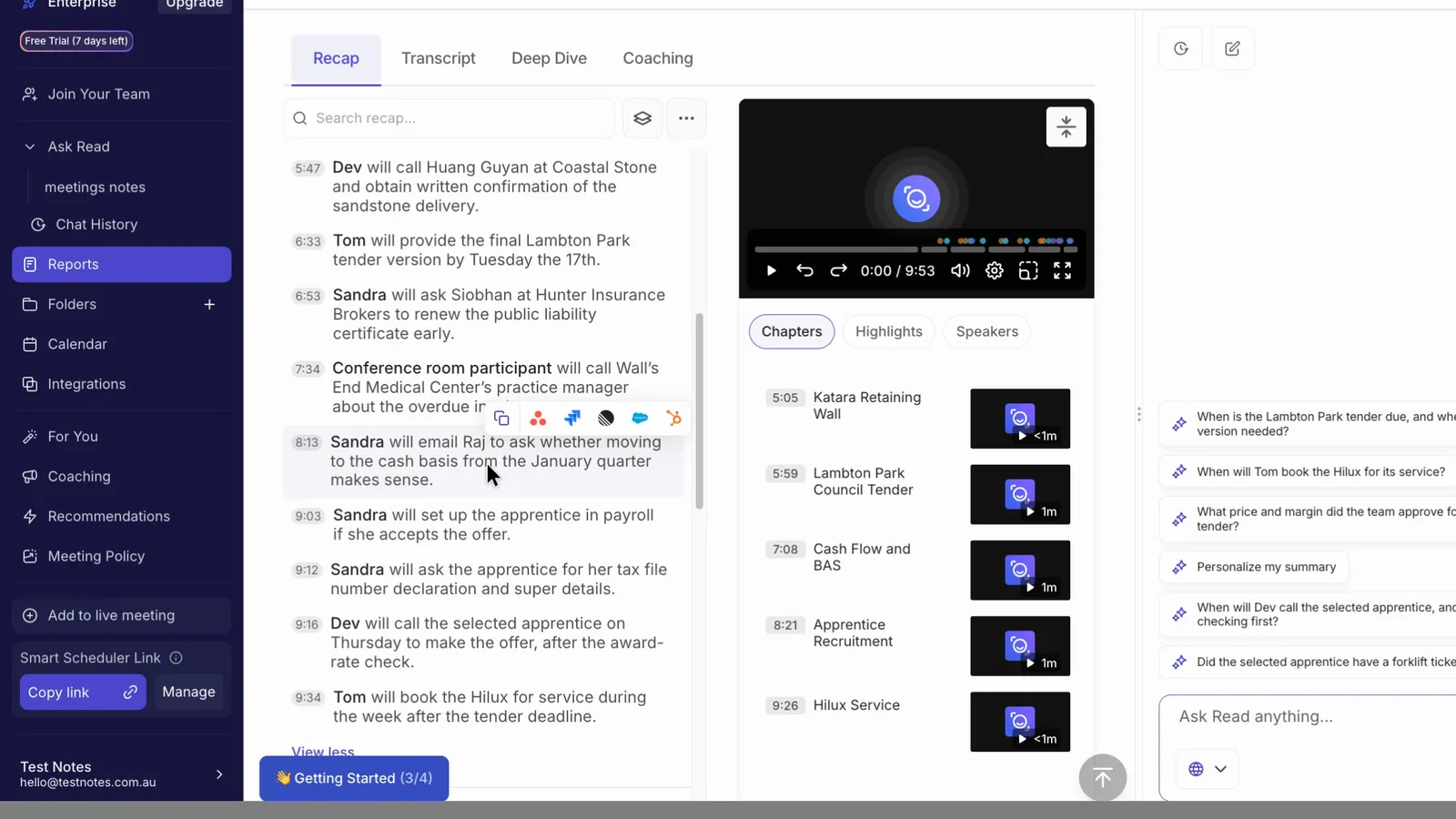
Read AI starts every task with a name, and it had the right person on all six tasks where someone was named aloud. But only two of its nine tasks carry a date, the fewest of the seven tools.
 (enlarge)
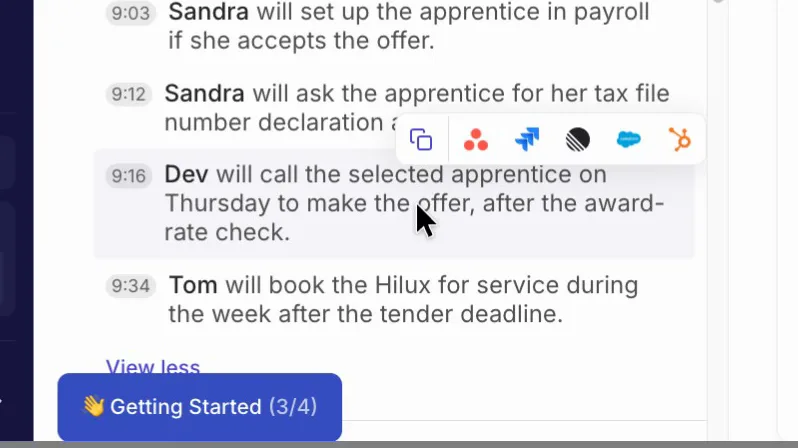
Read AI also missed one task. Checking the award rate with the accountant shows up only as a condition on another task, not as a task of its own, so nobody is down to do it.
 (enlarge)
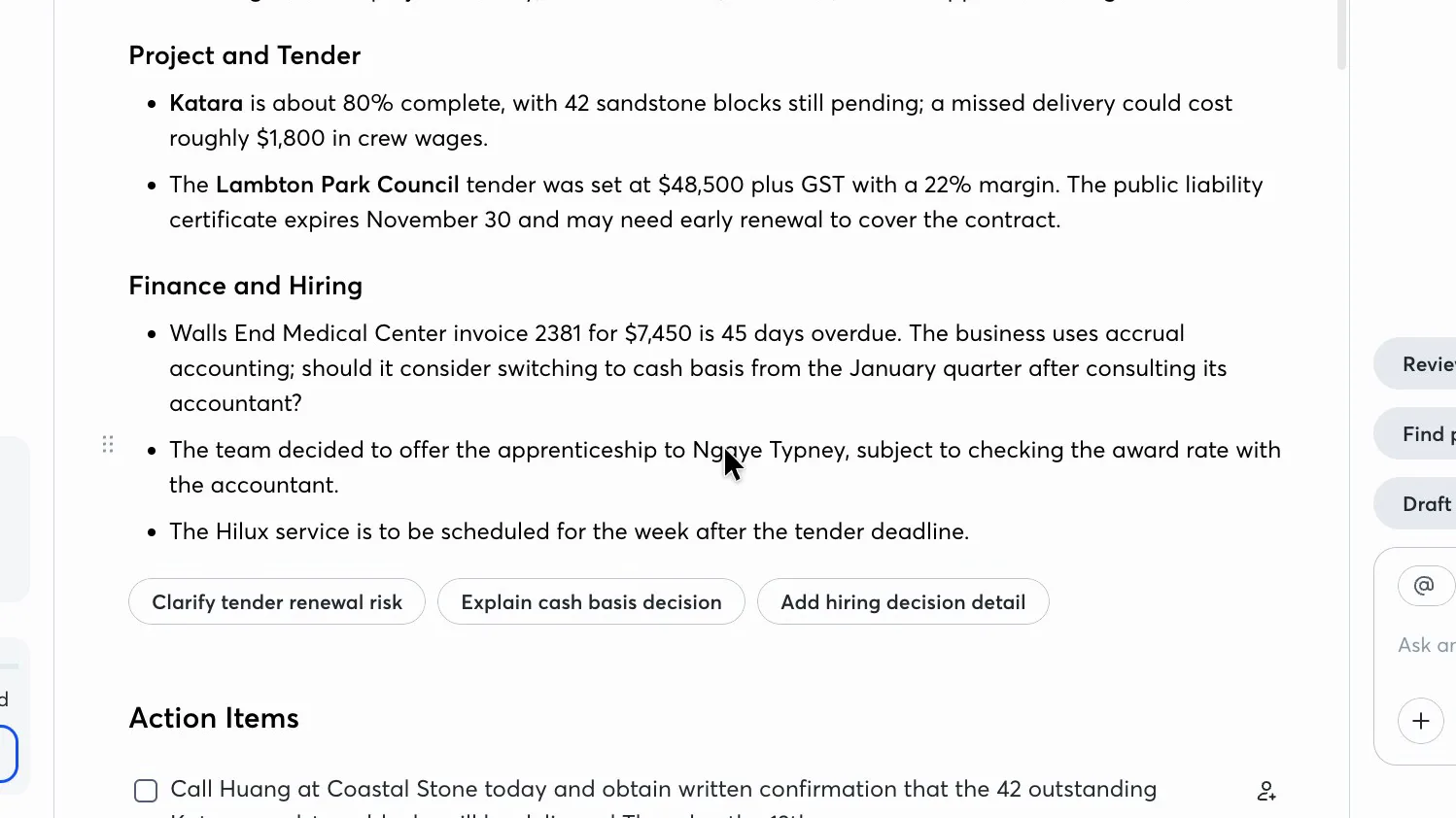
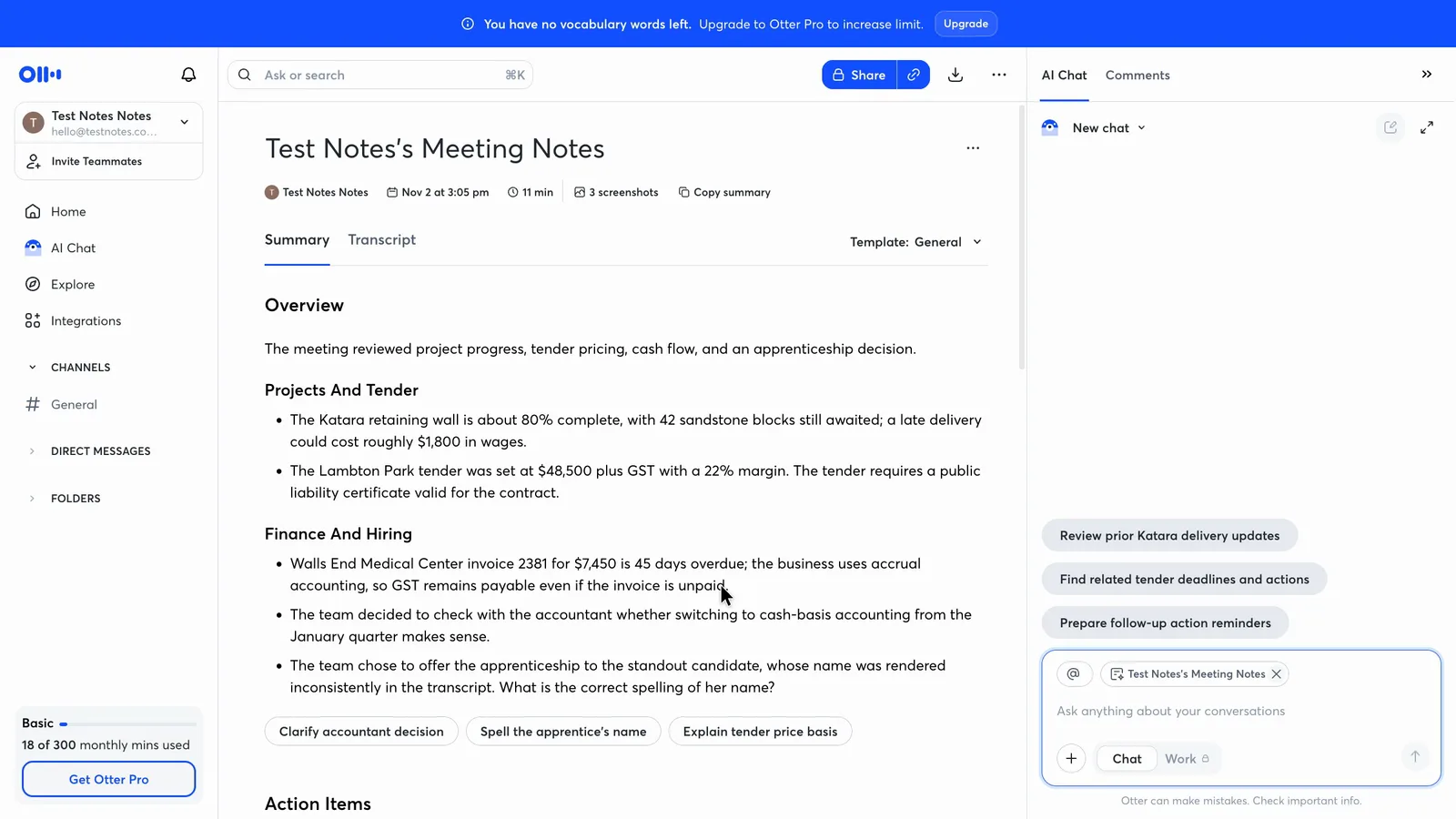
Both got every figure right, including the tender price, the margin and the overdue invoice, and both used the corrected dates. Both also turned a firm decision into a maybe. The business decided outright to offer an apprentice the job. Otter's notes make the offer subject to checking the award rate with the accountant.
 (enlarge)
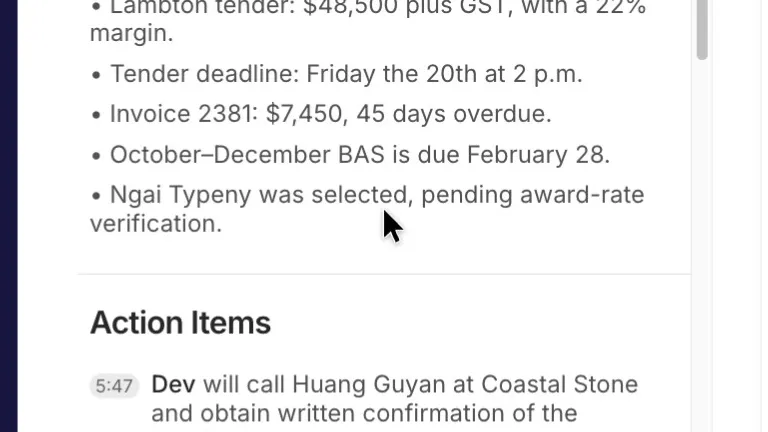
Read AI's notes say she was selected, pending award-rate verification. For anyone who missed the meeting, both versions say the offer hasn't been made yet.
 (enlarge)
Against the five other notetakers in the same test, Read AI and Granola made up the fewest details. Most of the others got the owners and at least six of the dates right.
Checking and fixing the notes
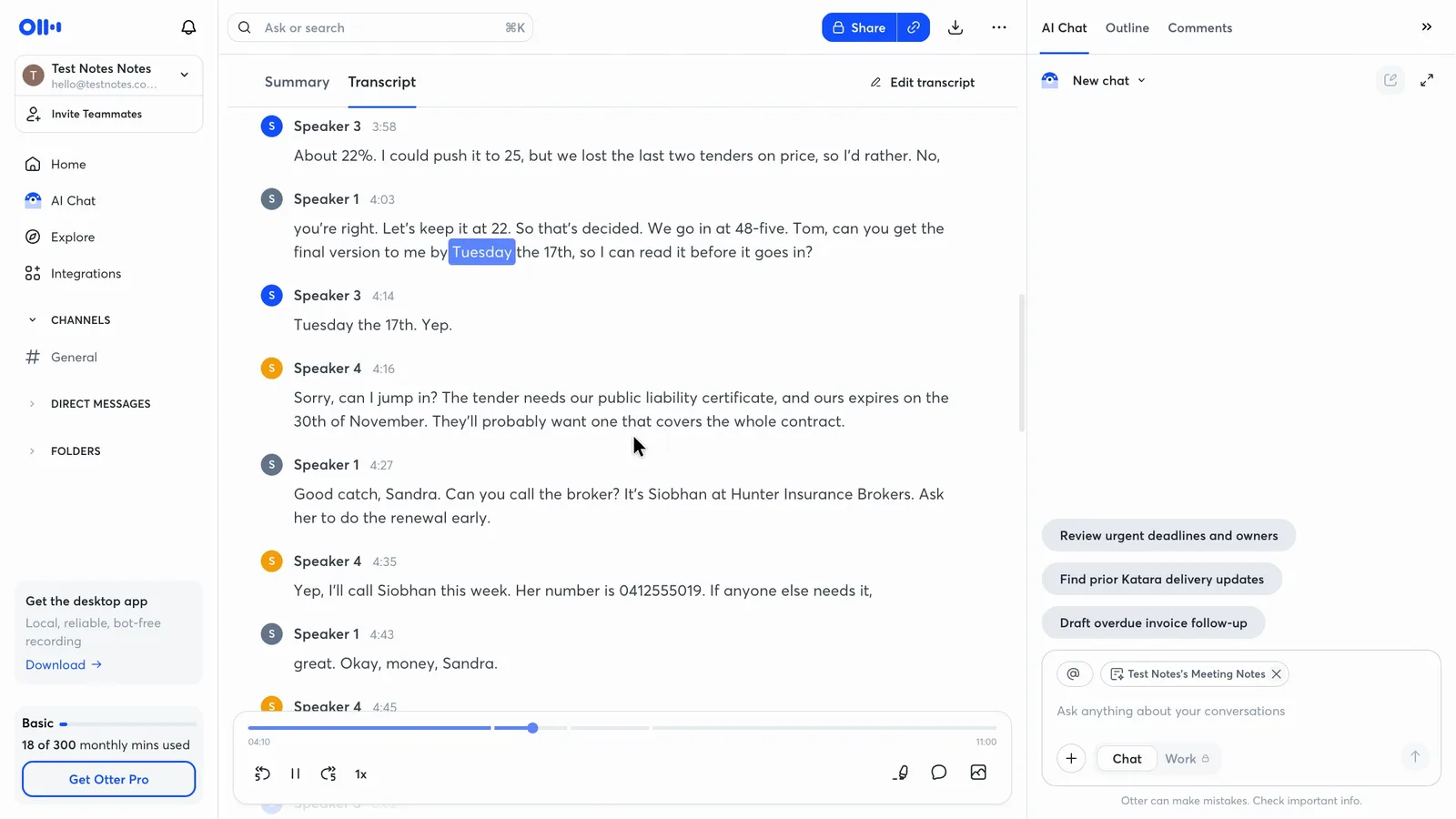
Otter makes it cheaper to check a doubtful line. Click any line of its transcript and the audio plays from there, with each word lit up as it's heard, on the free plan.
 (enlarge)
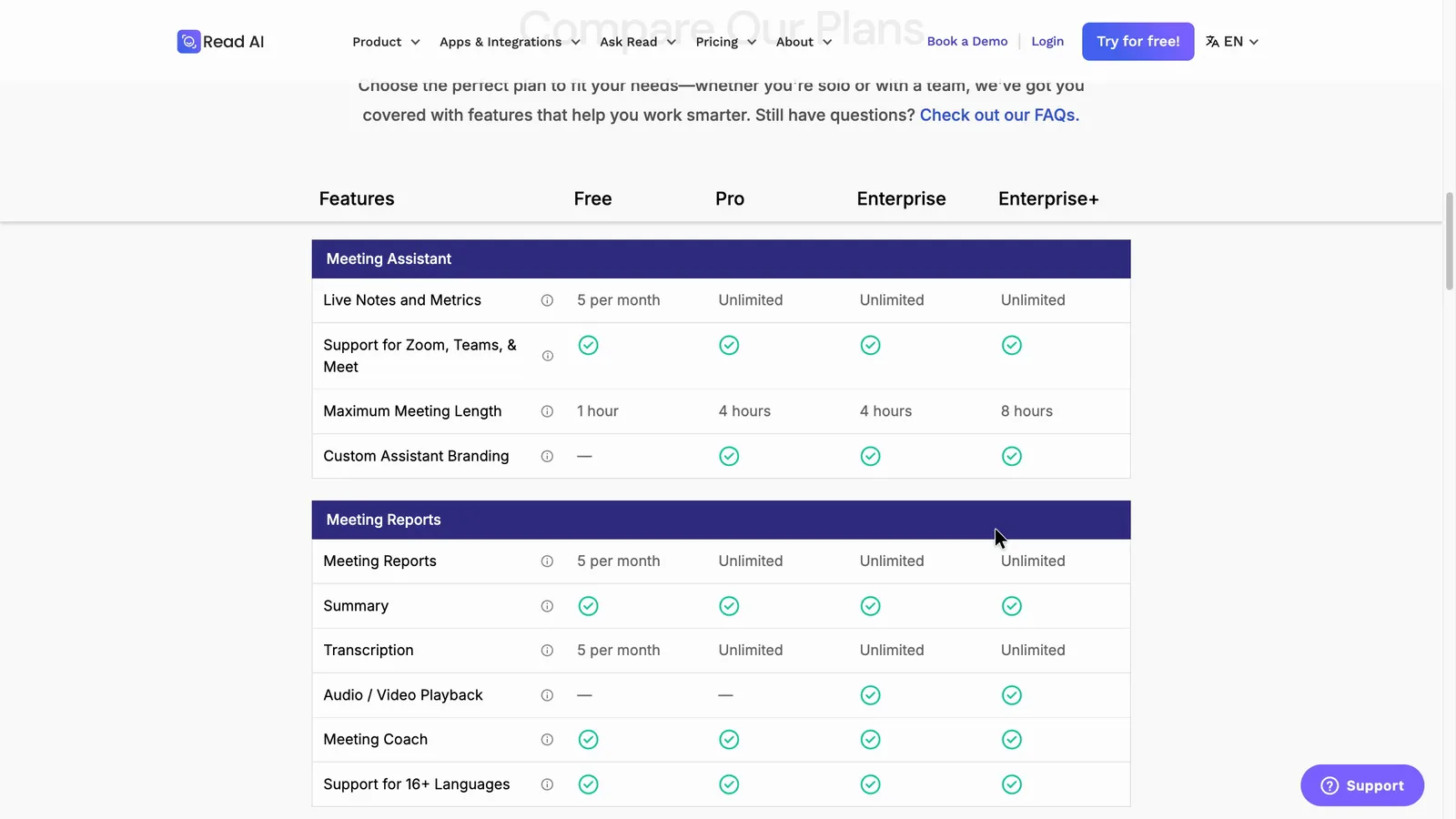
Read AI jumps straight from a task to the moment it was said, which is quicker for checking a task. But its plan table shows playback only on Enterprise and above, with a dash for Free and Pro.
 (enlarge)
In Otter, renaming a speaker after the meeting fills the name through the transcript, and pressing Update rewrites the summary and action items. In the one run in the test, Update appeared to wipe the edits made by hand, including owners typed into tasks. Otter's help page says a regenerated summary replaces the old one and can't be restored, so hand edits in Otter are safest left until after Update.
 (enlarge)
Recording every meeting
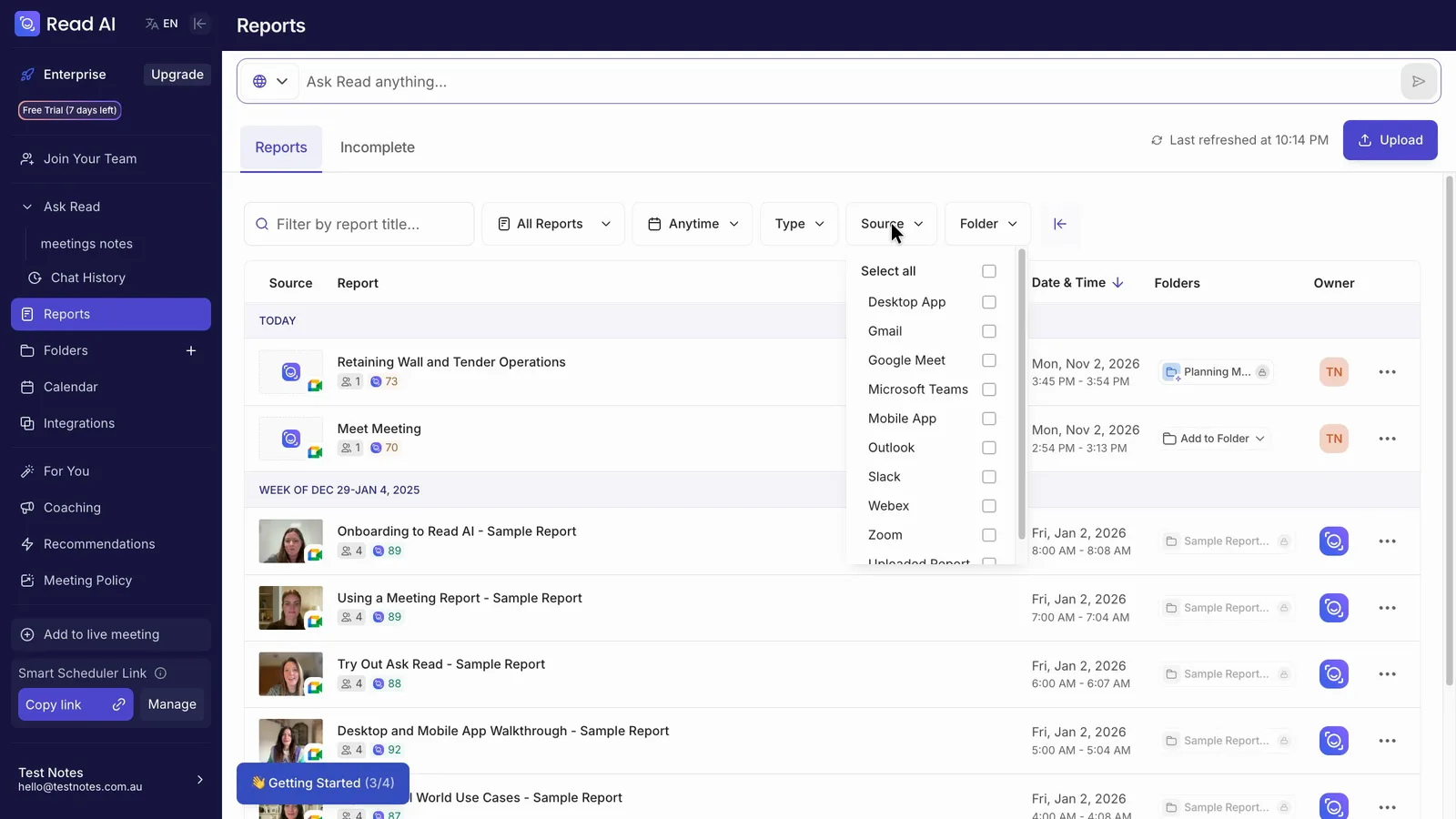
Both pricing tables say the bot joins Zoom, Microsoft Teams and Google Meet on every plan. Read AI's reports list can be filtered by Zoom, Teams, Meet, Webex, its desktop and phone apps, and uploaded files, so every meeting appears in one list.
 (enlarge)
For calls the bot can't join, Read AI's desktop help says anyone with a Mac or Windows computer can use its desktop app, which records audio without a bot. Otter also has a bot-free desktop app.
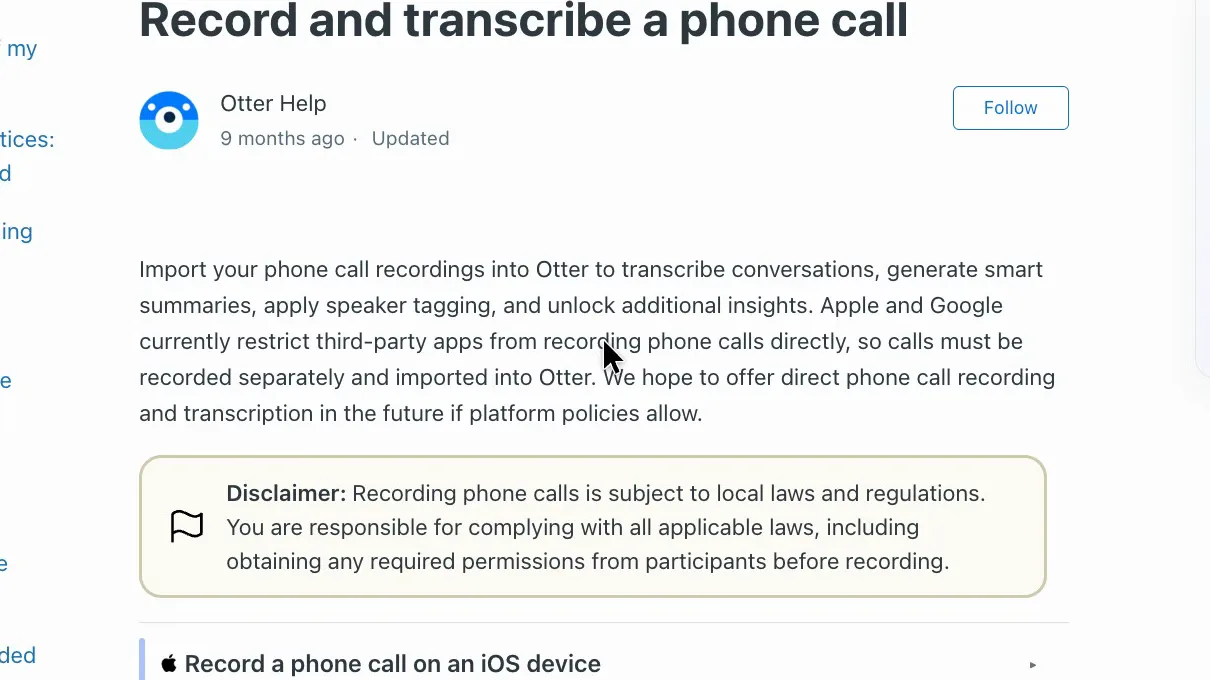
Both phone apps can record a meeting in a room with the phone on the table, but neither can record a phone call on your mobile directly. Otter says calls must be recorded separately and imported, and the free plan allows three imports in total.
 (enlarge)
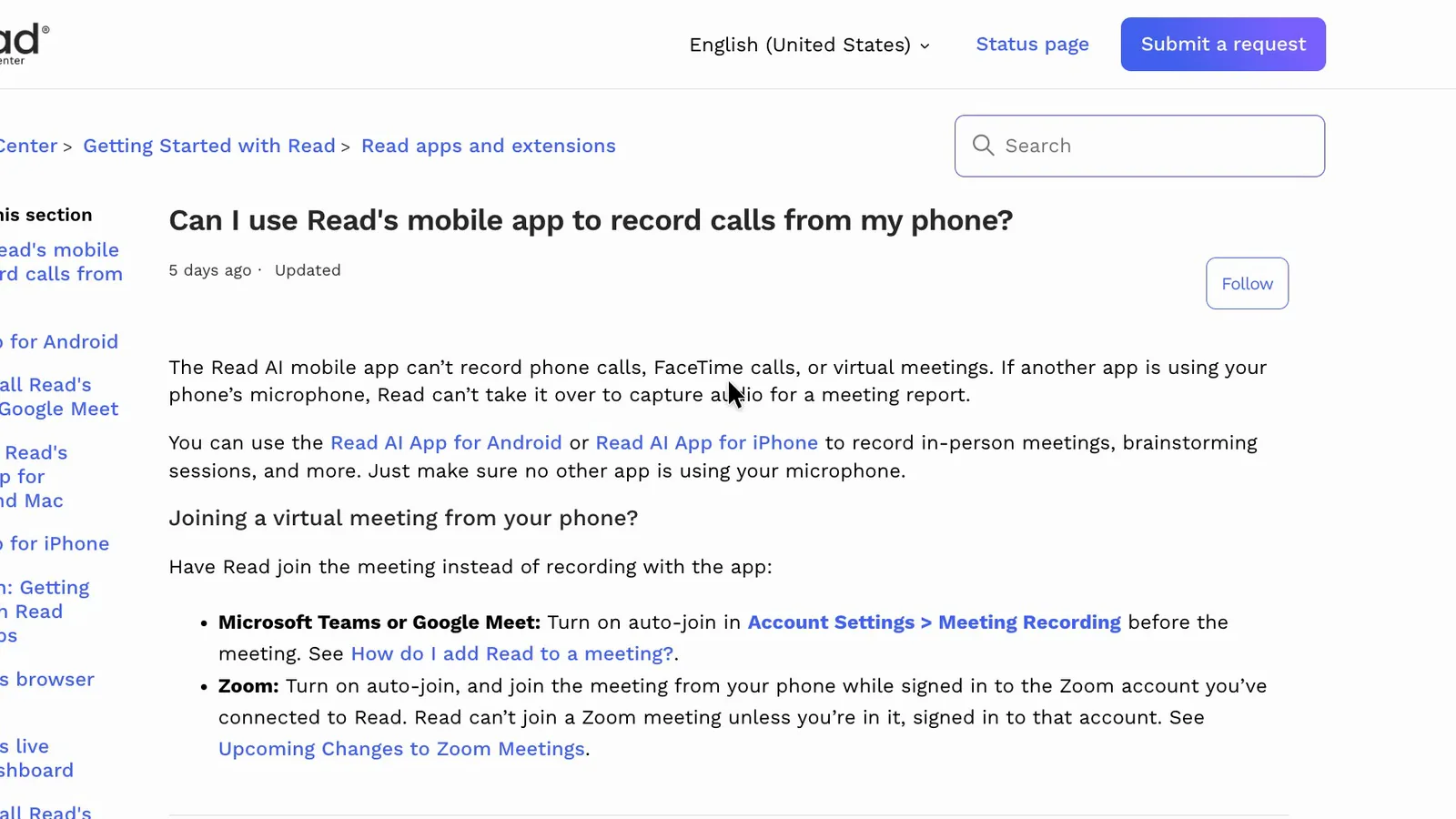
Read AI's help says its app can't record phone calls, FaceTime calls or virtual meetings.
 (enlarge)
Joining, sharing and consent
Read AI's settings need more attention before a client call, though both tools are quick to change.
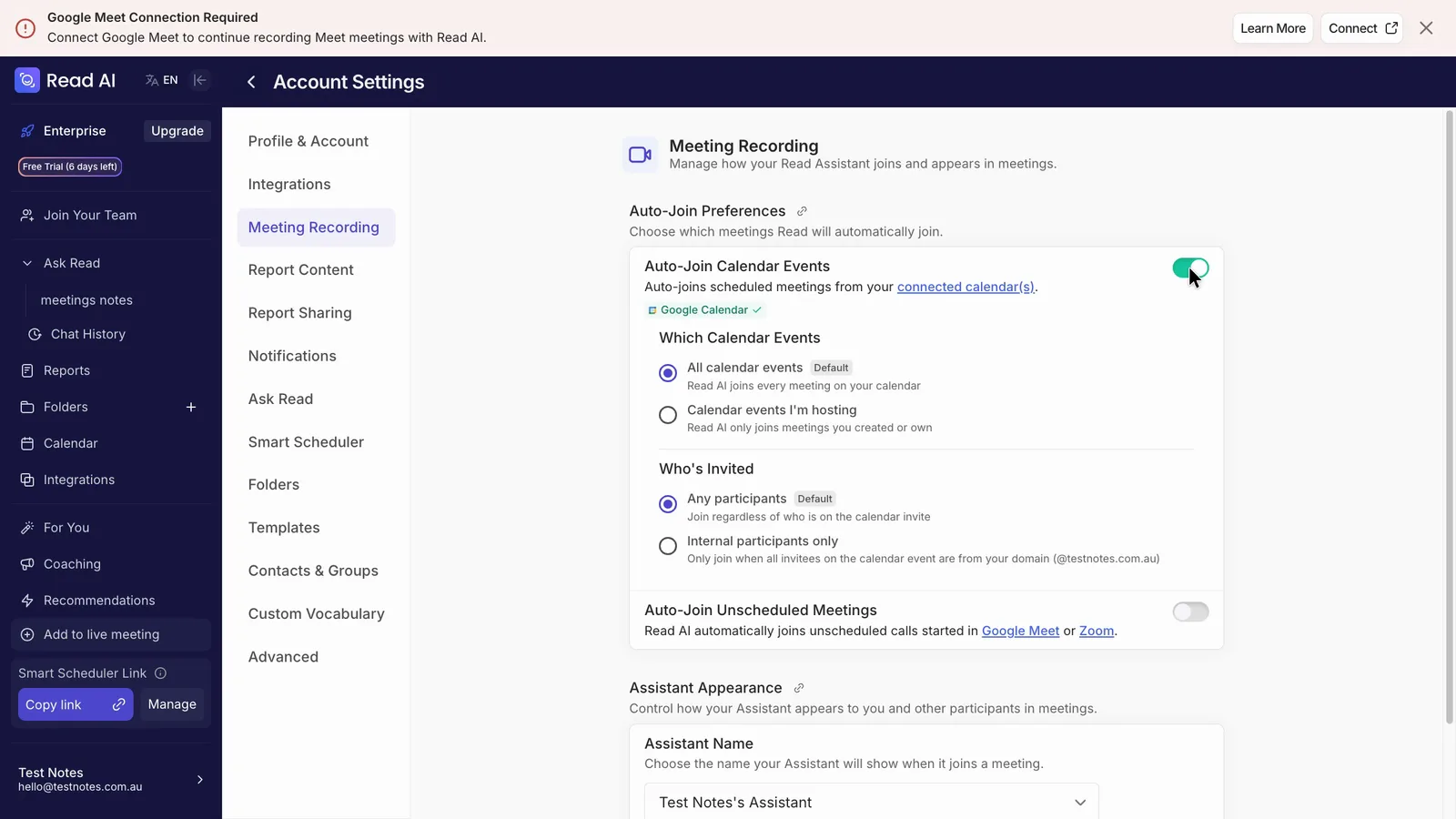
In Otter, the auto-join list has five options, and "Meetings I manually select" does the job of off. Setting the notes to "Don't share" takes two clicks. When I switched on Read AI's calendar auto-join, it started on "All calendar events" and "Any participants", so it would join client meetings too. One click turned it off, and a meeting it was already booked into cleared straight away. Read AI's account settings guide lists the same defaults for new accounts.
 (enlarge)
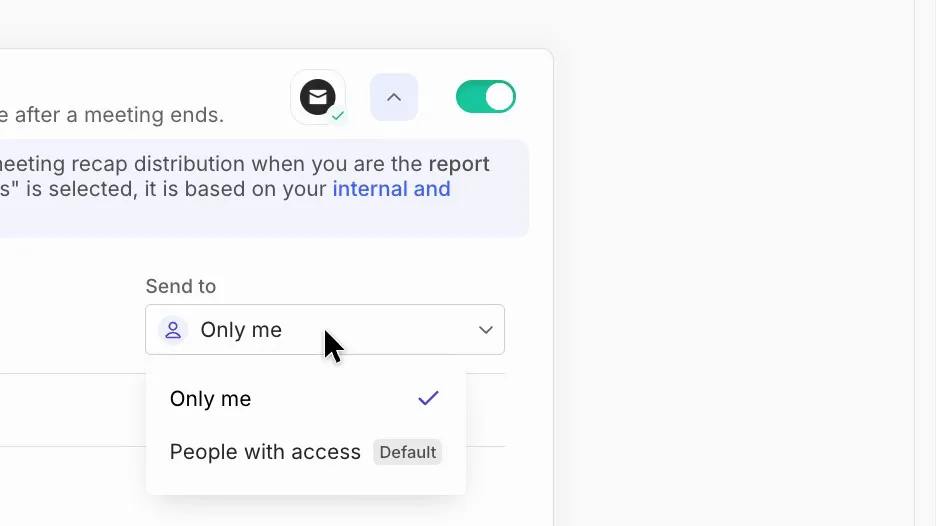
In the Read AI account tested, outside guests got viewer access to the report, and the recap email went to "People with access" by default rather than "Only me". Read AI's sharing help describes the same settings.
 (enlarge)
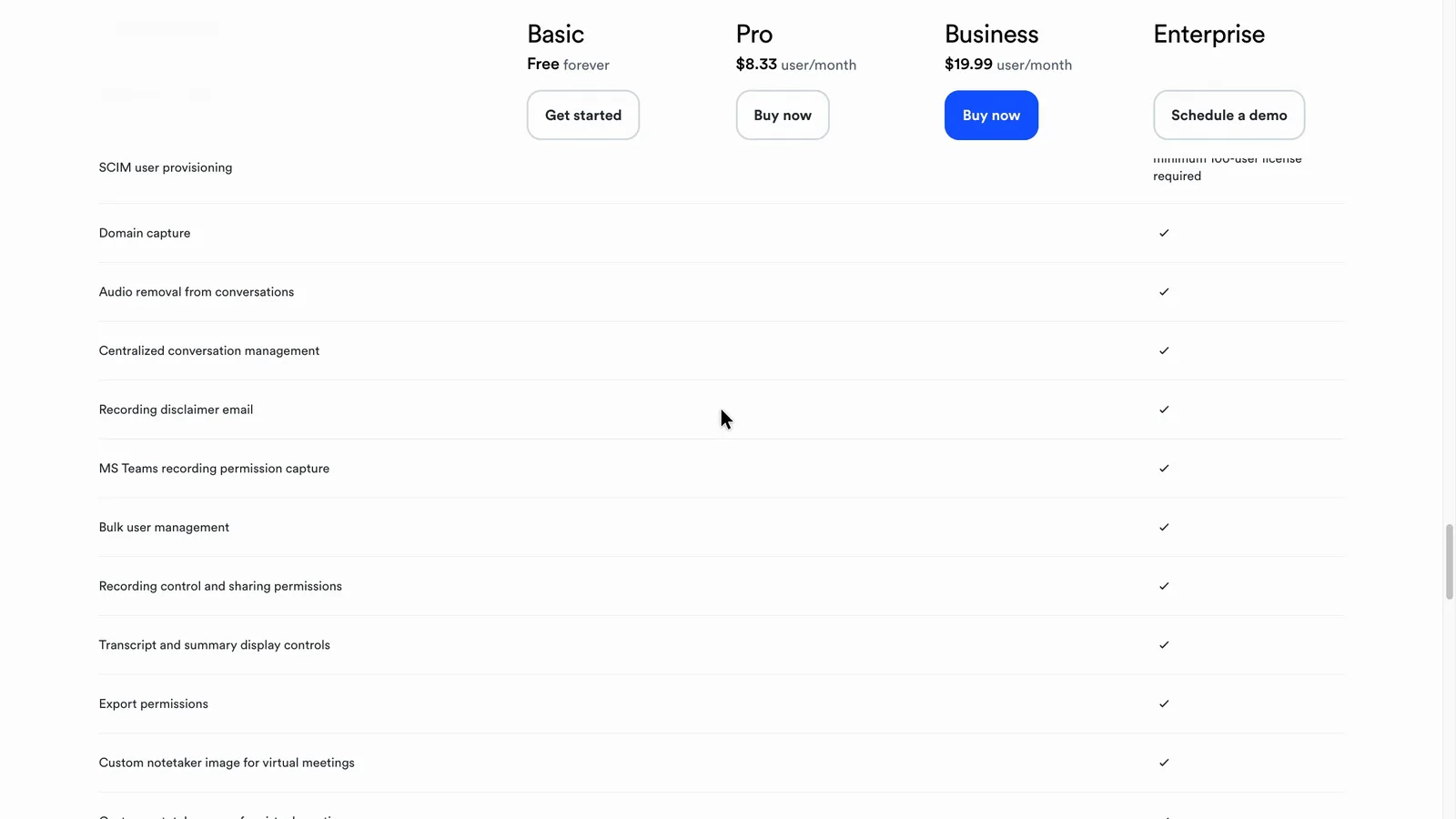
Both bots join as named participants, but both companies leave it to the customer to tell people they're being recorded and get any consent needed. Otter's terms make the customer responsible for notices and consent, and Read AI says the same when you record without its bot (Read AI's consent help). Read AI's help says its bot posts a recording notice in the meeting chat when possible. Otter's pricing table lists the email that warns guests about recording on Enterprise only, but its help page says you can switch on a similar pre-recording email yourself.
 (enlarge)
On the account tested, Otter's setting to post a live-summary link in the meeting chat was on.
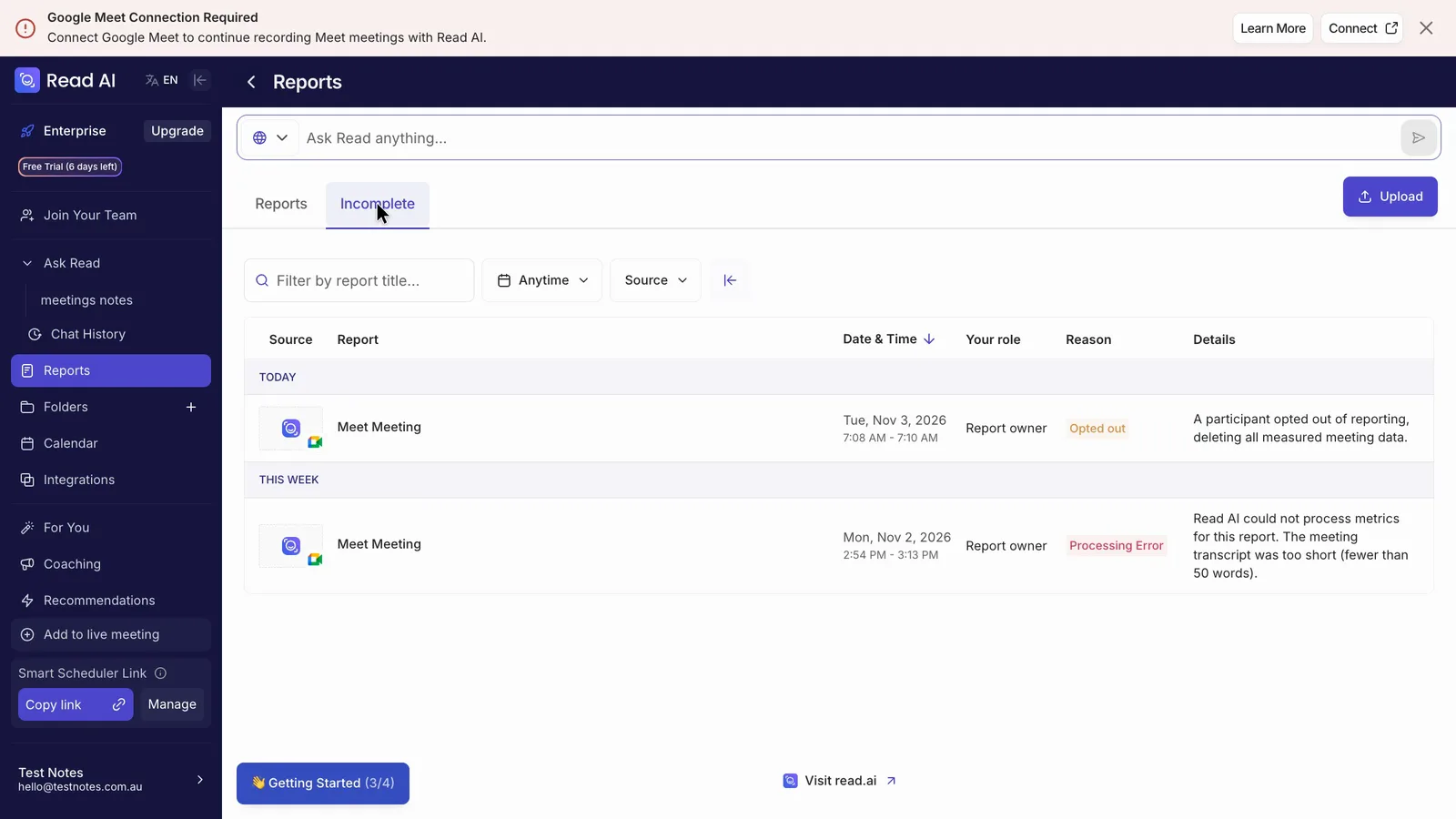
When I typed "Opt Out" in the chat, Read AI's bot left straight away, and the reports list showed it deleting what it had captured. Read AI's help says "Read stop" only ends the recording and keeps a partial report. Read AI's opt-out help adds that if the bot has posted an opt-out link in the chat, typing "opt out" won't work and the guest has to click the link, and that one guest opting out ends the recording and deletes it for everyone. Otter's help says any guest can type "stop otter" to remove its bot. That wasn't tried.
 (enlarge)
What it costs
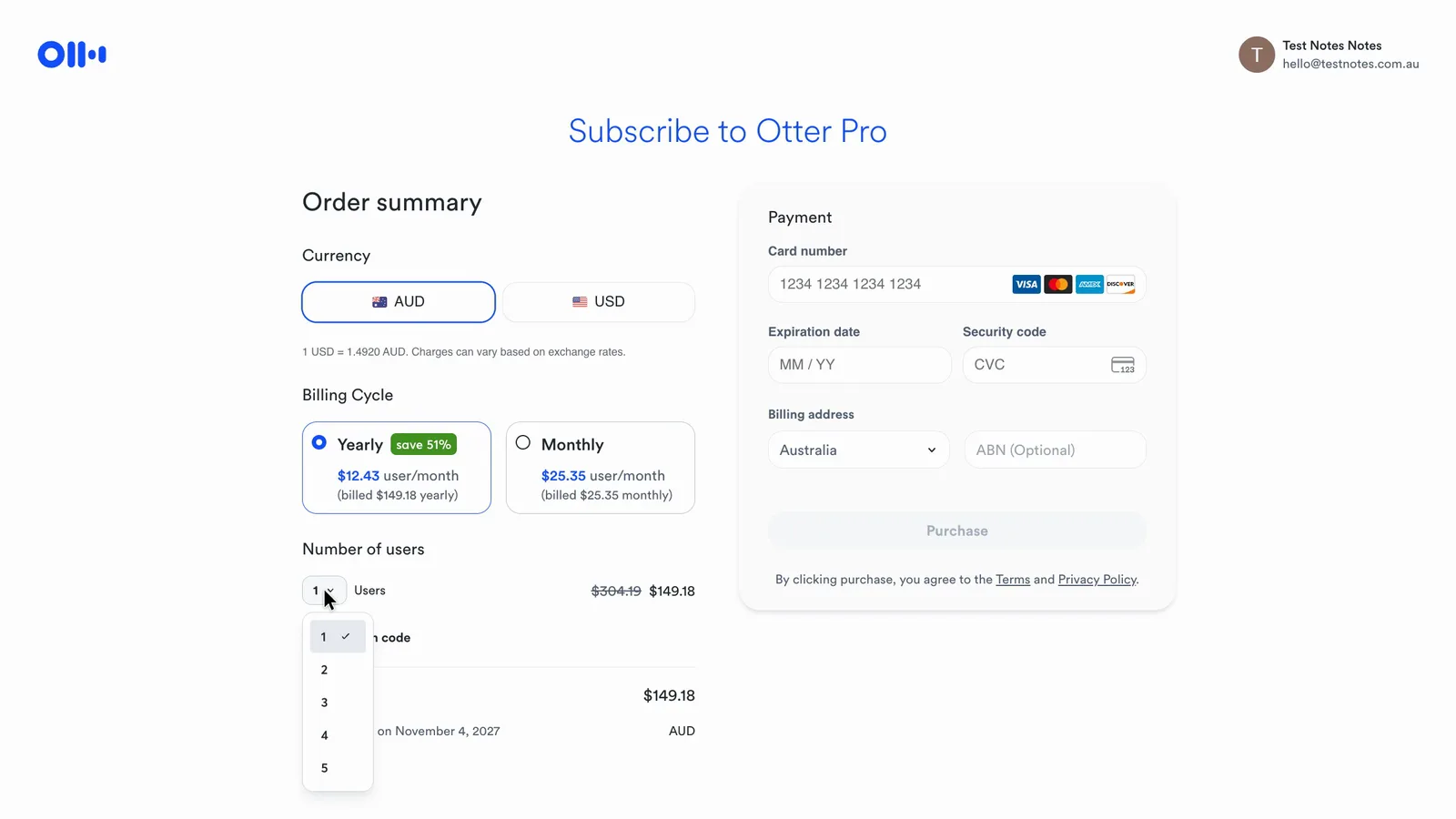
Otter costs about half as much for one to five people on yearly billing, but its Pro plan has lower limits: 1,200 minutes of transcription a month and 90 minutes per meeting, against unlimited reports and 4-hour meetings on Read AI Pro. At six people Read AI is cheaper, because Otter's Pro plan stops at five seats and a sixth person means moving to Business.
 (enlarge)
Otter's checkout shows Australian dollars, with an optional ABN box. Read AI's checkout is only in US dollars, even with Australia picked as the country, and shows "Sales tax $0.00". An Australian card may add an international transaction fee to either charge, since both companies are based in the US and Otter's terms say its fees are in US dollars. Neither checkout added GST.
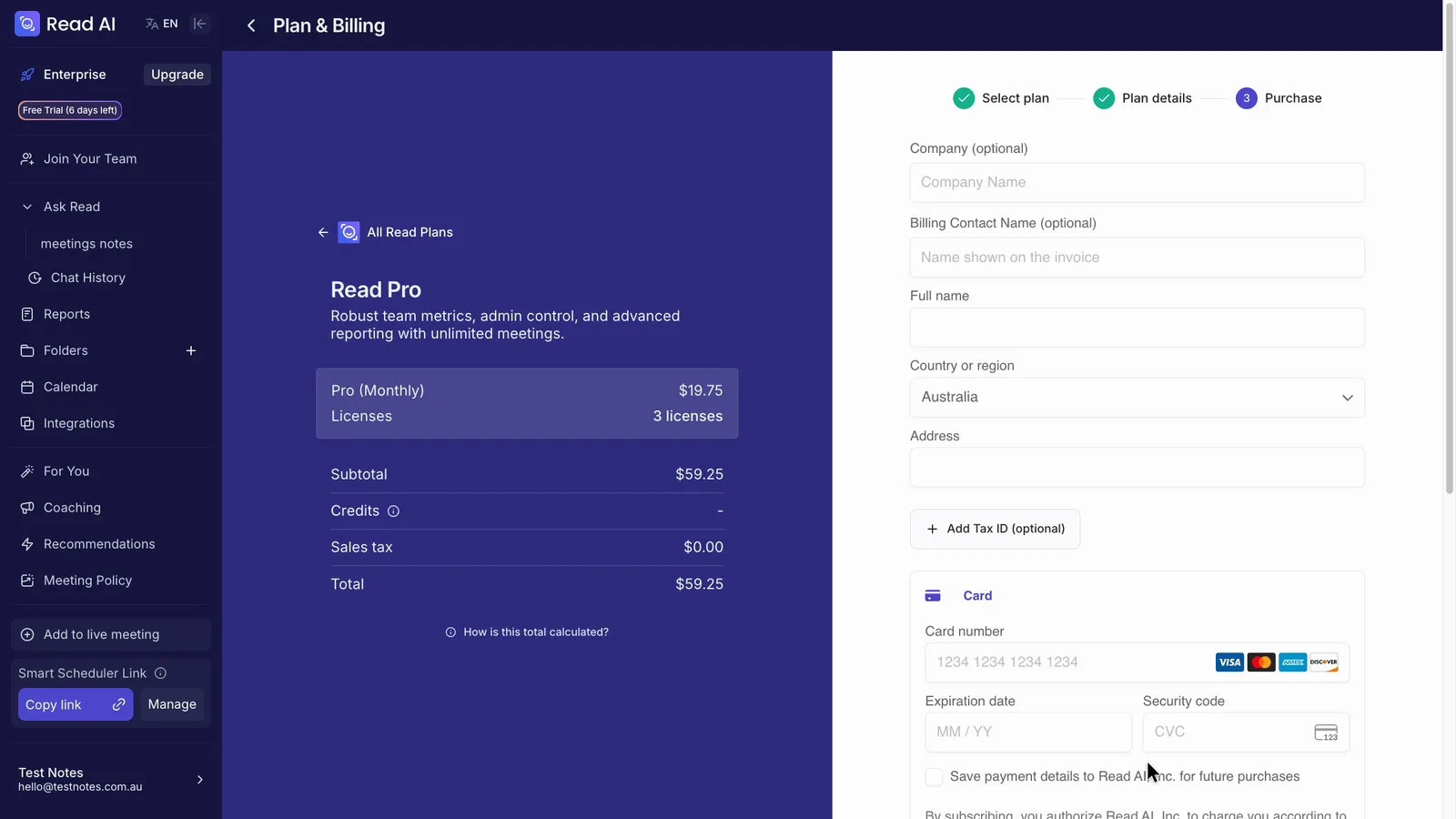 (enlarge)
| Monthly cost, before GST | Otter.ai | Read AI |
|---|---|---|
| 1 person | about $12 (Pro) | about $22 (Pro) |
| 3 people | about $37 (Pro) | about $65 (Pro) |
| 6 people | about $179 (Business) | about $130 (Pro) |
| 8 people | about $239 (Business) | about $174 (Pro) |
| 1 person, billed monthly | about $25 | about $29 |
| Cheapest plan with playback | Free | Enterprise, about $33 a person |
Prices are per month on yearly billing unless marked. Otter's are from its Australian checkout on 4 November. Read AI's are its US dollar prices converted at Wise's rate of A$1.446 on 10 November, before any card fee.
Otter's free plan appears to stop at 300 minutes of transcription a month and 30 minutes of transcript for each meeting (Otter's free plan limits).
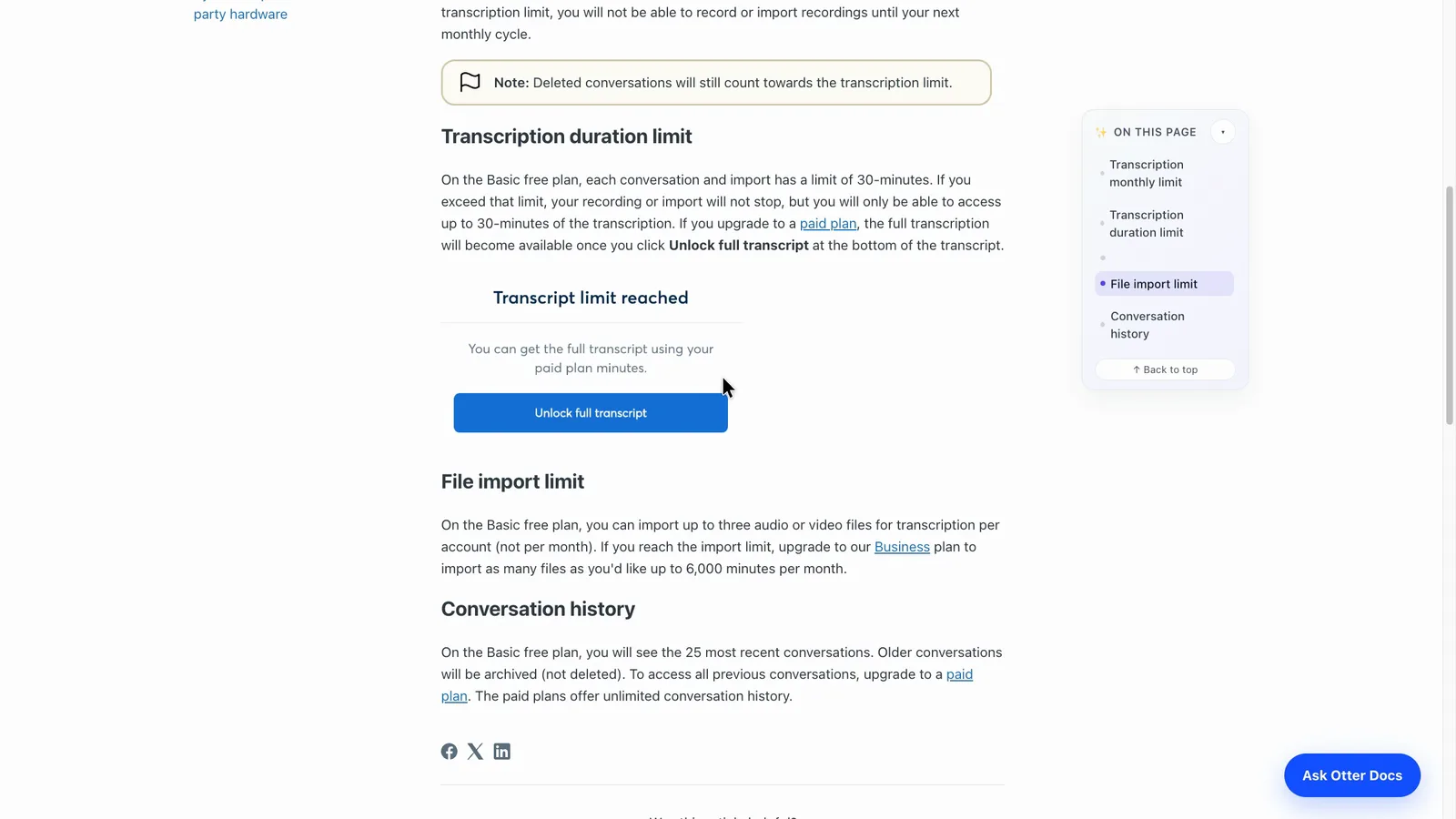 (enlarge)
As far as Read AI's pricing page shows, its free plan covers five meetings a month, each up to an hour, with no playback.
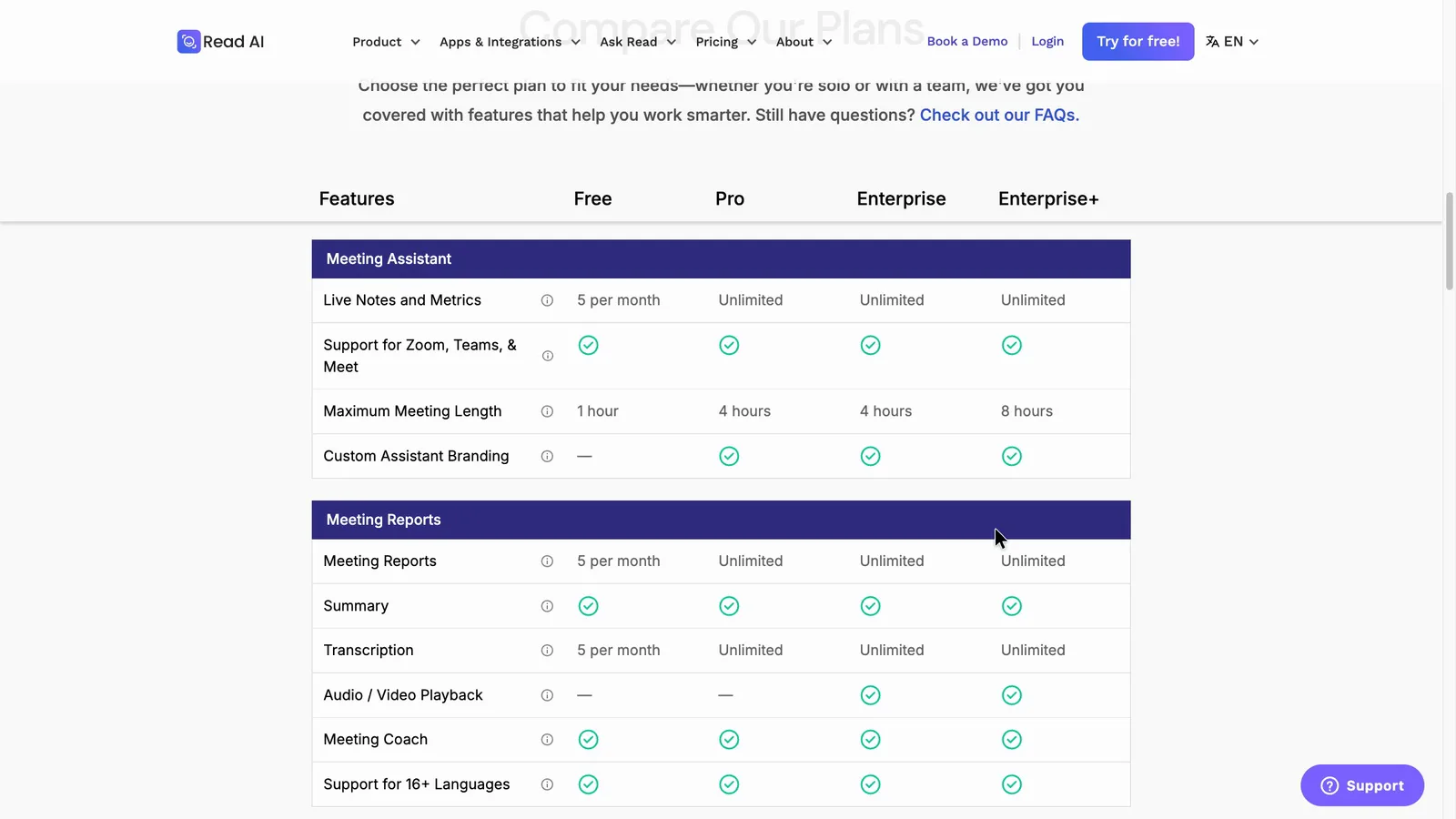 (enlarge)
Getting your records out
Neither tool was reopened after cancelling, so this rests on each vendor's help pages. Otter says your conversations stay after a downgrade, and older ones can still be exported one at a time. A single TXT export worked on the free plan and kept the figures. Pro adds PDF and Word files, and Business adds bulk export.
Read AI's help says free-plan reports are kept for at least a year after the meeting while paid reports are kept indefinitely. Its privacy policy says paid data is kept until you stop paying. The two pages are worded differently, so what happens to older reports after you stop paying is unclear. Its download menu offers the recap and transcript as TXT files (Read AI's export help).
Notes included in other platforms
Zoom Workplace Pro, Google Workspace Business Standard and Microsoft 365 with Copilot each include AI meeting notes for their own platform. Read AI's pricing page also says some Zoom plans include its premium features through Zoom Essential Apps.
Pricing
| Plan | Price | Per | Includes |
|---|---|---|---|
| Basic | Free | Free plan: 300 minutes a month, 30-minute transcripts, latest 25 conversations, 3 imports in total, one meeting at a time | |
| Pro (billed yearly) | $149.18 ex GST | per user per year | Up to 5 users, 1,200 minutes a month, 90-minute meetings, Zapier and CRM sync for one user |
| Pro (billed monthly) | $25.35 ex GST | per user per month | Up to 5 users, 1,200 minutes a month, 90-minute meetings, Zapier and CRM sync for one user |
| Business (billed yearly) | $357.90 ex GST | per user per year | Unlimited meeting minutes, 4-hour meetings, bulk export, usage reports |
| Business (billed monthly) | $44.76 ex GST | per user per month | Unlimited meeting minutes, 4-hour meetings, bulk export, usage reports |
AUD, inc GST unless marked ex GST or GST not stated. Checked 5 Nov 2026. Source: otter.ai/pricing
| Plan | Price | Per | Includes |
|---|---|---|---|
| Free | Free | 5 transcripts and 5 meeting reports a month, meetings up to 1 hour, no uploads included, no audio or video playback, basic integrations; Zoom, Teams and Meet supported | |
| Pro (monthly) | US$19.75 ex tax | per user per month | Unlimited reports, meetings up to 4 hours, 100 upload minutes a month, premium integrations; no audio or video playback |
| Pro (annual) | US$15 ex tax | per user per month | Billed US$180 per licence a year; same features as Pro monthly |
| Enterprise (monthly) | US$29.75 ex tax | per user per month | As Pro, plus audio and video playback and 200 upload minutes a month |
| Enterprise (annual) | US$22.50 ex tax | per user per month | As Enterprise monthly, billed yearly |
| Enterprise+ (monthly) | US$39.75 ex tax | per user per month | Requires 5+ licences; meetings up to 8 hours, 300 upload minutes a month, playback |
| Enterprise+ (annual) | US$29.75 ex tax | per user per month | Requires 5+ licences; as Enterprise+ monthly, billed yearly |
Read AI charges in US dollars. Your bank converts the price and may charge a foreign transaction fee. Checked 2 Nov 2026. Source: read.ai/plans-pricing
Integrations
| Connects to | What syncs | Direction | Checked |
|---|---|---|---|
| Google Meet | Bot joins and records the meeting | Google Meet → Otter.ai | |
| Google Calendar | Calendar events so the bot can join meetings | Google Calendar → Otter.ai | |
| Zoom | Bot joins and records meetings | Zoom → Otter.ai | |
| Microsoft Teams | Bot joins and records meetings | Microsoft Teams → Otter.ai | |
| Outlook Calendar | Calendar events so the bot can join meetings | Outlook Calendar → Otter.ai | |
| Slack | Not stated | Not stated | |
| HubSpot | Meeting notes to the CRM | Otter.ai → HubSpot | |
| Salesforce | Meeting notes to the CRM | Otter.ai → Salesforce | |
| Zapier | Not stated | Not stated | |
| Asana | Action items as tasks | Otter.ai → Asana | |
| Dropbox | Not stated | Not stated |
| Connects to | What syncs | Direction | Checked |
|---|---|---|---|
| Google Meet | Bot joins and records calls; reports land in the Read library | Google Meet → Read AI | |
| Google Calendar | Calendar events the bot is scheduled to join | Google Calendar → Read AI | |
| Zoom | Bot joins and records Zoom meetings | Zoom → Read AI | |
| Microsoft Teams | Bot joins and records Teams meetings | Microsoft Teams → Read AI | |
| HubSpot | Not stated | Not stated | |
| Notion | Not stated | Not stated |
What I didn't test (13 things)
- Real multi-person calls: every voice in the shared test came through one Meet participant, so how each tool names speakers and owners in a real Zoom or Teams call is unknown
- Zoom, Microsoft Teams, Webex, the phone apps, the desktop apps and in-person recording, for both tools; these rest on each vendor's own pages
- What an outside guest sees in the meeting or receives by email, including whether Otter's chat link posts and whether opening a Read AI recap signs a guest up
- Otter's "stop otter" command and Read AI's "Read stop" command; only Read AI's "Opt Out" was tried
- Defaults on a brand-new account: neither test account was new, so first-run auto-join and sharing settings come from the vendors' help pages
- Cancelling a paid plan, and reopening records after a plan or trial ended, on either tool
- Otter's 30-minute free transcript limit and its 26th-conversation archive in use
- Read AI's Ask Read search and file uploads (the trial had no upload credits)
- Whether custom vocabulary fixes misheard names in either tool
- Connected integrations, including Xero, MYOB, QuickBooks and Reckon, none of which appeared on either vendor's pages seen
- How each tool's invoice shows GST for a BAS claim, and whether Read AI's checkout accepts an ABN
- Support during Australian business hours
- State-by-state consent law on recording conversations
Video transcript
Otter vs Read
In the same test meeting, Otter got every due date right but didn't assign anyone to any of the tasks, and Read AI got every owner right but missed half the dates. Both are AI notetakers, which join your online meetings, create a transcript, and write up the notes. For a team of up to five, I'd start with Otter, because it's cheaper and you can play back the recording on the free plan. Read AI suits a team of six or more, where its Pro plan is cheaper, but playback costs more and a few settings need changing first. I used my AI review agent to put both through the same tests, then checked several of its findings myself.
The differences at a glance
In terms of how both tools performed in my test meeting, the biggest difference is the task list, where Otter got the dates right but Read AI correctly identified the people. After that, they differ mostly on playing back the audio and on price.
The same meeting in both
I played a pre-recording of a fictional landscaping firm's weekly meeting into one Google Meet call, with seven AI notetakers listening, then each one's notes were checked against what was said. The meeting had nine tasks and plenty of figures, plus two corrections, where someone gives a date and then fixes it. All the voices came through one connection, so this test doesn't show how well either tool identifies different meeting participants.
The same meeting in both
Otter's task list has every due date right, but not one task has an owner, even where someone was given the job by name. Each row just has an empty button to assign someone. Read AI starts every task with a name, and it had the right person on all six tasks where someone was named. But only two of its nine tasks have a date, and checking the award rate with the accountant shows up only as a condition on another task, not as a task of its own.
The same meeting in both
Both got every figure right. They also both caught the two corrections, so the notes use the fixed dates. But both turned a firm decision into a maybe. The business decided outright to offer an apprentice the job. Otter's notes make it subject to checking the award rate, and Read AI's say she was selected, pending that check.
The same meeting in both
Against the five other notetakers in the same test, Read AI and Granola made up the fewest details. Most of the others got the owners and at least six of the dates right.
Checking the notes
When a name or figure looks wrong, the quickest check is to play that moment. In Otter, you click any line of the transcript and it plays from there, with each word lit up as it's heard, even on the free plan. Read AI jumps straight from a task to the moment it was said, which is handy, but playback is only on the Enterprise plans, which need at least five licences. Otter can rewrite its summary after you fix things, but in our test that appeared to wipe out the edits made by hand.
Recording every meeting
Both can send a bot into Zoom, Microsoft Teams and Google Meet on every plan, though only Meet was tested. Read AI keeps meetings from its desktop and phone apps and uploaded recordings together in one list, and Otter does the same. Both phone apps can record a meeting in a room, but neither can record a phone call on your mobile directly.
Joining and sharing
Both let you control which meetings the bot joins. In Otter, you can just tick "Meetings I manually select" to turn it off. Read AI's calendar auto-join starts out set to every event and everyone invited, so it would join client meetings too. One click turns it off, and a meeting it was already booked into clears straight away.
Joining and sharing
Read AI's sharing settings give outside guests access to the report, and the recap email goes to everyone with access by default, not "Only me". Otter lets you set its notes to "Don't share" in two clicks. If a guest doesn't want to be recorded, typing "Opt Out" in the chat makes Read AI's bot leave straight away, and the report list shows it deleted what it had captured. Otter says any guest can type "stop otter" to remove its bot. Its pricing table lists the email that warns guests about recording as only available in the Enterprise plan, but its help page says you can switch on a similar email yourself. Both Otter and Read AI say it's up to you to tell people they're being recorded. Otter keeps your recordings in the United States, and Read AI says the United States and other countries. Read AI only uses your meetings to improve its AI if you opt in. Otter uses them with details that identify people taken out, and its settings say Enterprise customers can opt out of that.
What it costs
Otter's checkout is in Australian dollars, which makes it easy to budget for, but the Pro plan stops at five people, so a team of six or more needs the Business plan. Read AI's checkout is only in US dollars, even with Australia picked as the country. Otter's free plan appears to stop at 30 minutes of transcript for each meeting. As far as Read AI's pricing page shows, its free plan covers five meetings a month, each up to an hour.
What it costs
These are monthly costs on yearly billing, with Read AI converted to Australian dollars. For one to three people, Otter costs about half as much. At six people it flips, and Read AI's Pro plan comes in cheaper than Otter's Business plan.
Who each one suits
For a team of up to five that mainly meets online, I'd start with Otter. Going by my test, it got every due date right, it's cheaper, and you can check a doubtful line against the audio for free. But you may need to type in who does each task yourself. Read AI makes more sense for a team of six or more, because at that size its Pro plan comes in cheaper than Otter's Business plan. It got the people right, but I'd check every due date, and I'd change who gets the recap before the first client call.
Who each one suits
I hope that helps you decide which option is right for your business. Comparison tables are available in the full write-up, which is linked below. Thanks for watching.