Otter.ai vs Fireflies.ai: which is better?
Verdict: I think Fireflies is the better pick for a team that wants every task to have a name on it and will pay for Pro. Otter suits one to five people who want due dates on their tasks and a free plan they can export a transcript from, and who don't mind adding owners themselves. Neither tool's notes were ready to send without a check, and Otter costs about twice as much for a team of eight because its Pro plan stops at five people.
Who each one suits
- Otter.ai: sole traders and teams of up to five who want due dates on their tasks and a free plan that exports a text transcript
- Fireflies.ai: teams of six or more, or any team that wants an owner on every task and will pay for Pro
How it was tested
I played the same five-minute recording of a weekly meeting into one Google Meet call, with Otter, Fireflies and five other popular notetakers listening at once. The meeting is for a made-up Newcastle landscaping firm and has four voices, local place names, 18 figures, nine tasks and two corrections made partway through. I then checked what each tool wrote against what was actually said. I used my AI review agent to put both through the same tests, then checked several of its findings myself. Both tools were used on their free plans.
| Otter.ai | Fireflies.ai | |
|---|---|---|
| Task owners right (of 6) | 0 | 6 |
| Due dates on the task list | Yes, 8 of 8 right | No, they're higher up the notes |
| Custom words on free | 5 | None |
| Download on free | Text transcript | Nothing |
| Free meeting length | First 30 minutes of transcript | 2 hours |
| People on the Pro plan | Up to 5 | No cap at checkout |
| 8 users, billed yearly | About $240 a month | About $116 a month |
Notes you can send as they are
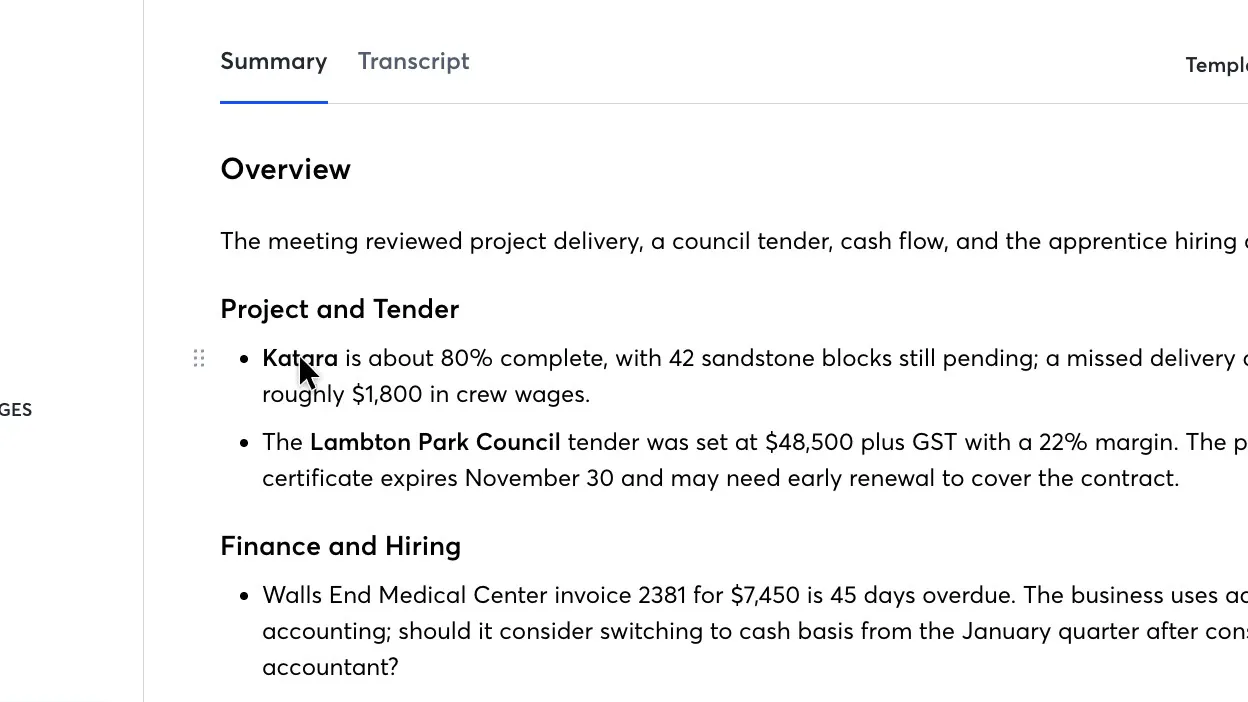
Neither tool's notes were ready to send to a client without a check, and each got different parts of the task list right. With Otter you'd type in who does each task. With Fireflies you'd copy the deadlines across from further up the notes.
Both got every number right and recorded both corrections, including a due date that changed partway through, and the two transcripts were about equally accurate. Otter is one of three tools in my test that got every due date right, and Fireflies is one of five that named every owner correctly.
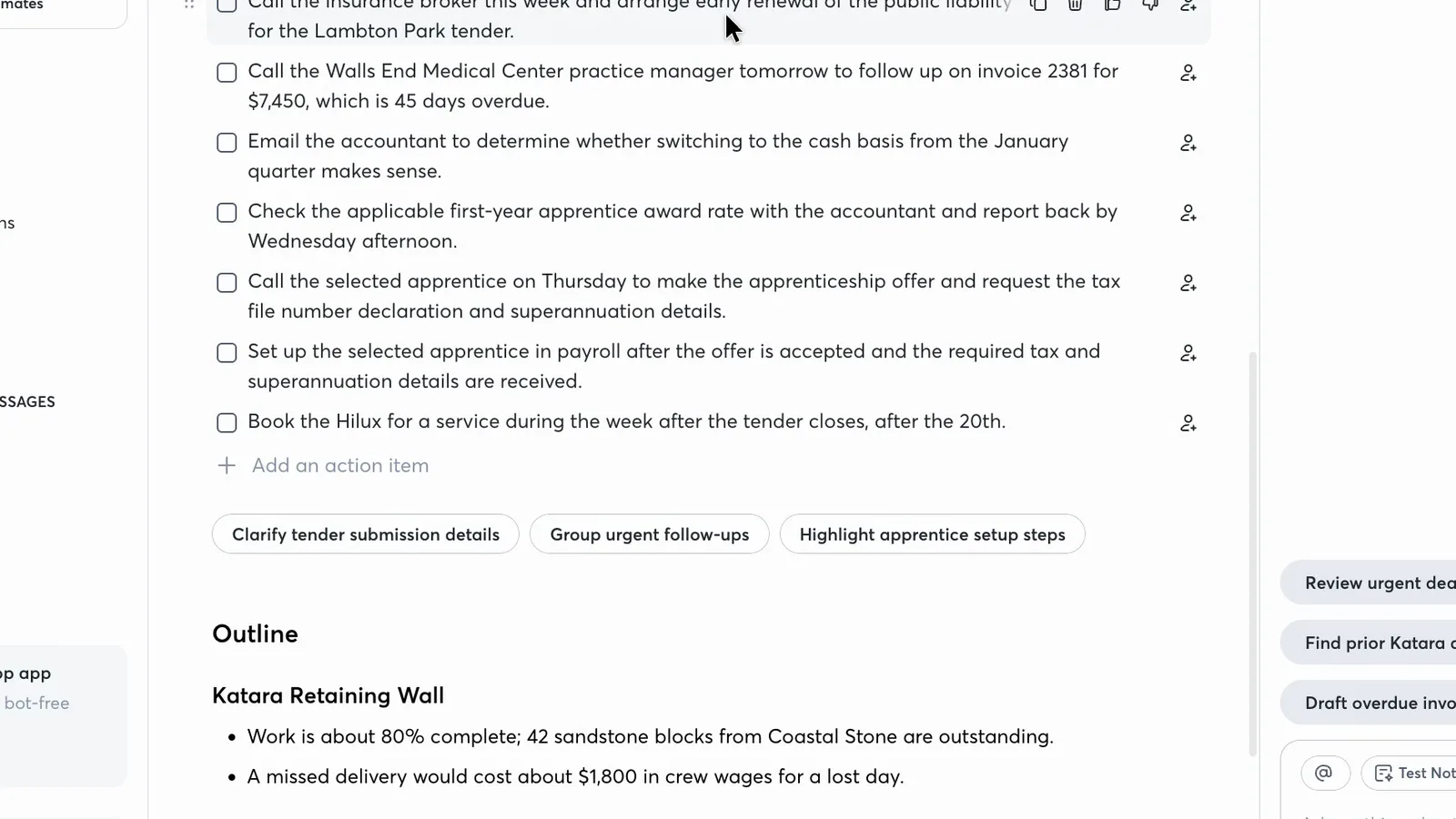
Right at the end of the meeting, a team member is asked to book the company car in for a service. Otter wrote the task with the right timing but left the assign icon empty, and it was the same on all six tasks given to someone by name. The five other notetakers in the test named five or six of those six owners.
 (enlarge)
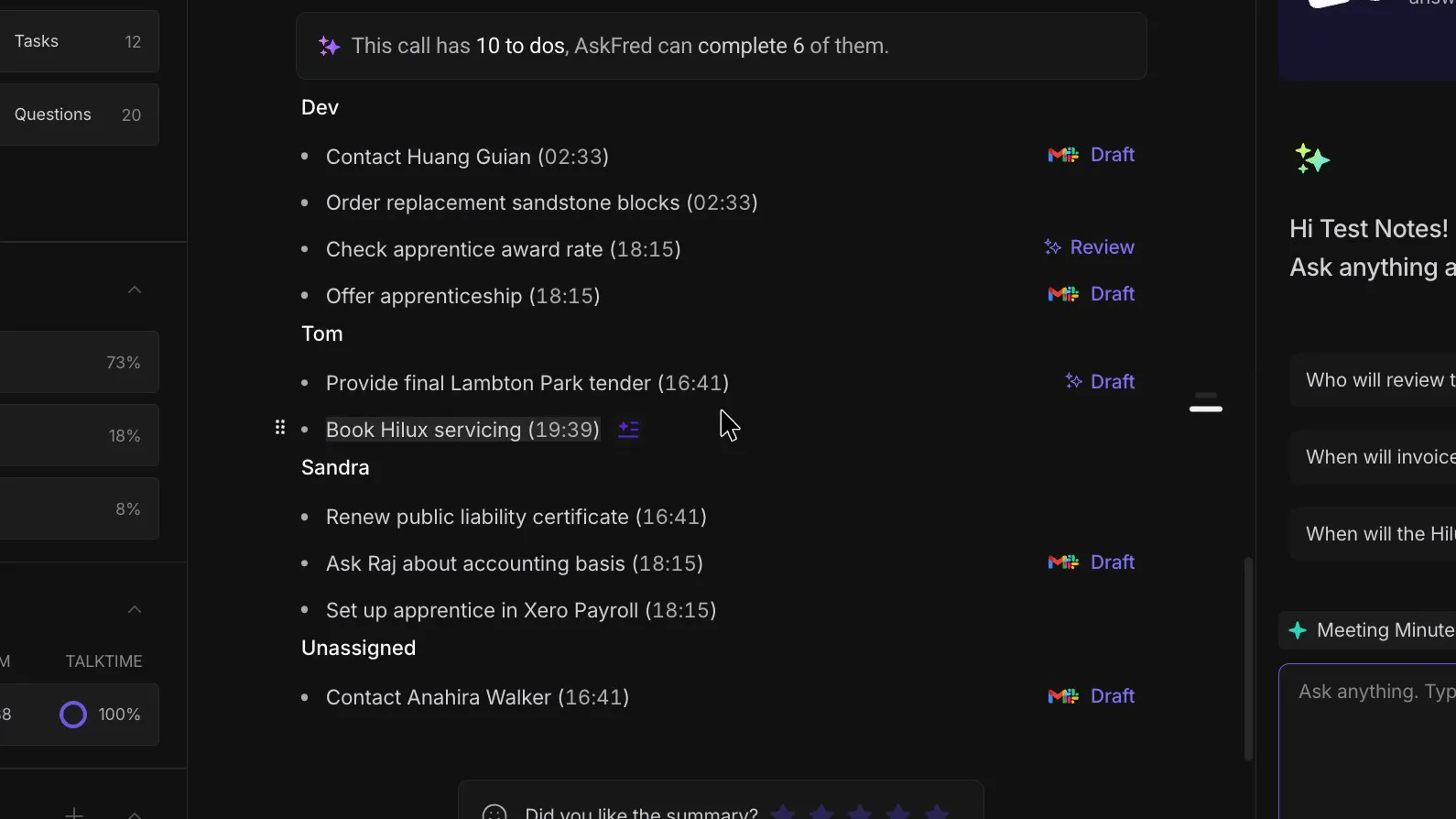
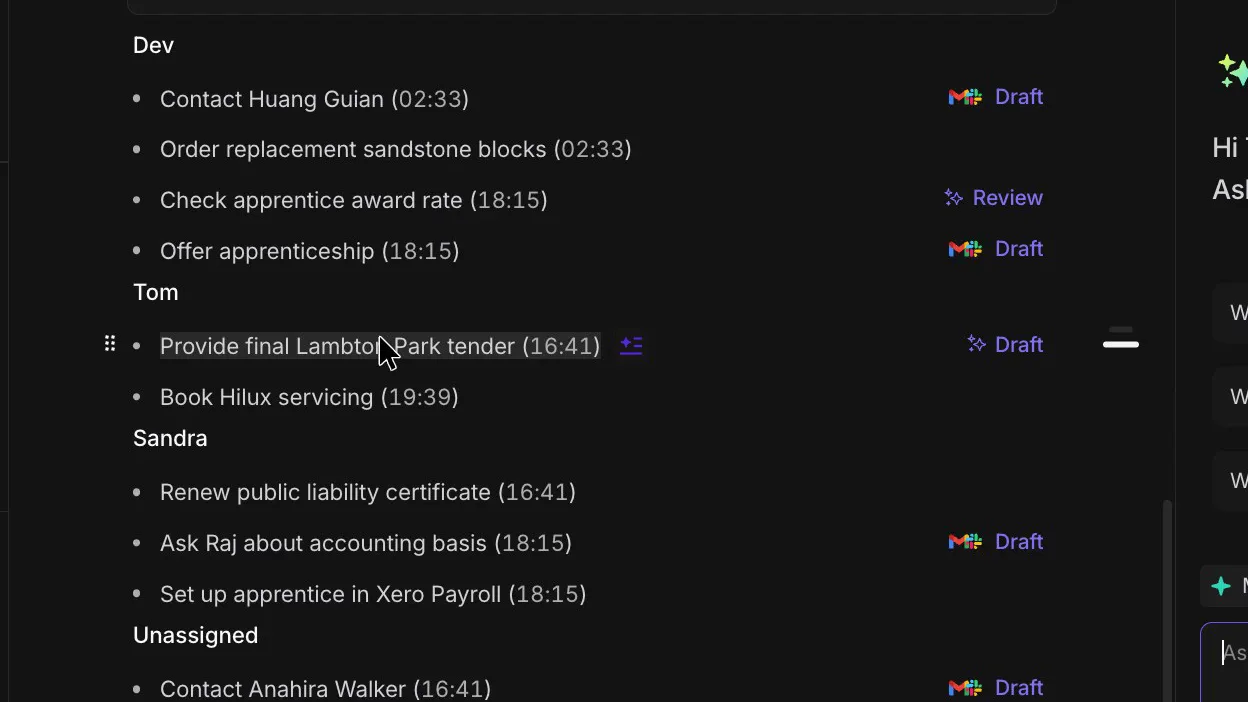
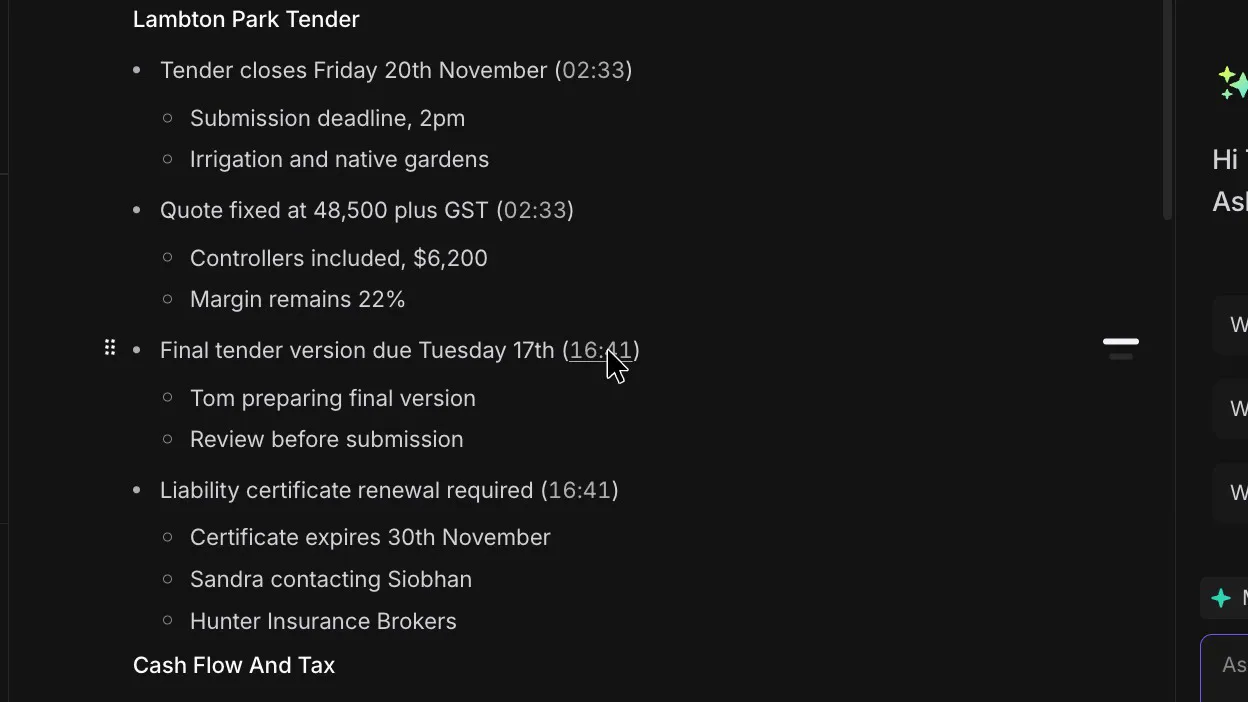
Fireflies groups its action list under each person and put all six owners in the right place. Its tasks carry a time in the recording instead of a date, though. The tender's "due Tuesday 17th", for example, sits in the notes above the action list.
 (enlarge)
 (enlarge)
 (enlarge)
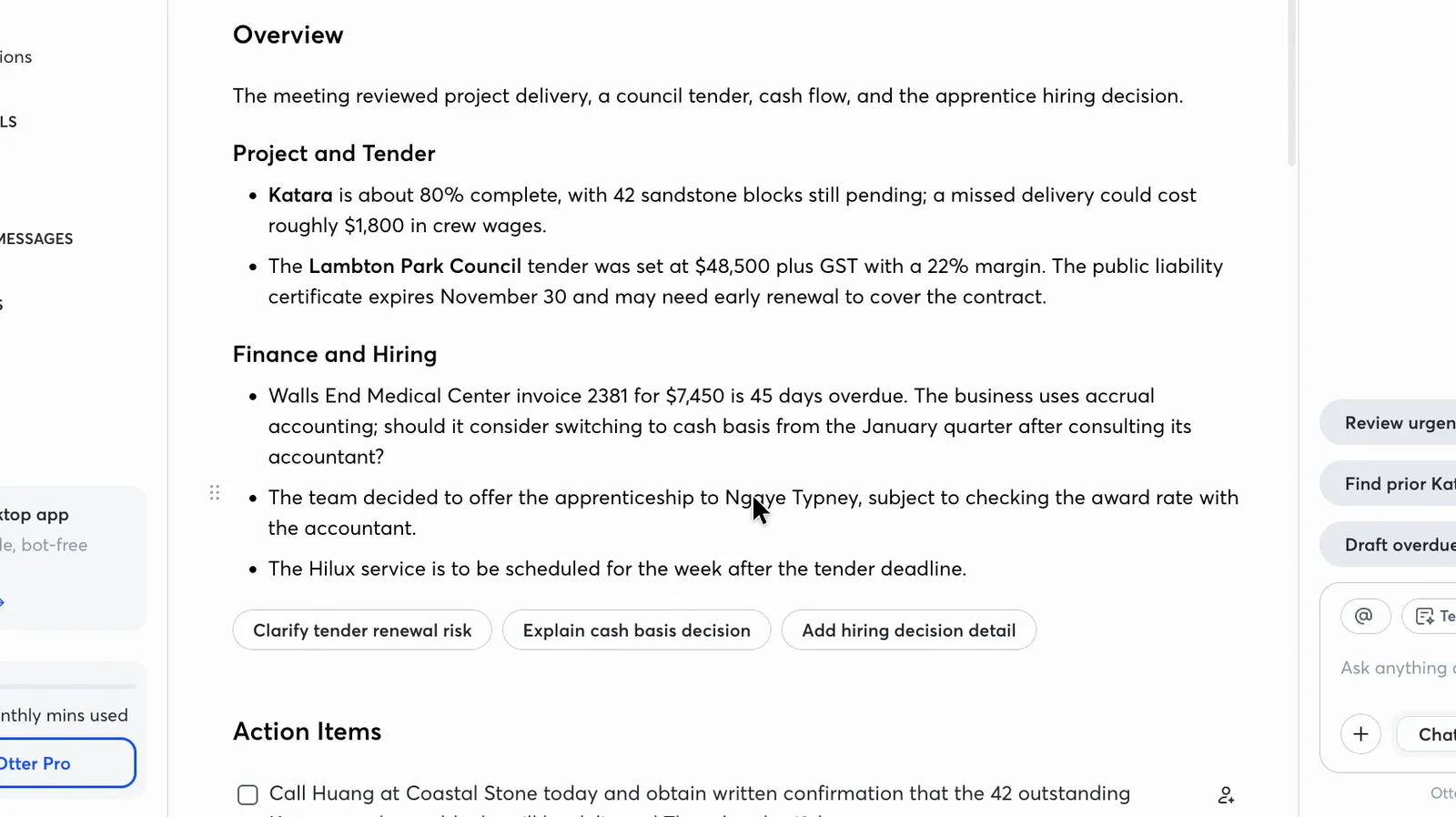
Each tool also got the certainty of a decision wrong, in opposite directions. The owner makes a firm decision to offer the new apprentice the job. Otter wrote it as subject to checking the pay rate with the accountant, so someone who missed the meeting could think the offer might still fall through.
 (enlarge)
Fireflies went the other way. A backup plan to order replacement sandstone blocks became a firm task, and a question the team planned to put to the accountant reads as if he'd already given advice. Otter kept that one as a question.
 (enlarge)
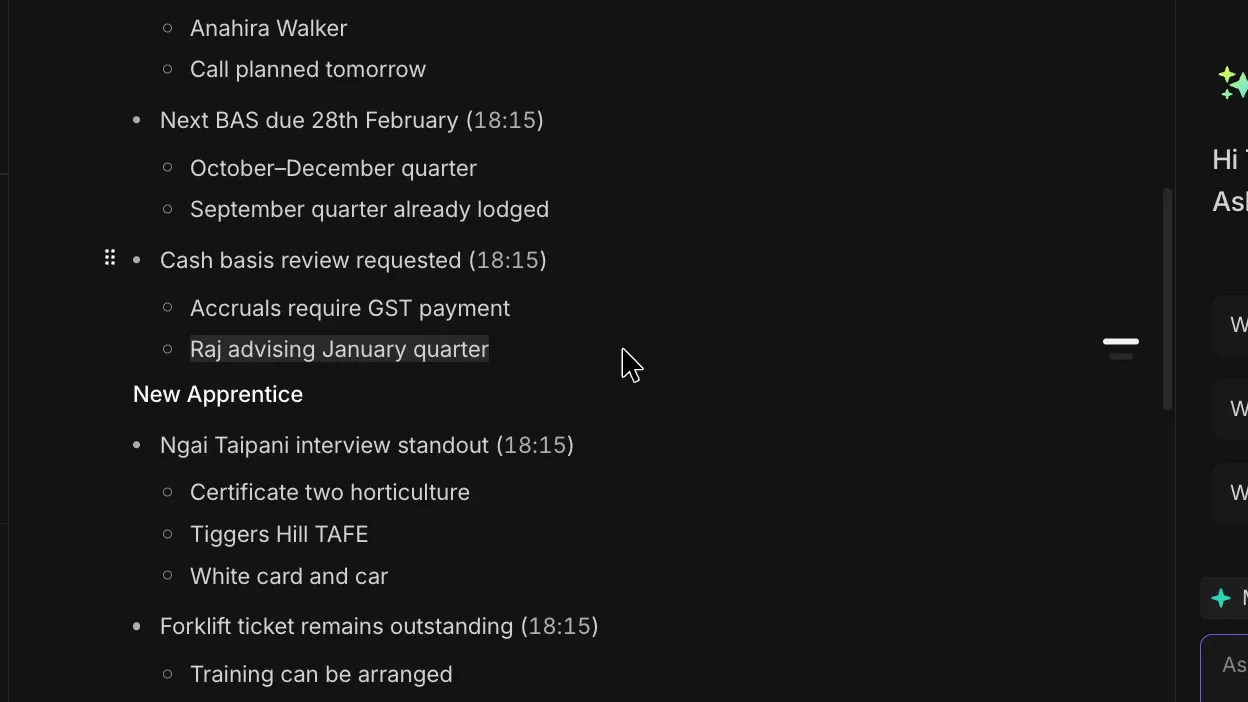
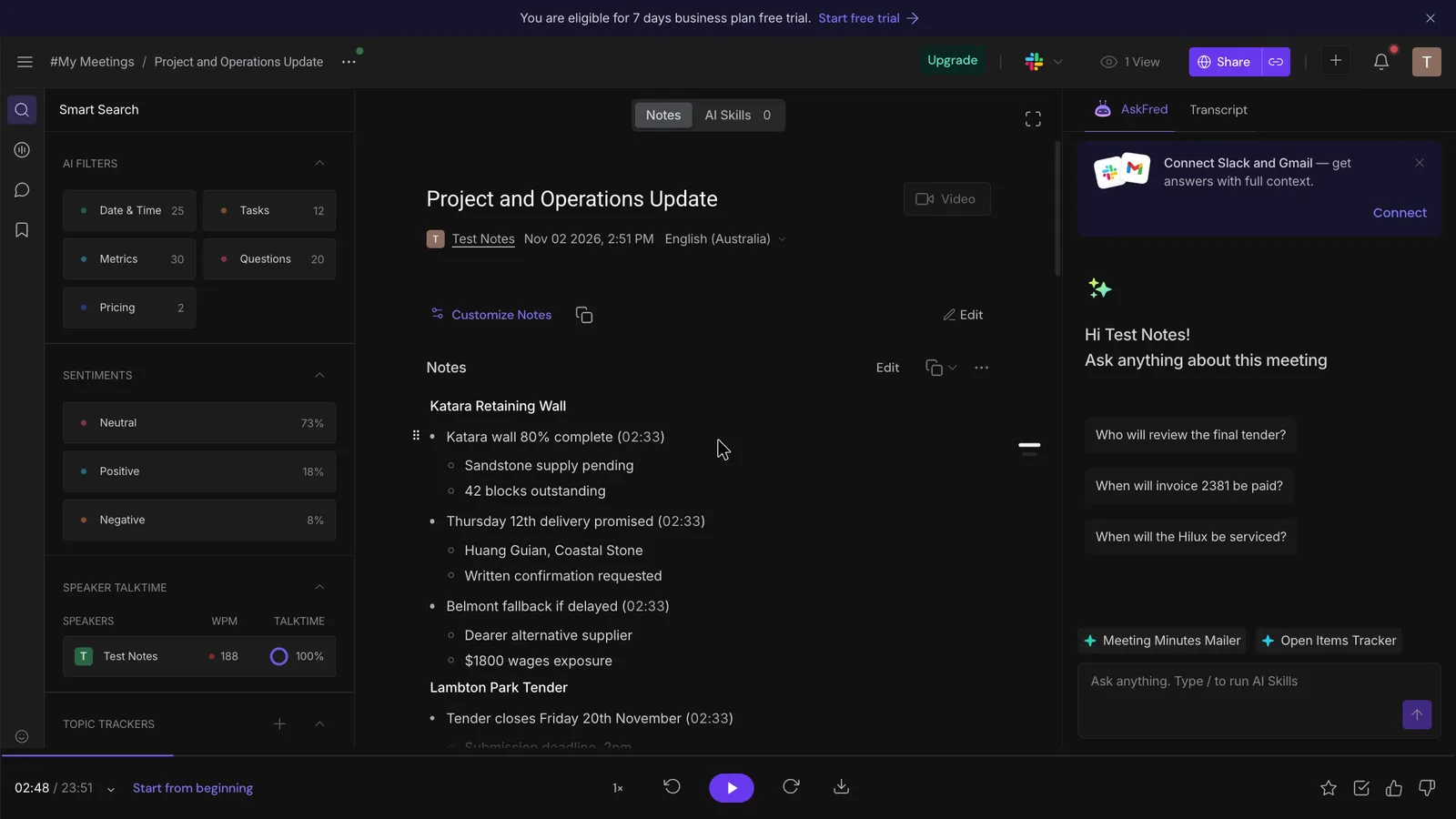
Both misheard the same local names, such as Katara for the suburb of Kotara, and the mistakes went into the notes. Otter got 10 of the 18 names right and Fireflies 11.
 (enlarge)
 (enlarge)
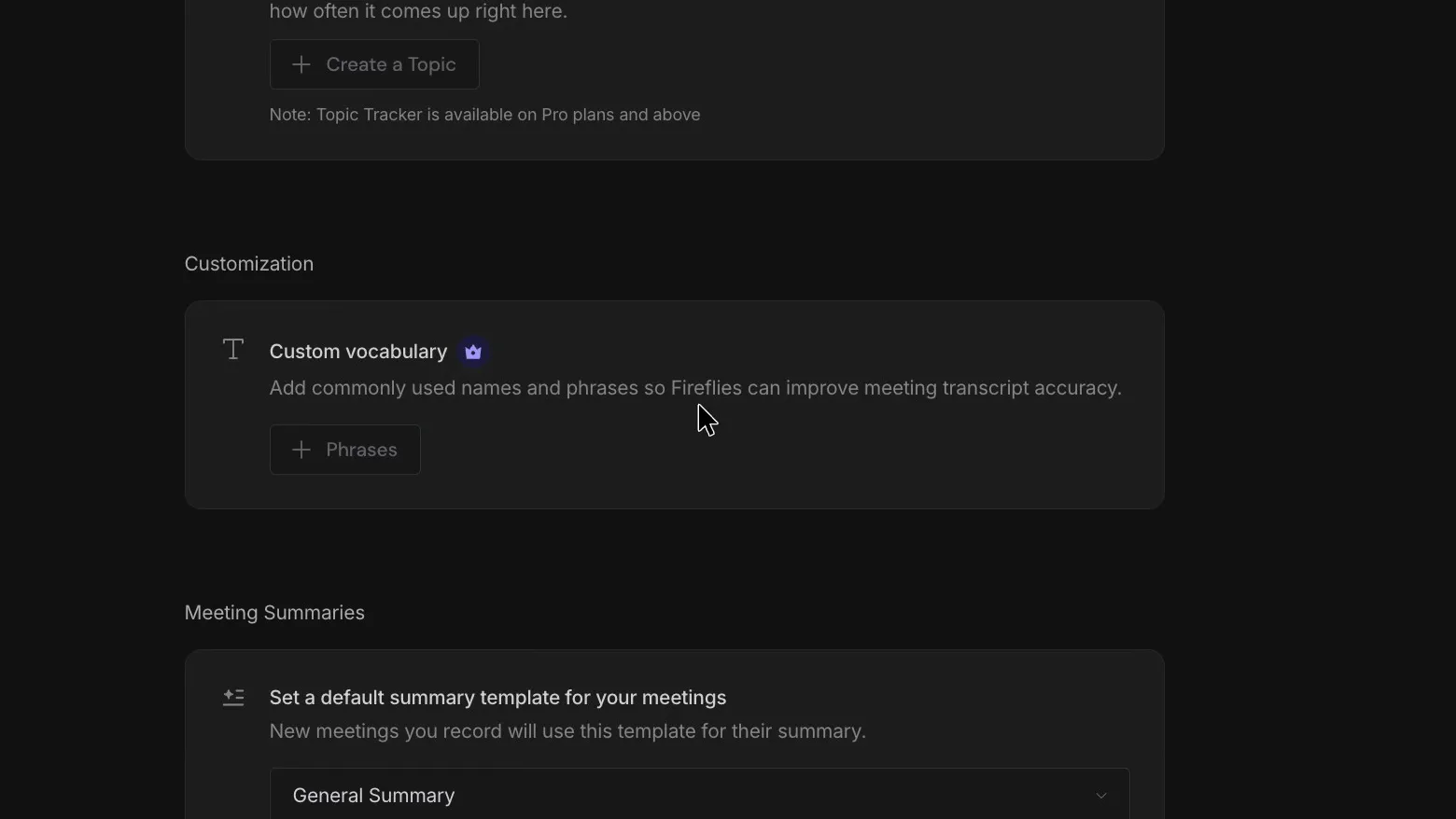
Fixing names is manual work in both. Otter's free plan lets you add five of your own words, such as place names, while Fireflies' free plan doesn't offer custom words.
 (enlarge)
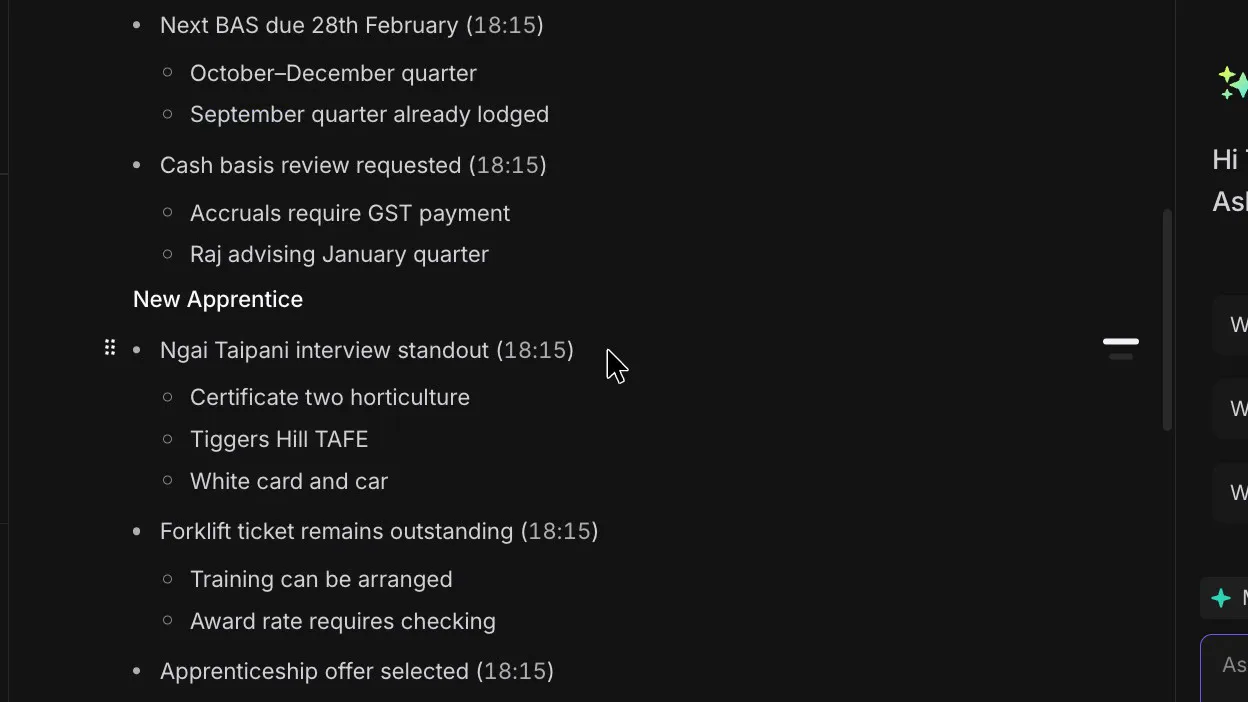
When I used Replace All to fix a name in the Fireflies transcript, the notes still had the old spelling, so the name has to be fixed again there.
 (enlarge)
Online calls and in-person meetings
Both companies say their bot joins Zoom, Microsoft Teams and Google Meet calls, and both bots joined the Google Meet test. That was the only route tested, so coverage of Zoom, Teams, phone calls and meetings across the desk rests on what each company says.
Fireflies' FAQ lists a browser extension, a desktop app and a phone app for in-person meetings. Its guide to recording without a bot says the desktop app can capture a phone call when the phone is linked to the computer through Windows Phone Link. On a Mac it works with an iPhone, once "Calls from iPhone" is turned on in FaceTime on both devices, and Fireflies captures the call through system audio.
Who knows it's recording
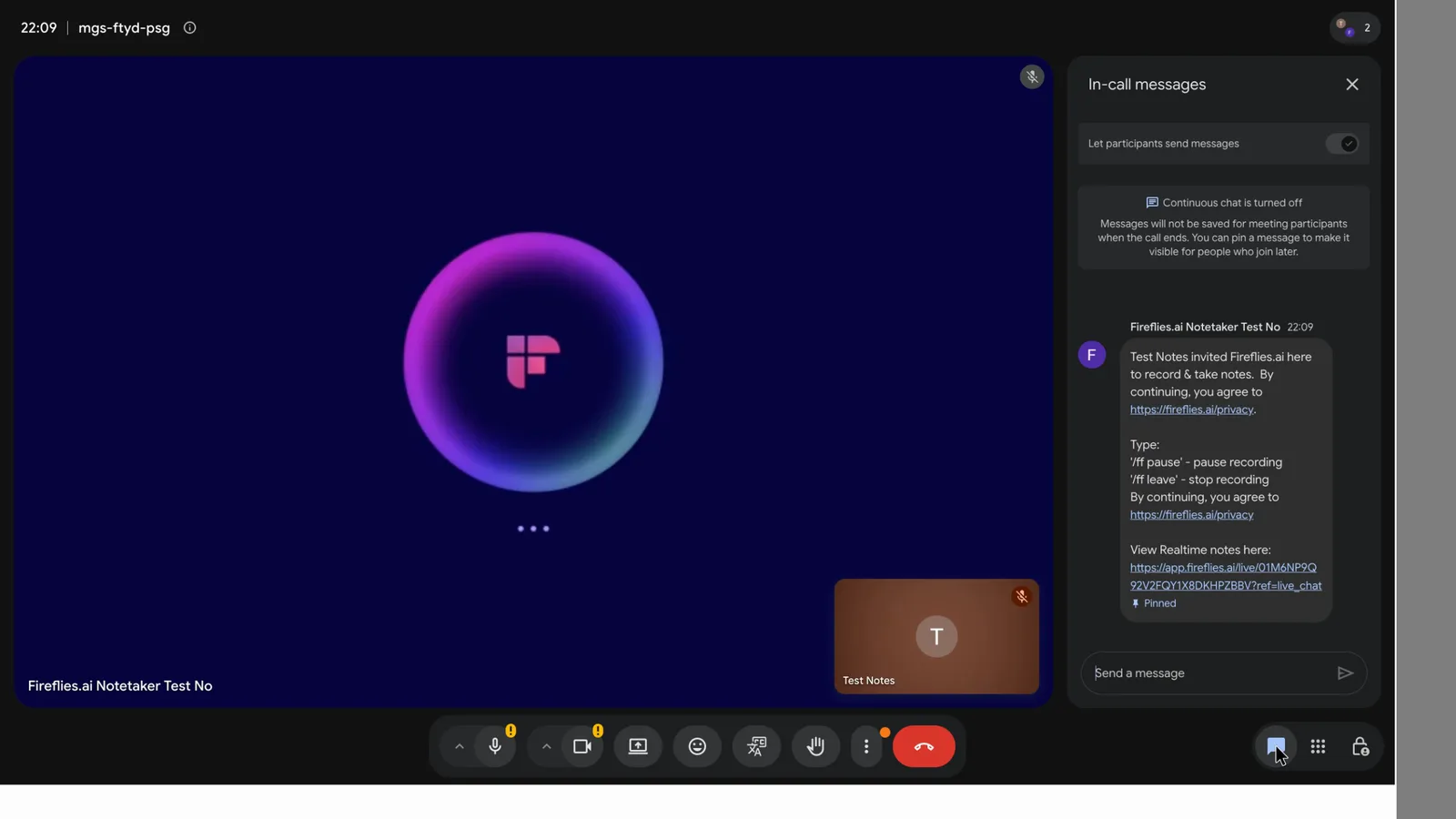
Both bots join under a name everyone in the call can see. Fireflies also posts a chat message saying who invited it, that it's recording, and how to pause or stop it. Typing "/ff pause" paused it straight away for the host.
 (enlarge)
Otter's help says anyone in the call can type "stop otter" to remove its bot.
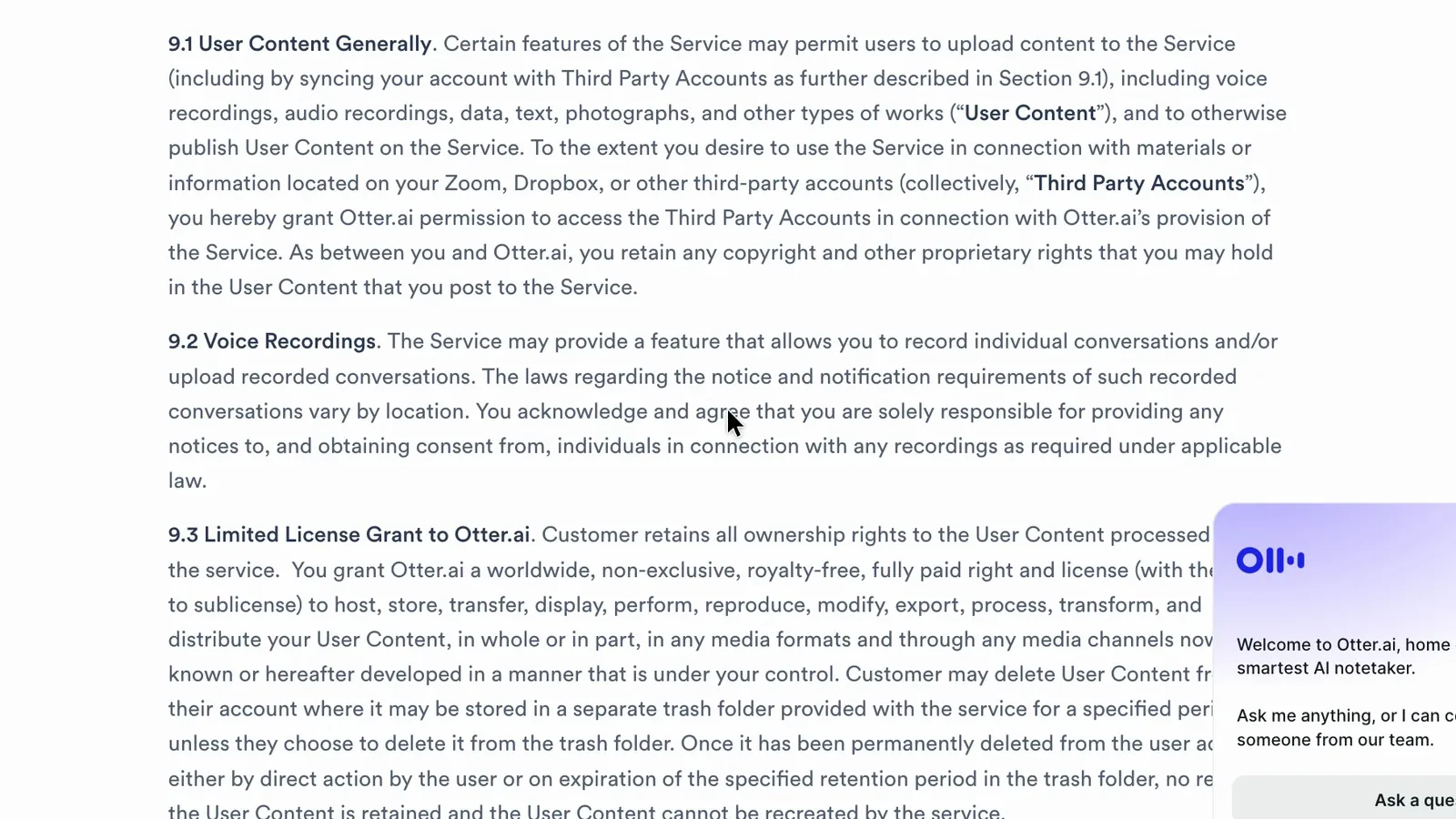
A name in the participant list tells people a recording is happening, but it isn't proof they agreed. Both companies' terms make getting that agreement your job. Otter's section 9.2 makes the customer "solely responsible" for notice and consent, and Fireflies' section 5(d) puts participants' consent on the customer too. On client calls, I'd tell people at the start that it's recording and ask for their agreement.
 (enlarge)
Most businesses with turnover under $3 million are exempt from the Privacy Act, but health providers are covered whatever their size, and covered businesses have extra duties when sending personal information overseas.
On AI training, Fireflies' privacy policy says it doesn't use personal information for AI training.
Control over joining and sharing
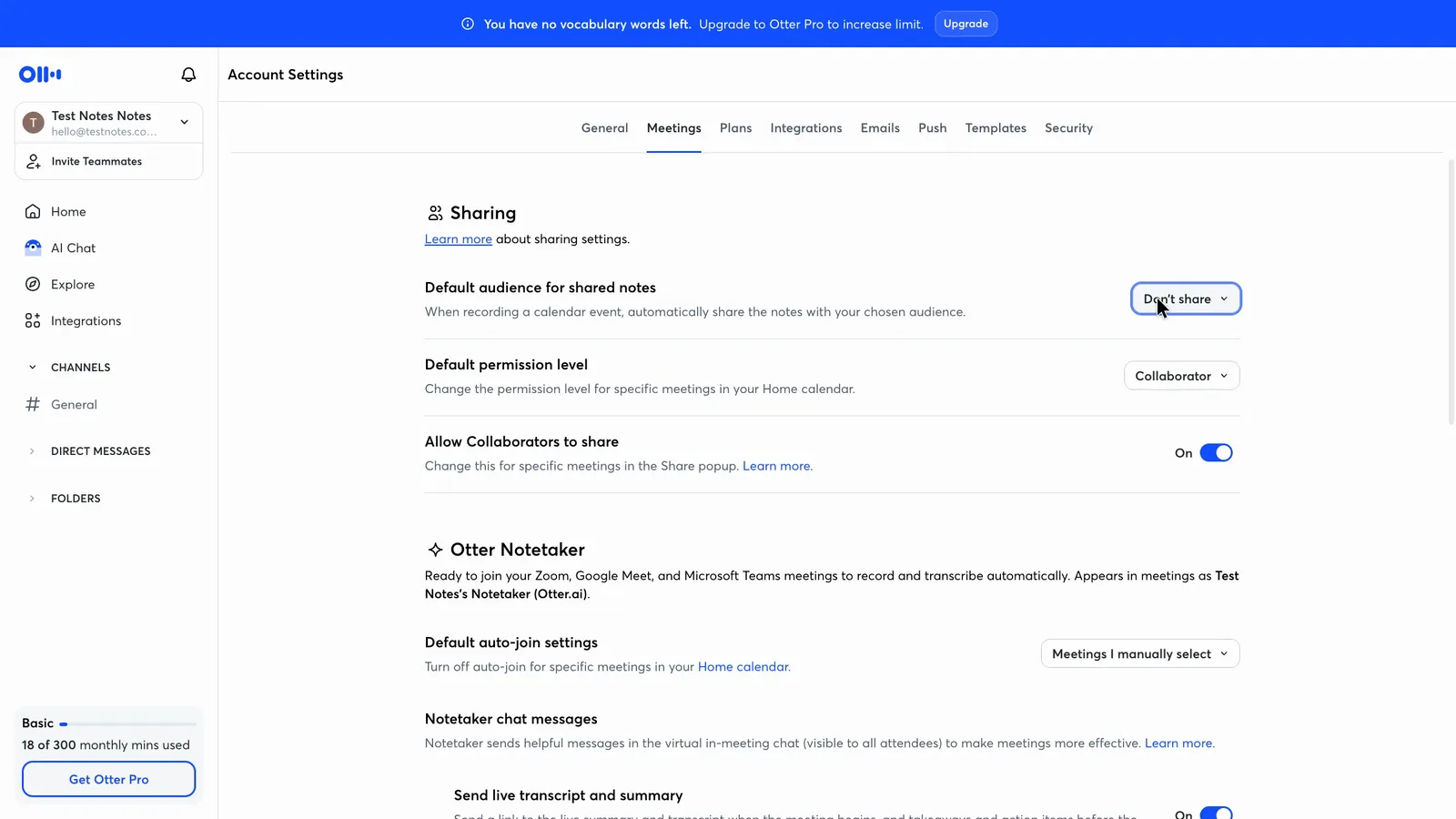
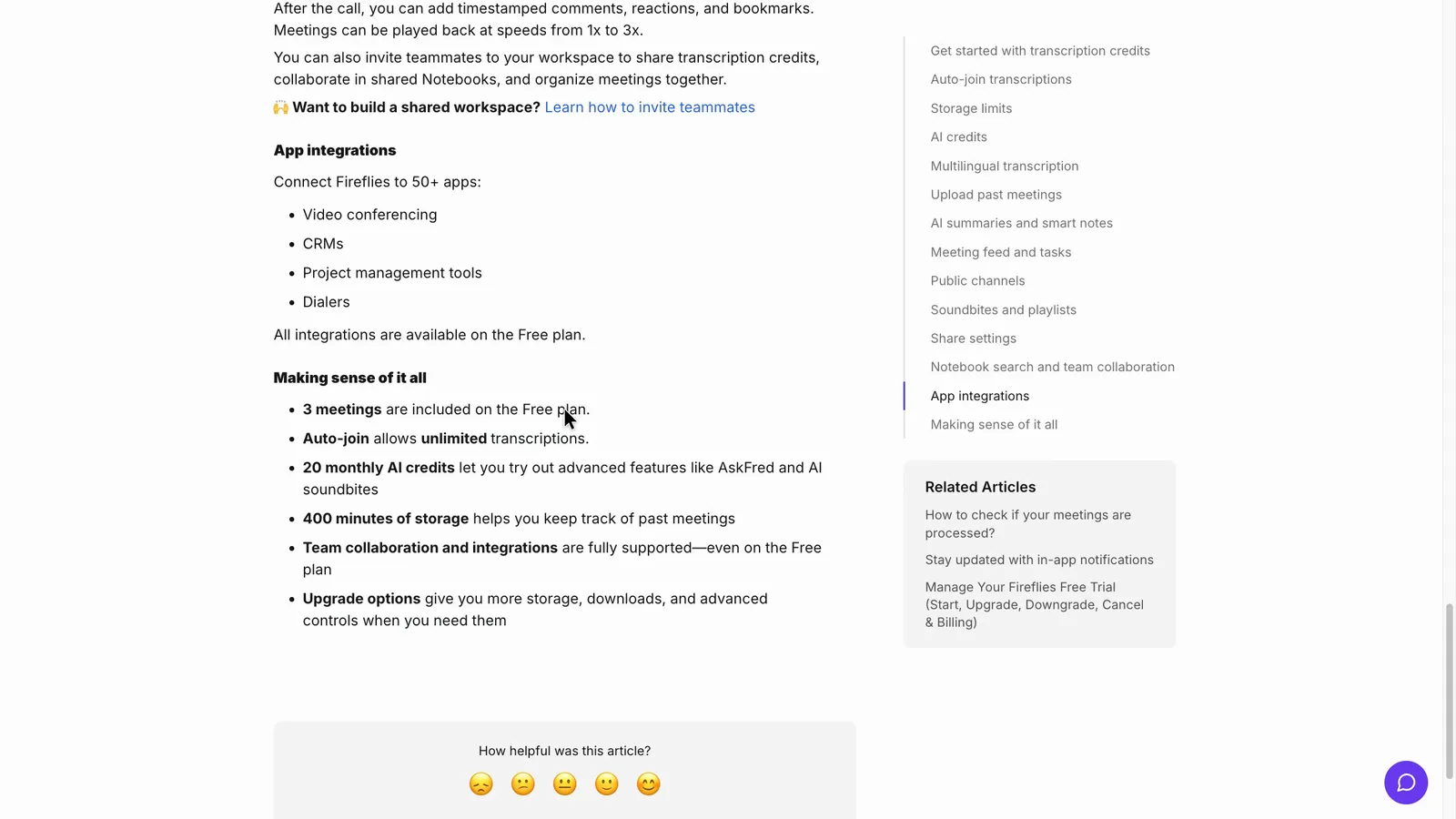
A bot joining a client meeting, or a recap reaching a client's inbox, is the main risk with both tools. Both can be stopped from joining on their own and set to keep the notes to yourself in a couple of clicks, but Fireflies' free plan rules appear to favour leaving the bot to join automatically.
| Otter.ai | Fireflies.ai | |
|---|---|---|
| Stop auto-joining | "Meetings I manually select", 2 clicks | Off, 1 click |
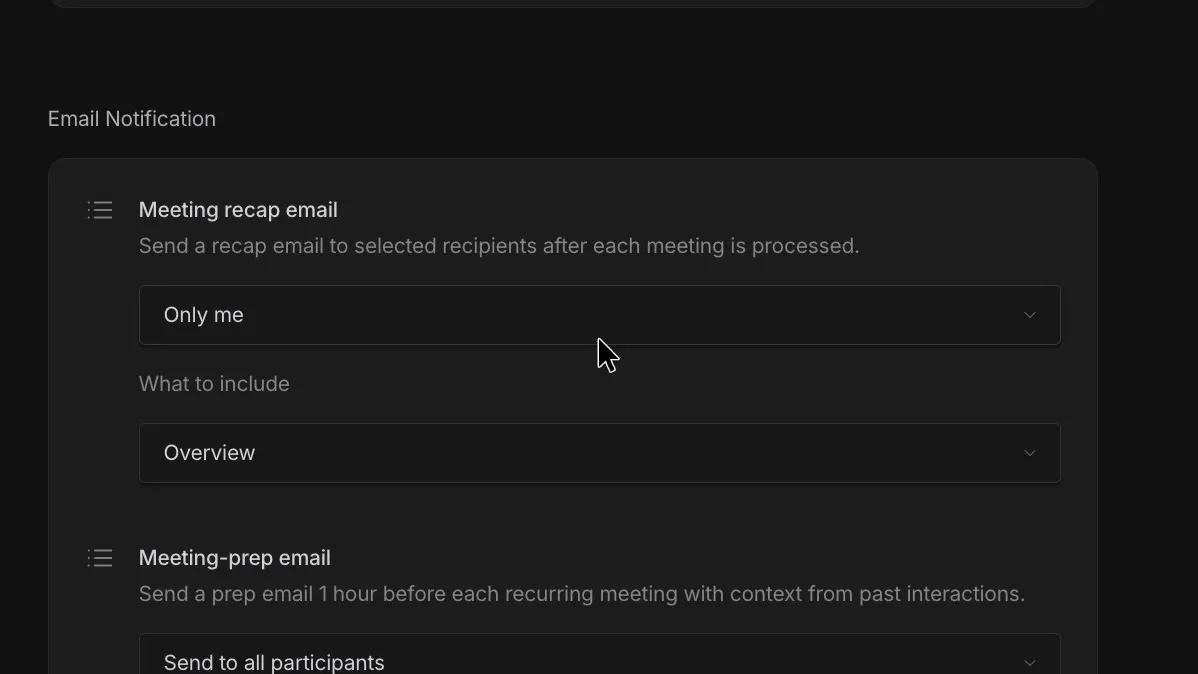
| Keep the recap to yourself | "Don't share", 2 clicks | "Only me", 2 clicks |
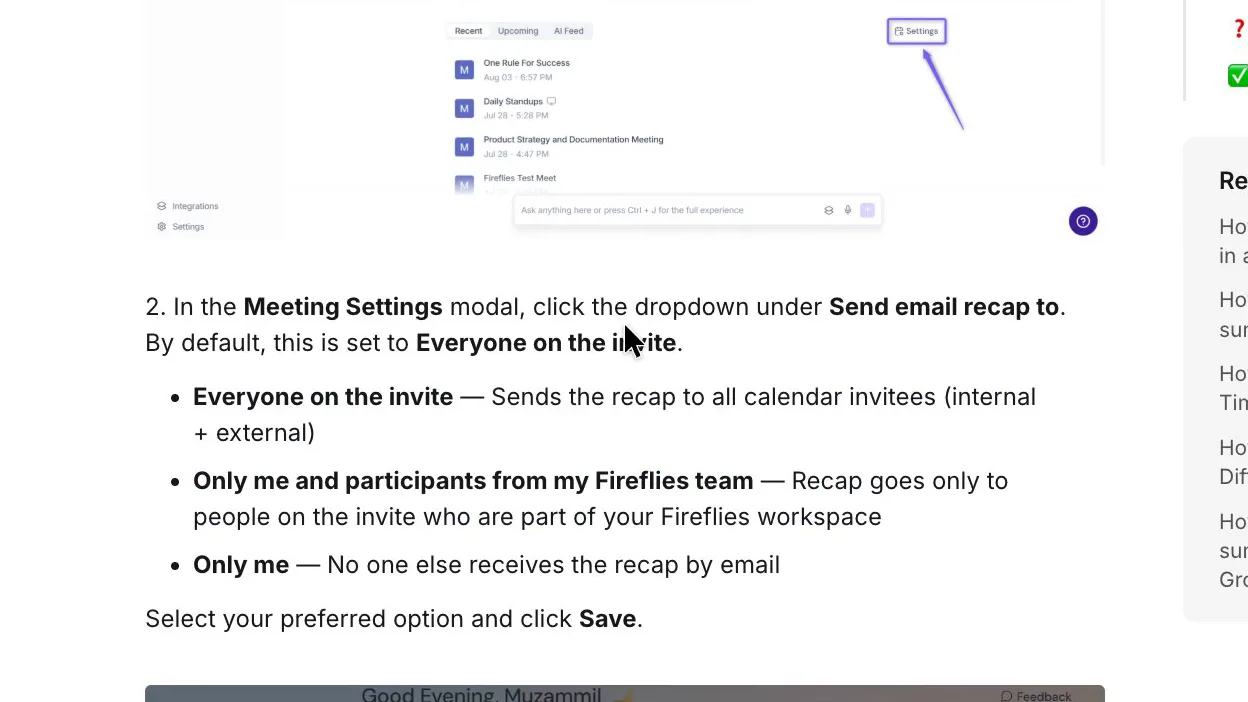
| Recap default, per the vendor | Not seen | Everyone on the invite |
| Limit the meeting link | Just you | Just you |
Otter has no option labelled "off", but "Meetings I manually select" does that job. Otter's sharing guide warns that a meeting you've set individually keeps its own setting when you change the default.
 (enlarge)
Fireflies' recap guide says the recap goes to everyone on the calendar invite by default, including people outside the business.
 (enlarge)
 (enlarge)
Fireflies' free plan guide ties unlimited free transcription to leaving the bot joining automatically, and says that with it off you're limited to three transcribed meetings.
 (enlarge)
Finding things later
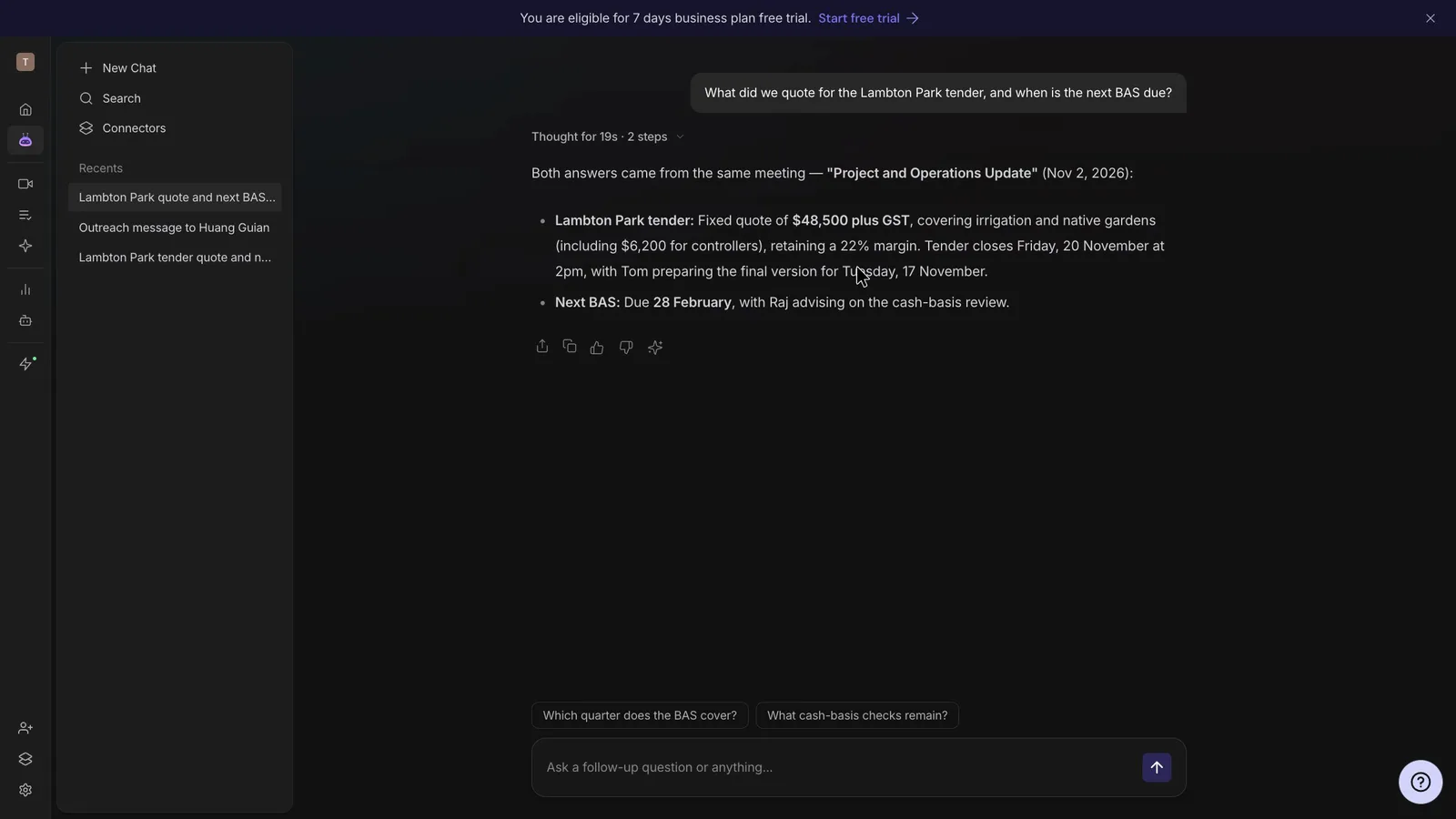
Both AI assistants answered a question about a past job correctly, and both said so when asked about a job that never came up. Otter's AI Chat gave the right quote and margin for the tender and said it couldn't find a quote for a made-up pool job. Fireflies' AskFred got the quote and the BAS due date right and said it couldn't find a made-up deposit, but it repeated the notes' error about the accountant having given advice.
 (enlarge)
Both list connections for sending tasks to Asana, monday.com and ClickUp, and Fireflies also lists Trello, which it notes is under maintenance. Otter's integrations page shows Slack on its free plan, HubSpot and Salesforce on Pro, and Asana through Zapier from Pro (a native Asana connection is Enterprise only).
What it costs and keeping your records
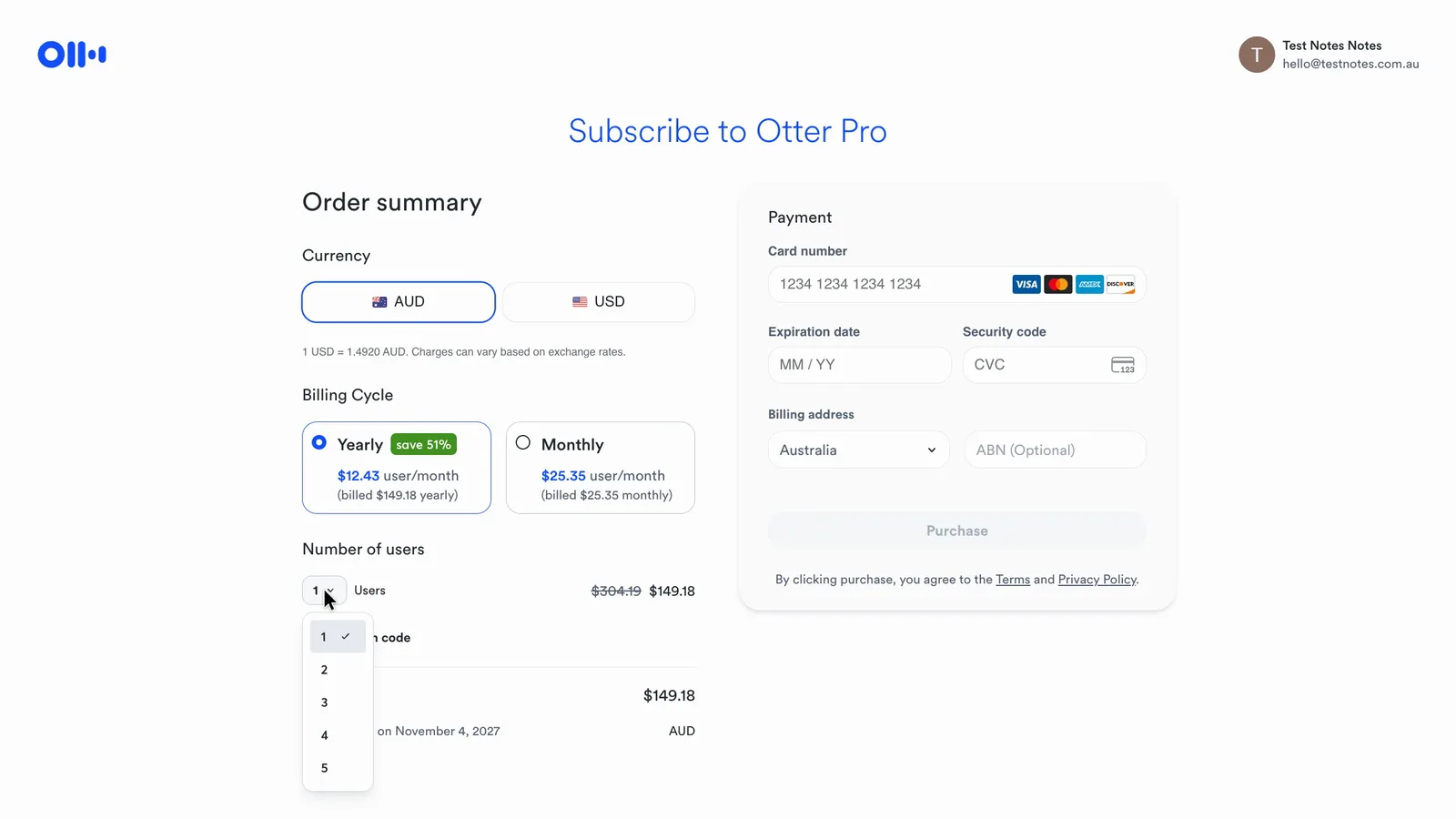
For one to three people the two cost about the same, with Otter a little cheaper. Otter's Pro plan stops at five people, though, so a team of eight needs Otter Business, which costs about twice as much as Fireflies Pro.
| Team size, per month | Otter.ai | Fireflies.ai |
|---|---|---|
| 1 user, billed yearly | About $12 (Pro) | About $15 (Pro) |
| 3 users, billed yearly | About $37 (Pro) | About $44 (Pro) |
| 8 users, billed yearly | About $240 (Business) | About $116 (Pro) |
| 8 users, billed monthly | About $360 (Business) | About $210 (Pro) |
Otter's figures come from its Australian-dollar checkout. Fireflies charges in US dollars, converted here at the Reserve Bank rate on 9 November.
 (enlarge)
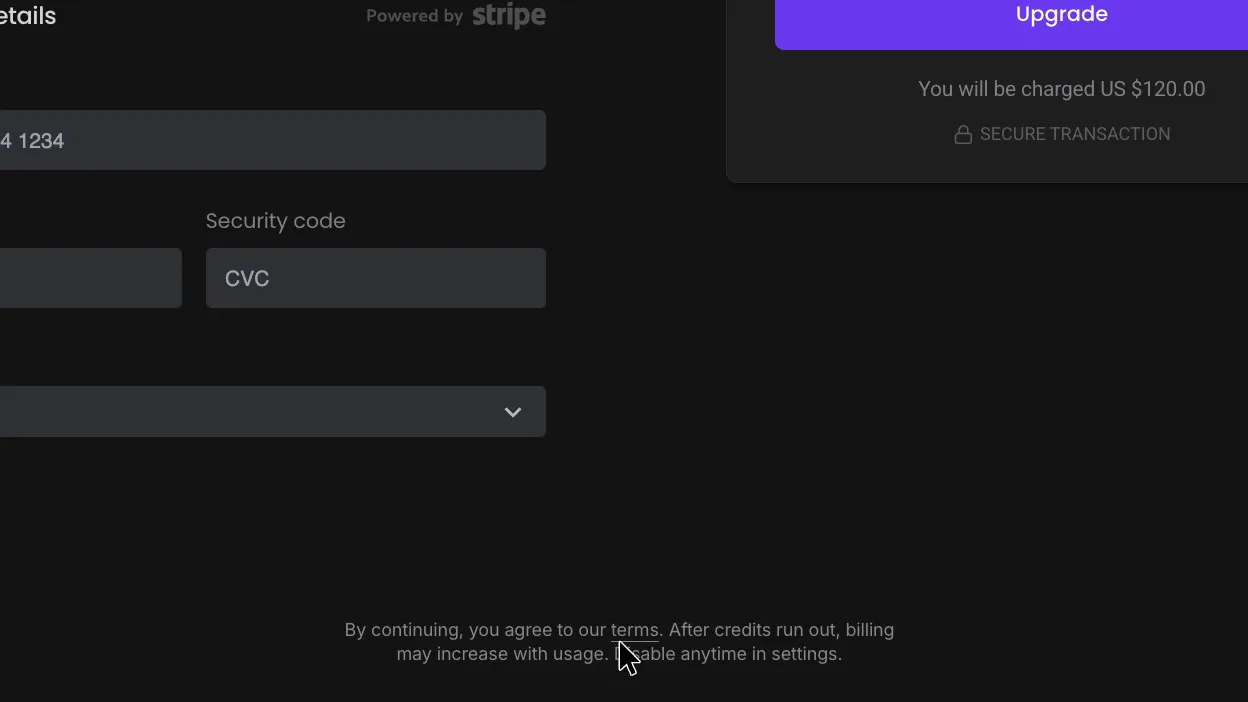
Fireflies' checkout warns that "billing may increase with usage" once AI credits run out. Its billing guide says that when credits run out on a paid plan without an AI credits subscription, Fireflies subscribes the account to the lowest credit tier automatically, and that a seat is created the moment a teammate is added to the workspace. The same guide says Free-plan users who run out of credits hit a paywall and aren't charged unless they choose to upgrade. Both checkouts show the full price before any card details go in.
 (enlarge)
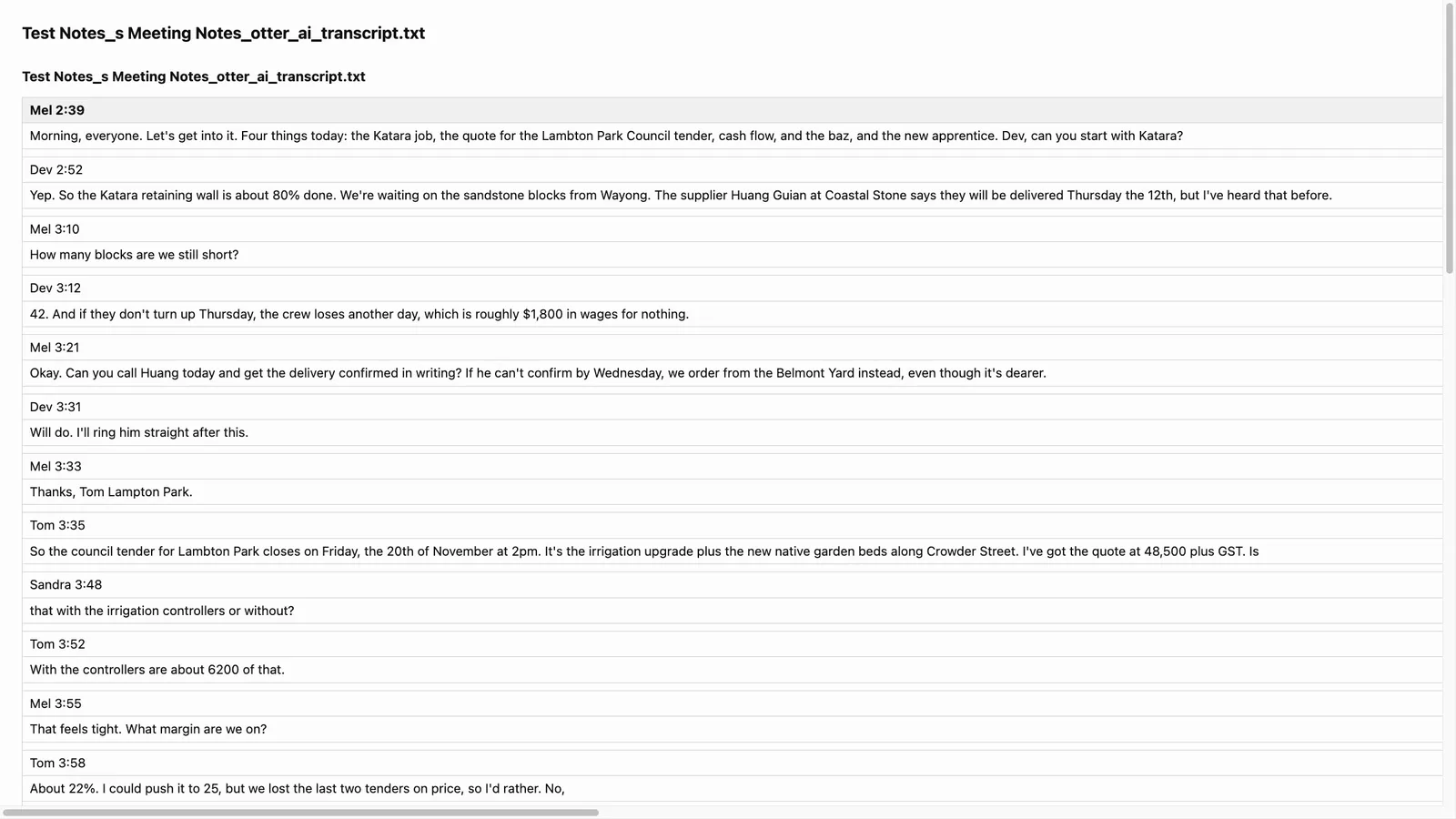
The free plans differ most on what you can keep. Otter's free plan exported a text transcript that opened with the figures intact.
 (enlarge)
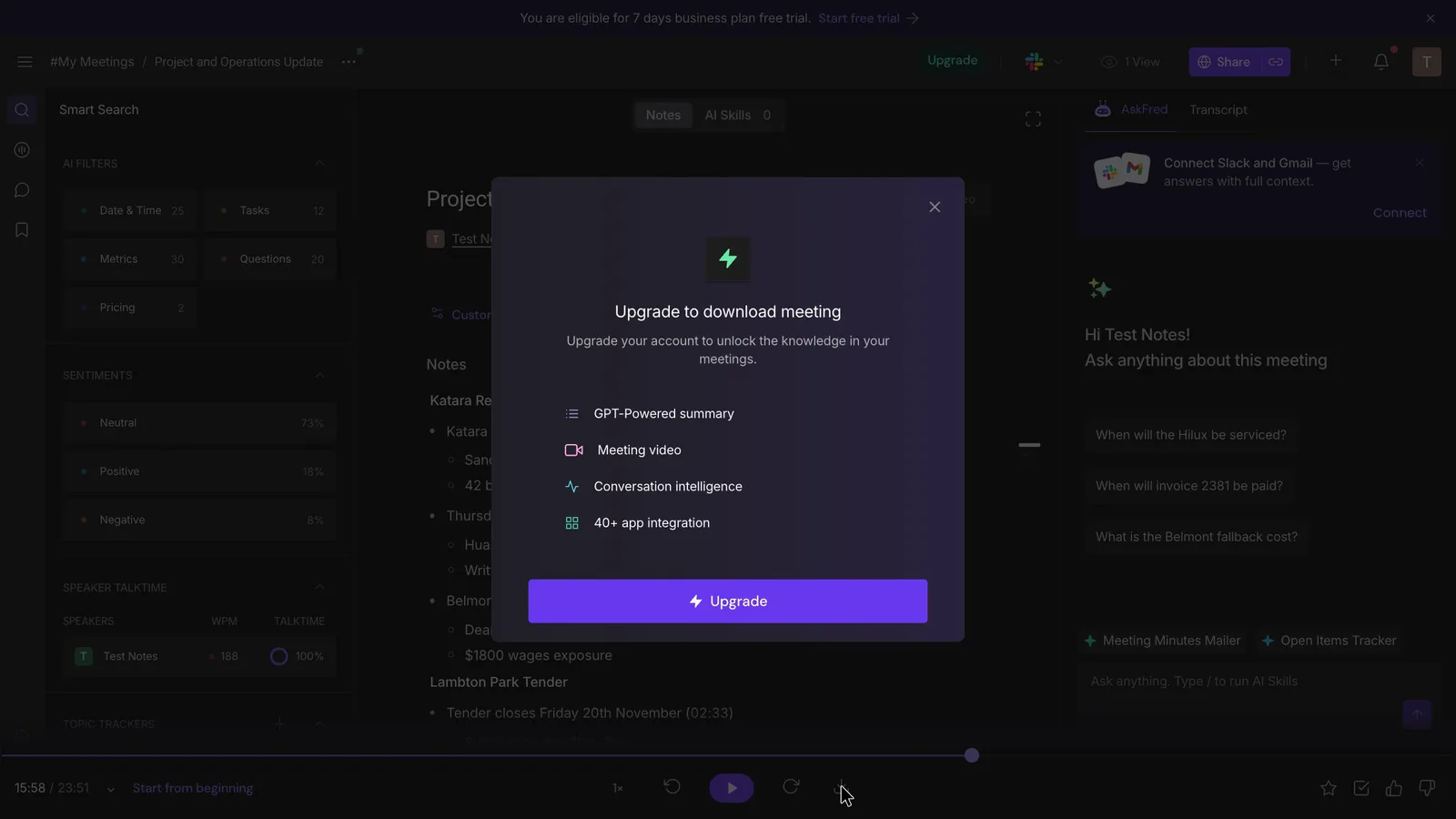
Fireflies Free lists every download format, but picking one brings up an upgrade prompt, from both the player bar and the menu. Without a download you can't keep a file copy of a client record on Fireflies Free.
 (enlarge)
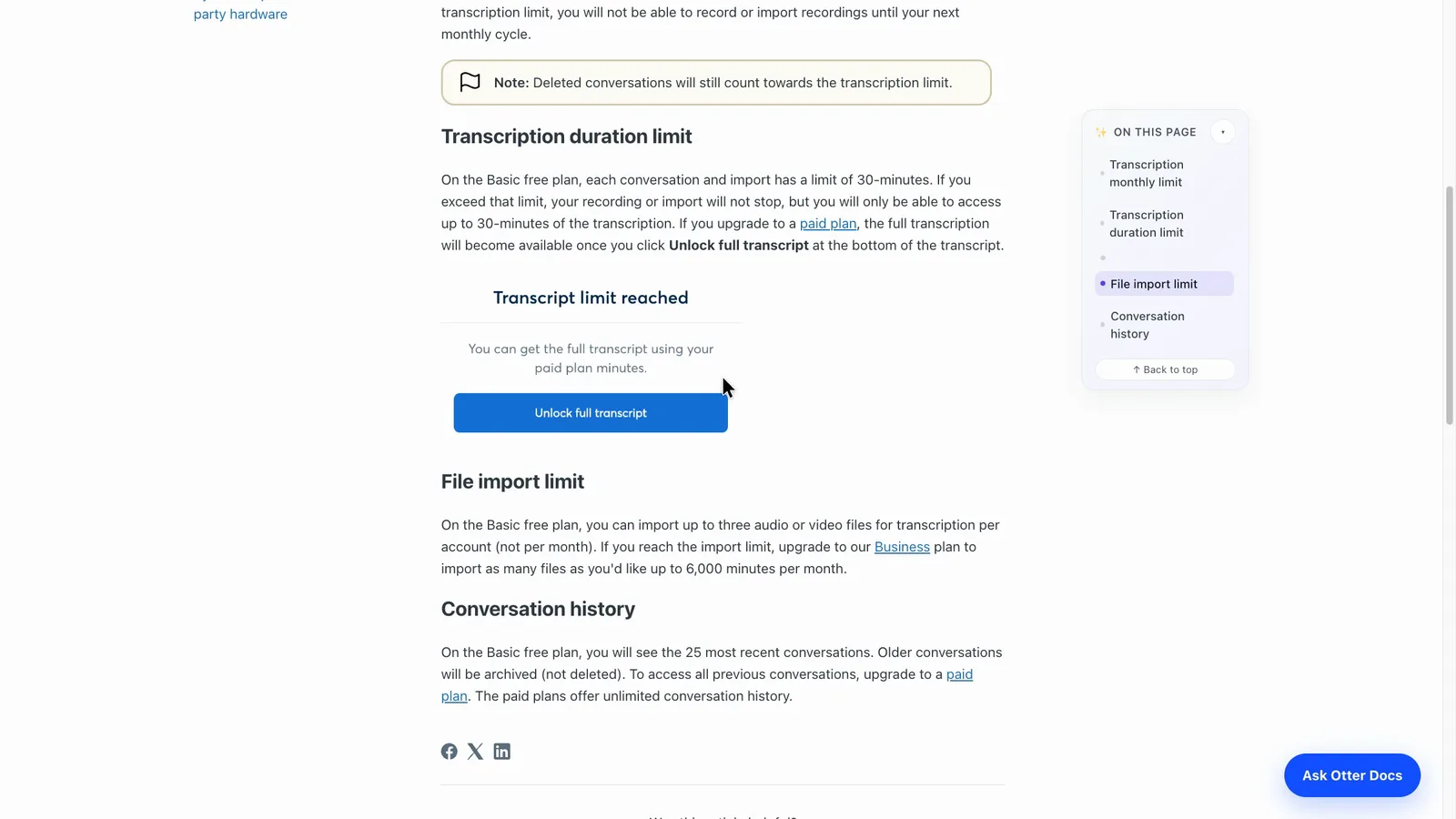
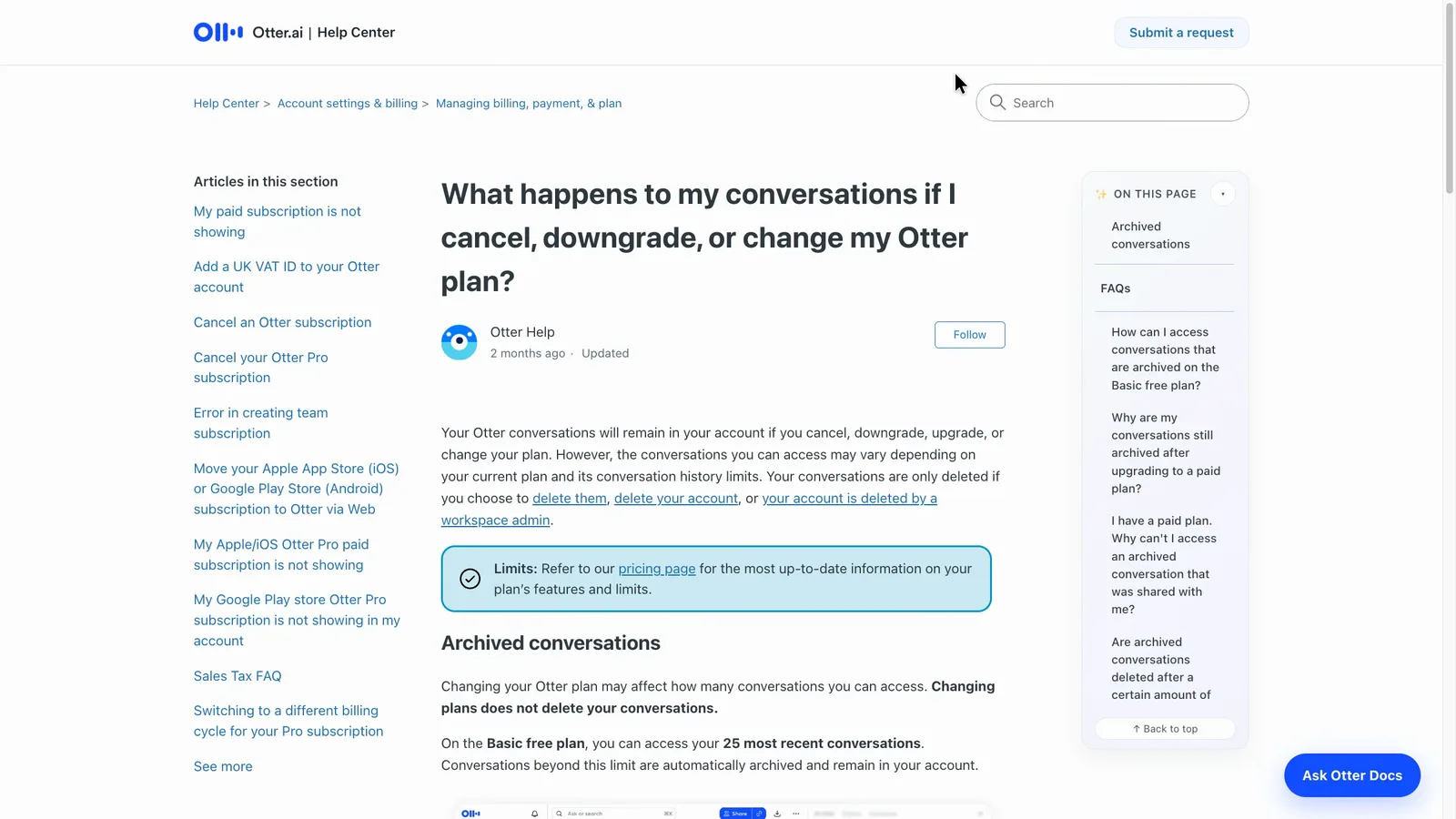
Otter's free plan gives 300 minutes a month but shows only the first 30 minutes of each meeting's transcript and your 25 most recent meetings. Its help page says older ones are archived and can still be exported.
 (enlarge)
 (enlarge)
Fireflies Free allows meetings of up to two hours, and once storage is full its guide says to delete older files to make room.
Which suits which business
For a sole trader or a team of up to five, I'd start with Otter. It's a little cheaper, it dates every task, and the free plan lets you keep a text copy of each transcript. Someone has to add who does what before the notes go out.
For a team of six or more, or anyone who wants an owner on every task, I'd choose Fireflies and pay for Pro so the records can be downloaded.
Pricing
| Plan | Price | Per | Includes |
|---|---|---|---|
| Basic | Free | Free plan: 300 minutes a month, 30-minute transcripts, latest 25 conversations, 3 imports in total, one meeting at a time | |
| Pro (billed yearly) | $149.18 ex GST | per user per year | Up to 5 users, 1,200 minutes a month, 90-minute meetings, Zapier and CRM sync for one user |
| Pro (billed monthly) | $25.35 ex GST | per user per month | Up to 5 users, 1,200 minutes a month, 90-minute meetings, Zapier and CRM sync for one user |
| Business (billed yearly) | $357.90 ex GST | per user per year | Unlimited meeting minutes, 4-hour meetings, bulk export, usage reports |
| Business (billed monthly) | $44.76 ex GST | per user per month | Unlimited meeting minutes, 4-hour meetings, bulk export, usage reports |
AUD, inc GST unless marked ex GST or GST not stated. Checked 5 Nov 2026. Source: otter.ai/pricing
| Plan | Price | Per | Includes |
|---|---|---|---|
| Free | Free | Bot recording on Zoom, Google Meet and Teams, transcript, notes and action list; 400 minutes of storage per seat; no downloads; custom vocabulary not available | |
| Pro (annual billing) | US$120 ex tax | per user per year | Everything in Free plus downloads of transcripts, summaries and recordings; larger storage allowance |
| Pro (monthly billing) | US$18 ex tax | per user per month | Same as Pro on annual billing |
| Business (annual billing) | US$228 ex tax | per user per year | Everything in Pro plus unlimited storage and team analytics |
| Business (monthly billing) | US$29 ex tax | per user per month | Same as Business on annual billing |
Fireflies.ai charges in US dollars. Your bank converts the price and may charge a foreign transaction fee. Checked 5 Nov 2026. Source: fireflies.ai/pricing
Integrations
| Connects to | What syncs | Direction | Checked |
|---|---|---|---|
| Google Meet | Bot joins and records the meeting | Google Meet → Otter.ai | |
| Google Calendar | Calendar events so the bot can join meetings | Google Calendar → Otter.ai | |
| Zoom | Bot joins and records meetings | Zoom → Otter.ai | |
| Microsoft Teams | Bot joins and records meetings | Microsoft Teams → Otter.ai | |
| Outlook Calendar | Calendar events so the bot can join meetings | Outlook Calendar → Otter.ai | |
| Slack | Not stated | Not stated | |
| HubSpot | Meeting notes to the CRM | Otter.ai → HubSpot | |
| Salesforce | Meeting notes to the CRM | Otter.ai → Salesforce | |
| Zapier | Not stated | Not stated | |
| Asana | Action items as tasks | Otter.ai → Asana | |
| Dropbox | Not stated | Not stated |
| Connects to | What syncs | Direction | Checked |
|---|---|---|---|
| Google Meet | Bot joins calls from the linked calendar, records and writes notes | Google Meet → Fireflies.ai | |
| Zoom | Bot joins and records meetings | Zoom → Fireflies.ai | |
| Microsoft Teams | Bot joins and records meetings | Microsoft Teams → Fireflies.ai | |
| Google Calendar | Calendar events tell the bot which meetings to join | Google Calendar → Fireflies.ai | |
| Asana | Action items | Fireflies.ai → Asana | |
| HubSpot | Meeting notes | Fireflies.ai → HubSpot | |
| Slack | Meeting notes | Fireflies.ai → Slack |
What I didn't test (11 things)
- Zoom, Microsoft Teams, phone calls and in-person meetings: only the Google Meet bot was used, so other routes are each company's description
- A call with people joining separately: all four test voices came through one participant, so matching names to speakers wasn't tested
- What a guest sees: no second person joined, so a guest's view of the notice, 'stop otter' and '/ff pause' typed by a guest weren't tried
- A brand-new account's default settings: neither account was new
- Whether either bot stays away after being switched off for meetings already scheduled
- Search across a large archive: Otter held three meetings and Fireflies one
- Sending tasks to other apps: nothing was connected
- Paid plans: nothing was bought, so cancelling, invoices, paid exports and Fireflies' credit add-on weren't seen
- Whether Otter's custom vocabulary fixes names, because no new audio was run
- The desktop apps and browser extensions: neither was installed
- Support during Australian business hours: no tickets were sent
Video transcript
Otter AI vs Fireflies
I played the same pre-recorded meeting into both Otter AI and Fireflies, and each one got different things correct. They're AI notetakers, which usually send a bot into your online meeting to record it and write up the notes. For a sole trader or a team of up to five, I'd start with Otter, which is a bit cheaper and lets you keep the transcript for free. Fireflies suits a team of six or more, where its Pro plan costs less than the Otter plan you'd need. I used my AI review agent to put both through the same tests, and checked all the key differences myself.
The same meeting in both
The test was a pre-recording of a fictional landscaping firm's weekly meeting, which I played into a Google Meet call with seven popular AI notetakers listening at once. Then I checked what each one wrote against what was actually said. The recording runs five minutes, with local names, prices, two corrections and nine tasks.
The same meeting in both
Both got every number right and recorded both corrections, including a due date that changed partway through. But they do split on owners and due dates. Otter is one of three tools in my test that got every due date right, and Fireflies is one of five that named every owner correctly.
The same meeting in both
Right at the end of the meeting, one of the team members on the call is asked to book the company car in for a service. Otter wrote the task with the right timing but no owner, and it was the same on all six tasks given to someone by name. For comparison, Fireflies put the task under the right person, and it got all six owners right. But its tasks have no dates, just a time in the recording. The dates sit further up the notes, like this one. So with Otter you'd type in who does each task, and with Fireflies you'd copy the deadlines across.
The same meeting in both
A bit earlier, someone is asked to put a question to the accountant. Otter kept it as a question to email the accountant, which is what was asked. But Fireflies wrote it as if the accountant had already given advice. Someone reading those notes could think the question was already answered, and Fireflies' AI assistant repeated the same error when asked later.
The same meeting in both
Towards the end, the owner makes a firm decision about the new apprentice. Otter made it a maybe, subject to checking the pay rate with the accountant, so someone who missed the meeting could think the offer might still fall through. For comparison, Fireflies just says the offer was selected, under a misheard version of her name.
Fixing misheard names
Both tools misheard the same local names, like writing Katara for the suburb of Kotara, and the mistakes went into the notes. Otter's free plan lets you add five of your own words, such as place names, while Fireflies' free plan doesn't offer that functionality. And when I used "Replace All" to fix a name in the Fireflies transcript, the notes still had the old spelling, so you'd need to fix it again in there.
What the free plan lets you keep
On the free plans, Otter lets you export the transcript as a text file, and the figures come through fine. Fireflies' free plan lists every download format, but picking one brings up an upgrade prompt. Fireflies' free plan records meetings of up to two hours. Otter says its free plan gives 300 minutes a month, but you only see the first 30 minutes of each conversation, and only your 25 most recent ones.
Notice, joining and sharing
Both let you keep the bot out of your meetings and stop the notes being emailed to everyone. In Otter you tick "Meetings I manually select" and "Don't share", two clicks each. In Fireflies, one click turns the bot off, but on the free plan Fireflies says that limits you to three transcribed meetings. And two clicks send the recap email to you alone. Fireflies' guide says that recap goes to everyone on the invite by default, including people outside your business. When the Fireflies bot joins, it also posts this notice in the chat, saying who invited it and how to pause or stop it. Otter's terms say getting everyone's agreement to record is up to you, and Fireflies' terms say the same. So on client calls I'd tell people at the start and ask for their agreement.
What it costs
For one to three people, the two cost about the same, with Otter a little cheaper. But Otter's Pro plan stops at five people, so a team of eight needs the Business plan, which comes to about twice what Fireflies Pro costs for eight people on yearly billing. Fireflies' checkout also warns that your bill may go up once its AI credits run out.
Who each one suits
Going by my test, I'd start with Otter if you're on your own or in a team of up to five and want due dates on your tasks. You'd just need to add who does what before sending the notes. I'd choose Fireflies for a team of six or more, or if you want an owner on every task, but I'd pay for Pro so you can download your records. I only tested both on Google Meet, so for Zoom, Microsoft Teams and in-person meetings I'm going by what each company says. Either way, I'd still read the names and dates before anything goes to a client.
Who each one suits
I hope that helps you decide which option is right for your business. Comparison tables are available in the full write-up, which is linked below. Thanks for watching.