Fathom vs Fireflies.ai: which notetaker is better?
Verdict: Going by my test, Fireflies suits a business that will pay for its Pro plan. It's cheaper per seat and it used both corrections in the test meeting. Fathom suits someone who wants a free plan that keeps every recording and charges in Australian dollars. That only works if you change its sharing settings first and check every summary, because in my test it left out the BAS date and added details nobody said.
Who each one suits
- Fathom: a sole trader or small team that meets online from a computer, wants a free plan that keeps every recording and prefers to be billed in Australian dollars, as long as someone changes the sharing settings and reads each summary
- Fireflies.ai: a small team that meets on scheduled online calls and will pay for Pro
How it was tested
Fathom and Fireflies.ai both record your online meetings and write up a summary, an action list and a transcript. I used my AI review agent to put both through the same tests, then checked several of its findings myself. The Fathom account was on a 14-day Business trial, which is a paid plan, and Fireflies was on its Free plan. Prices below compare like-for-like paid plans, and each finding says which plan it was seen on.
The shared test is a five-minute recorded team meeting for a landscaping business. It has four people, Australian names, prices and BAS dates, and two corrections partway through. I played it into one Google Meet call with seven notetakers listening, then checked each tool's notes against the script. All four voices came through one participant, so speaker labels couldn't be judged.
| Fathom | Fireflies.ai | |
|---|---|---|
| Corrections used in the test (of 2) | 1 | 2 |
| Details added that nobody said | 6 | 2 |
| Who gets the recap | Everyone on the invite, as the account stood | Your choice, down to "Only me" |
| AI training on your meetings | On until you turn it off | Policy says no training on personal information |
| Free plan | Keeps every recording | 400 minutes, no downloads |
| Charged in | Australian dollars | US dollars |
Notes you can send as they are
Neither tool's notes could go to a client as they were. Fathom got every number right and put every named task under the right person. However, it left out the corrected BAS date and added six details nobody said. Fireflies used both corrections and added two details, but it turned a maybe into a firm task. A wrong task or a promise nobody made reads like something you agreed to once it reaches a client or your accountant. Either tool means a few minutes of checking after every meeting.
| Shared test | Fathom (Business trial) | Fireflies.ai (Free) |
|---|---|---|
| Tasks found (of 9) | 8, plus 1 partly | 7, plus 2 partly |
| Owners right (6 named tasks) | 6 | 6 |
| Numbers right (of 18) | 18 | 18 |
| Names right in the transcript (of 18) | 11 | 11 |
| Corrections used (of 2) | 1 | 2 |
| Details nobody said | 6 | 2 |
Both tools picked up a call that was moved to Thursday, and both let you click a line to hear that moment of the recording.
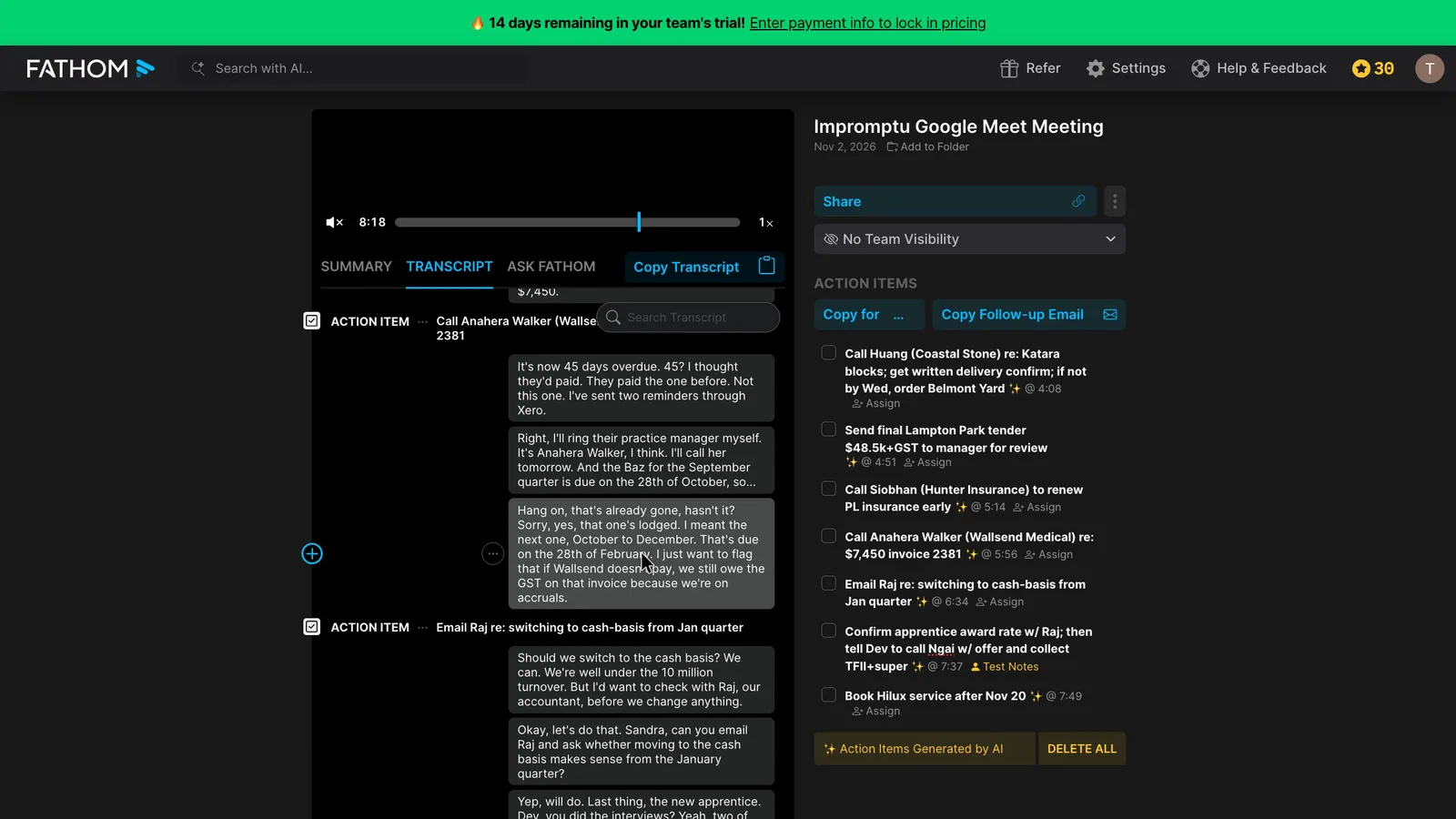
The clearest difference is the BAS date. One of the team gives the wrong due date and then corrects it to 28 February. Fathom's summary has a Cash Flow & BAS section with no due date at all, even though its transcript has "28th of February" word for word. So the transcript is right, but the summary you'd send isn't.
 (enlarge)
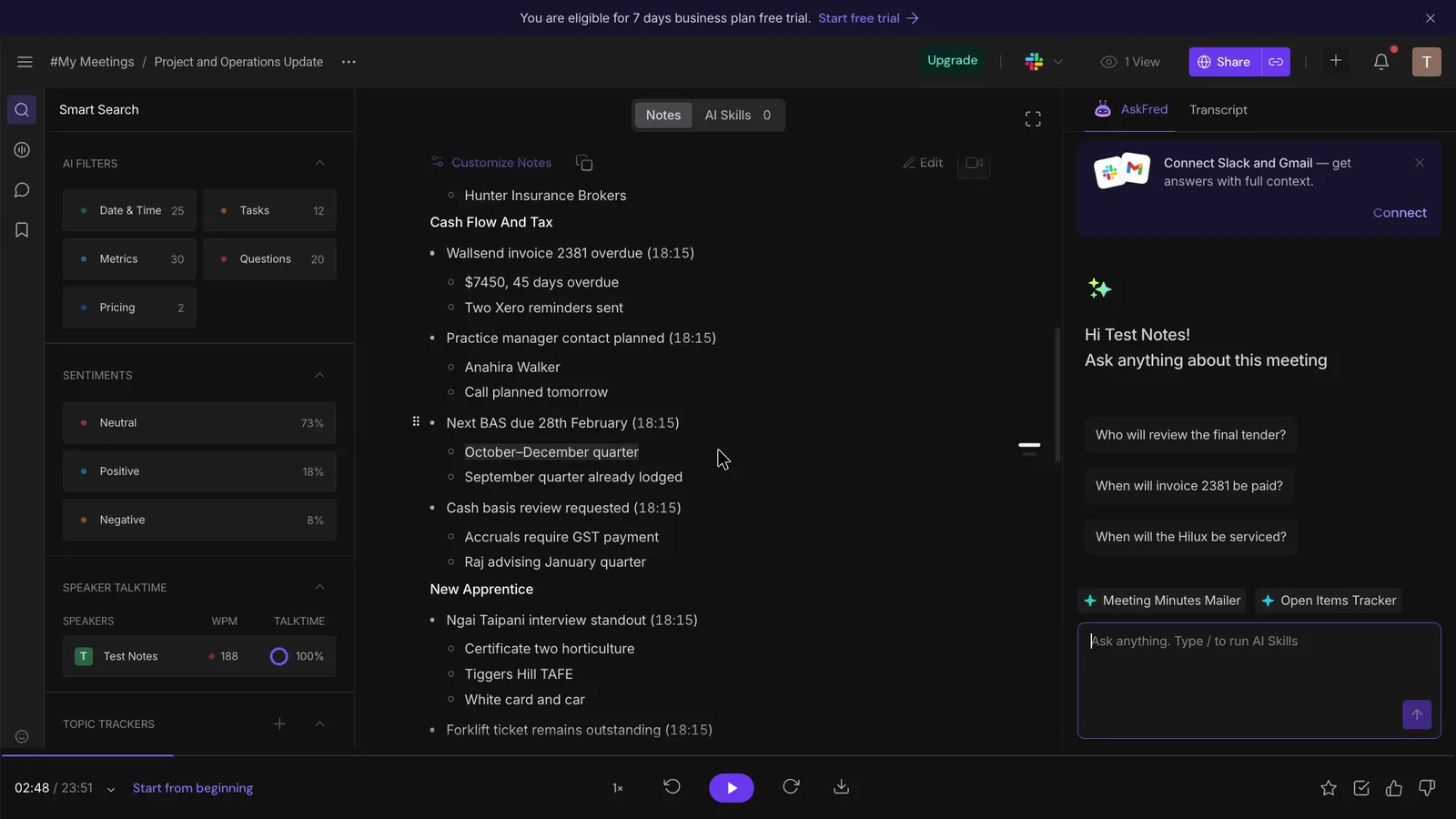
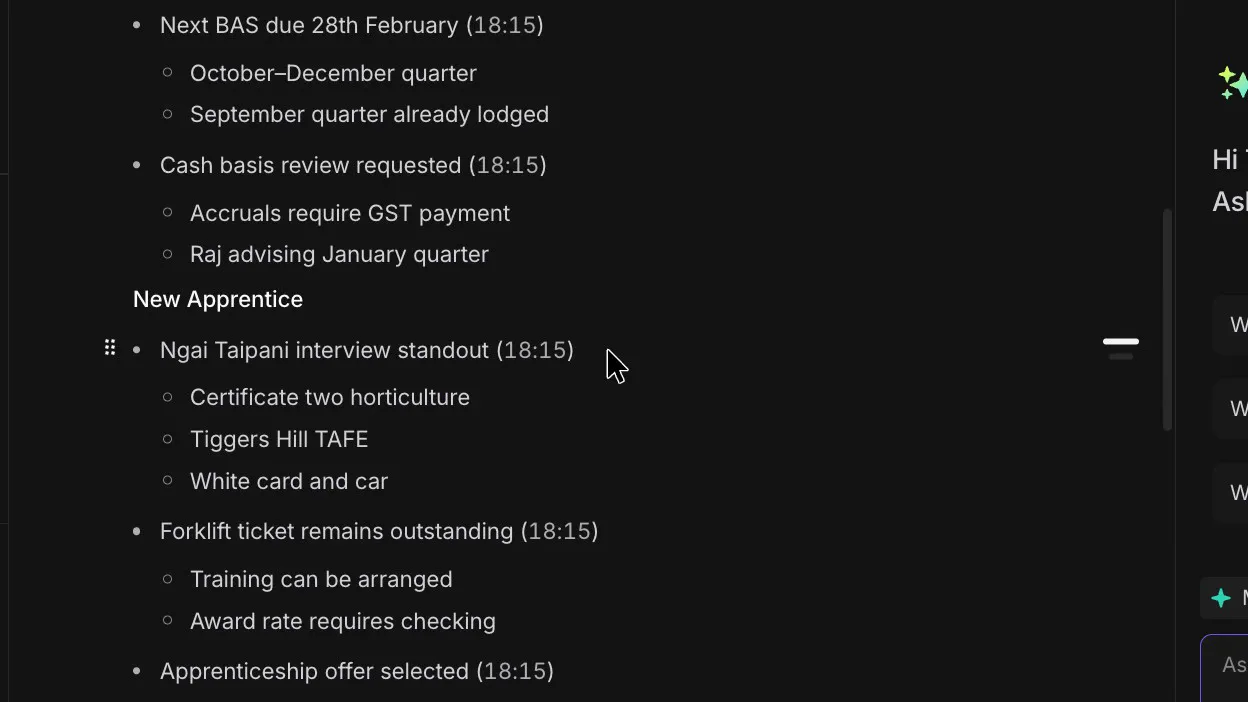
Fireflies wrote "Next BAS due 28th February" and noted that the September quarter was already lodged.
 (enlarge)
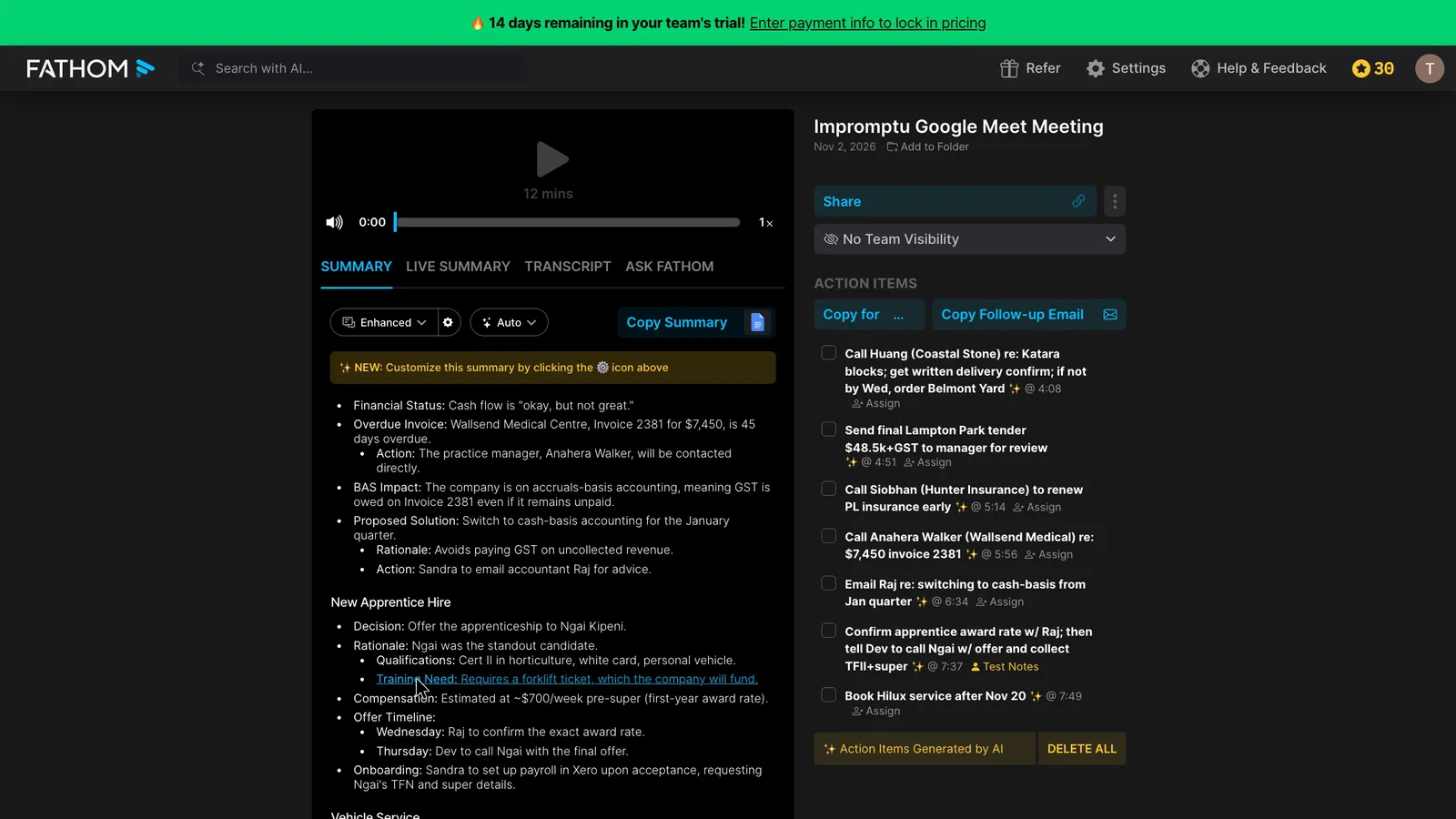
A client would read Fathom's added details as commitments. Fathom headed a section "New Apprentice Hired" when she was only going to be offered the job. It also said the business "will fund" her forklift ticket, which nobody said.
 (enlarge)
 (enlarge)
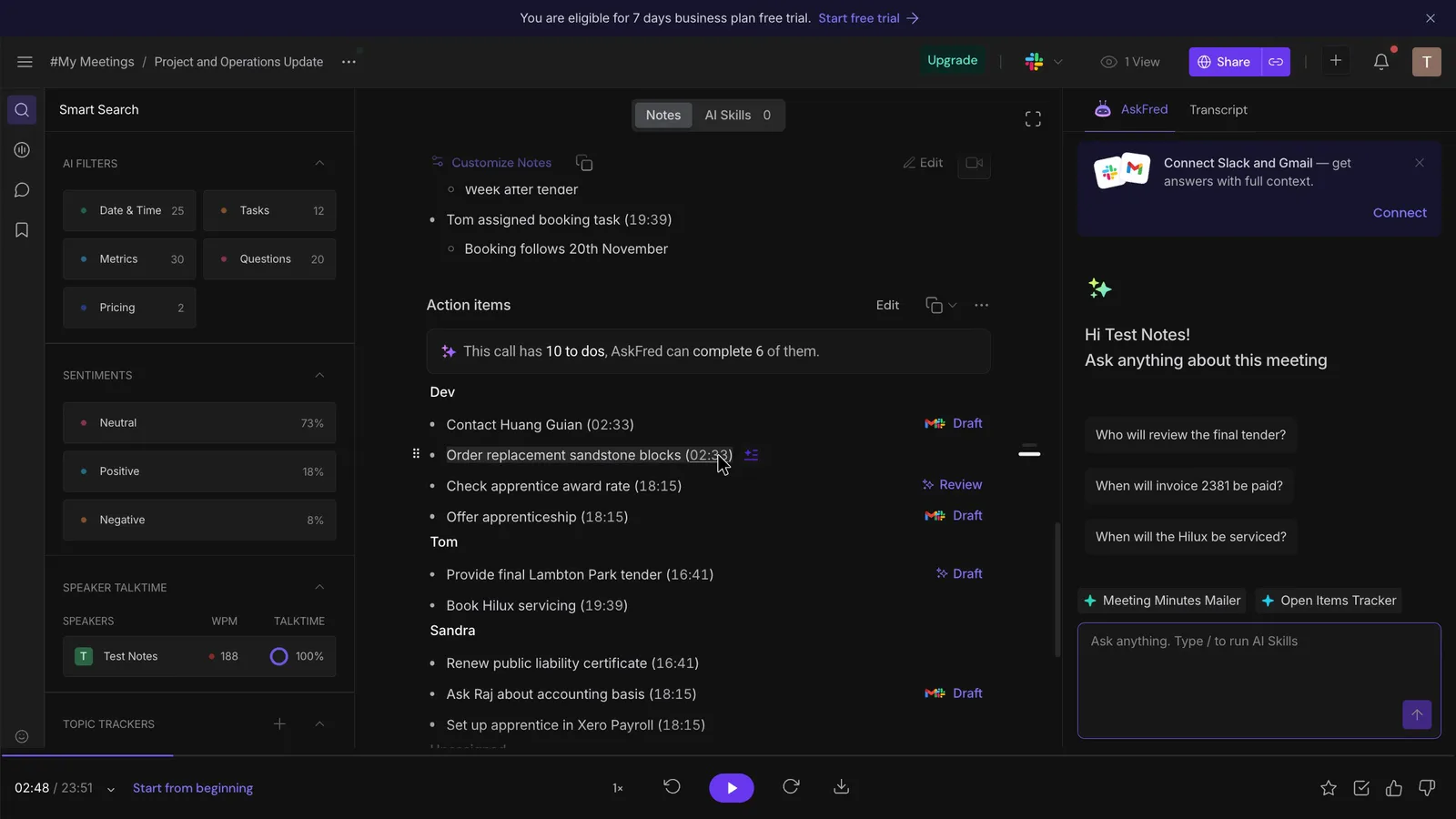
Fireflies' two additions turned maybes into settled facts. The team agreed to order sandstone blocks from another supplier only if a late delivery wasn't confirmed by Wednesday. Fireflies turned that into the firm task "Order replacement sandstone blocks", while Fathom kept the condition. Fireflies also wrote "Raj advising January quarter", when someone was only going to ask the accountant. For comparison, Granola added one detail in the same test, and Read AI and Otter.ai added one or two each.
 (enlarge)
Both tools group action items by person, and Fathom's Next Steps carry dates such as the Thursday call. Both tools misheard the apprentice's name and several local place names.
 (enlarge)
Finding old calls and passing notes on
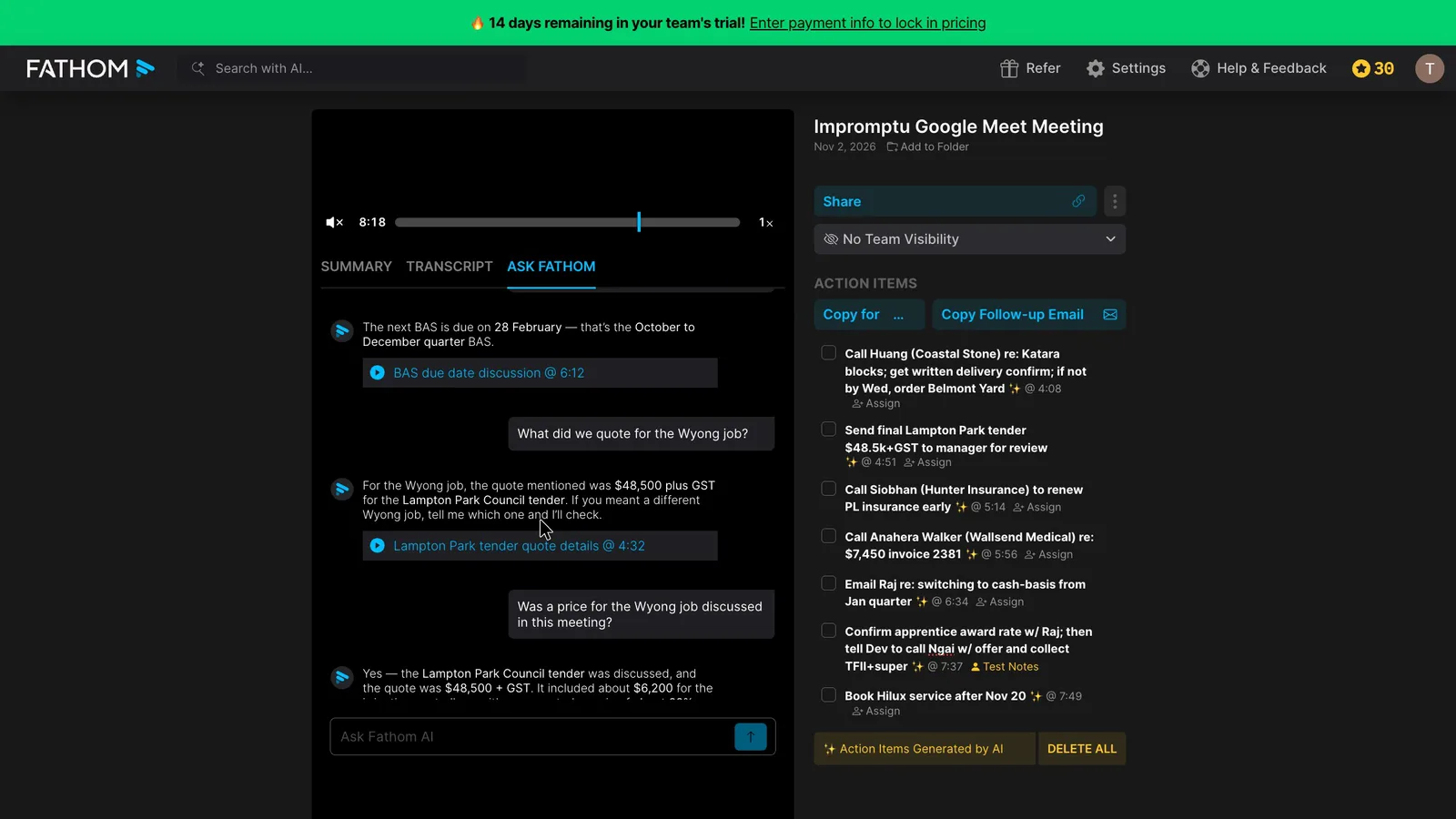
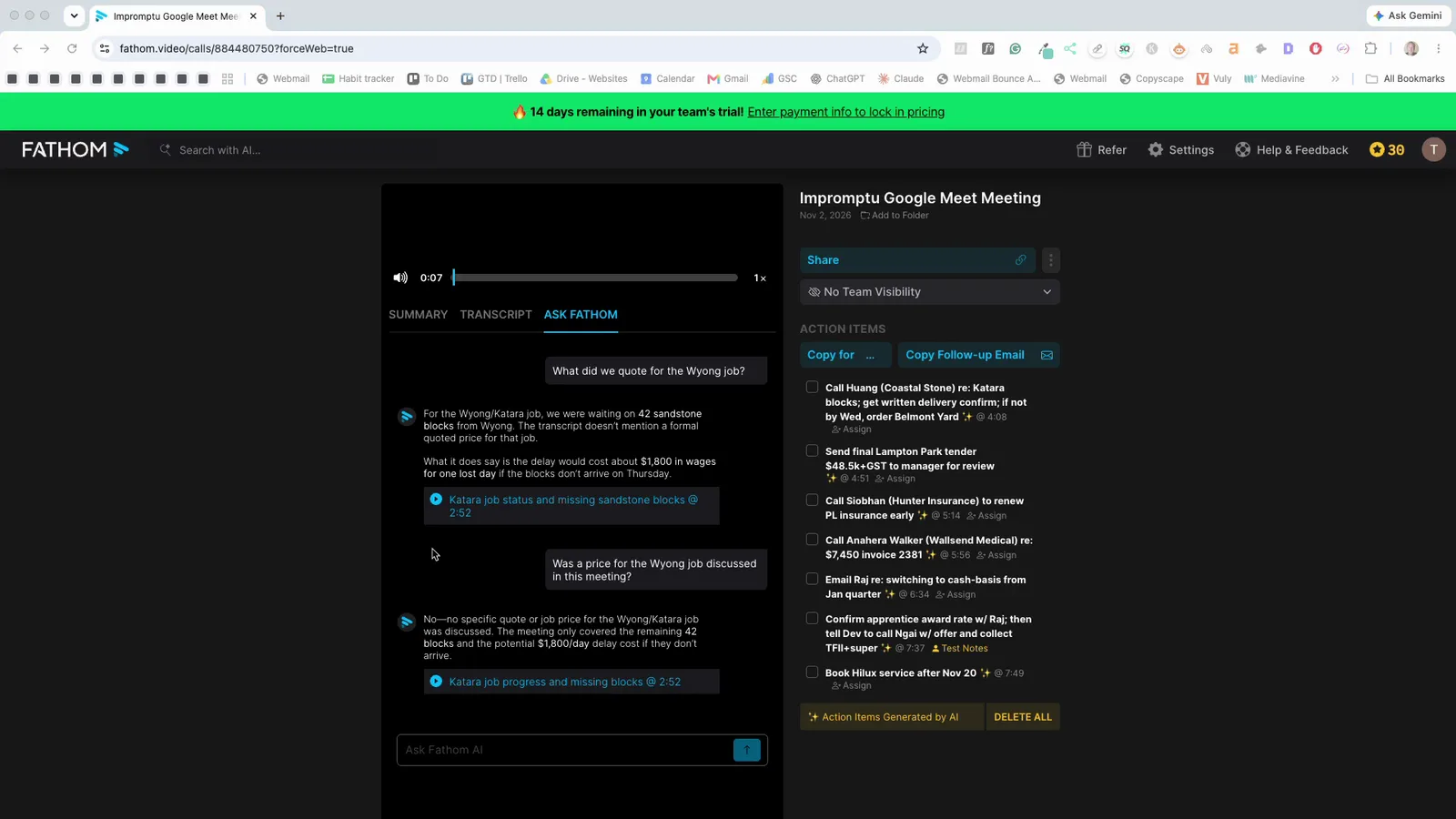
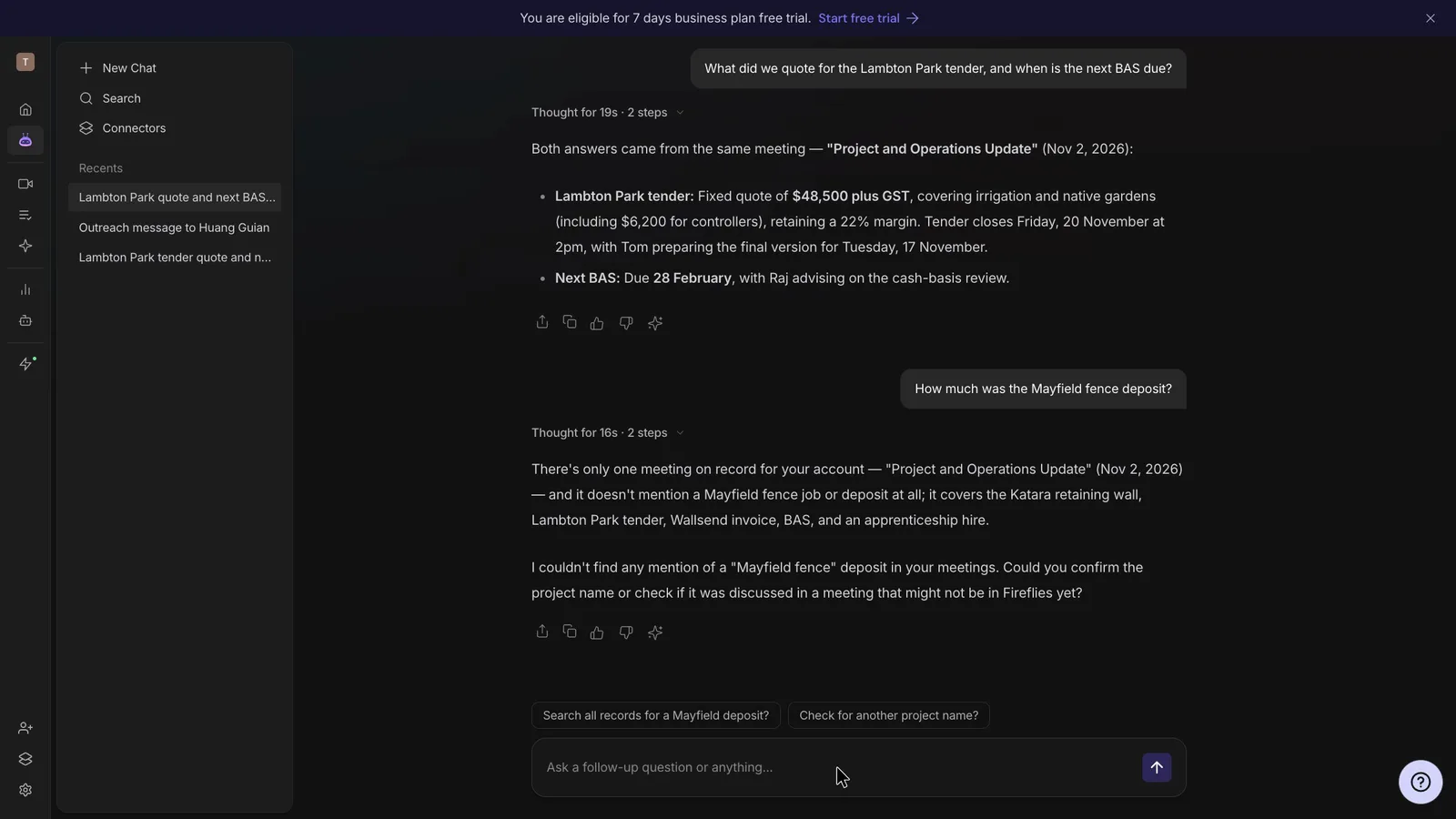
Fireflies' assistant was the more careful of the two because it said when something had never been discussed. Fathom's assistant links straight to the moment something was said, but it gave different answers to the same question. You'd use these assistants to check what a client agreed months later, and a confident wrong answer could send you back to the client with another job's price.
Asked what was quoted for a job that was never priced, Ask Fathom gave the price of a different job from the same meeting.
 (enlarge)
When I asked the same question again, it correctly said no price was given, but it mixed that job up with another one from the meeting.
 (enlarge)
Fireflies' assistant, AskFred, was asked about a deposit that was never mentioned. It said it "couldn't find any mention" of it.
 (enlarge)
Both assistants found the BAS date that Fathom's summary dropped. Ask Fathom answered 28 February with an "@ 6:12" link to the line. AskFred gave the same date and named the meeting.
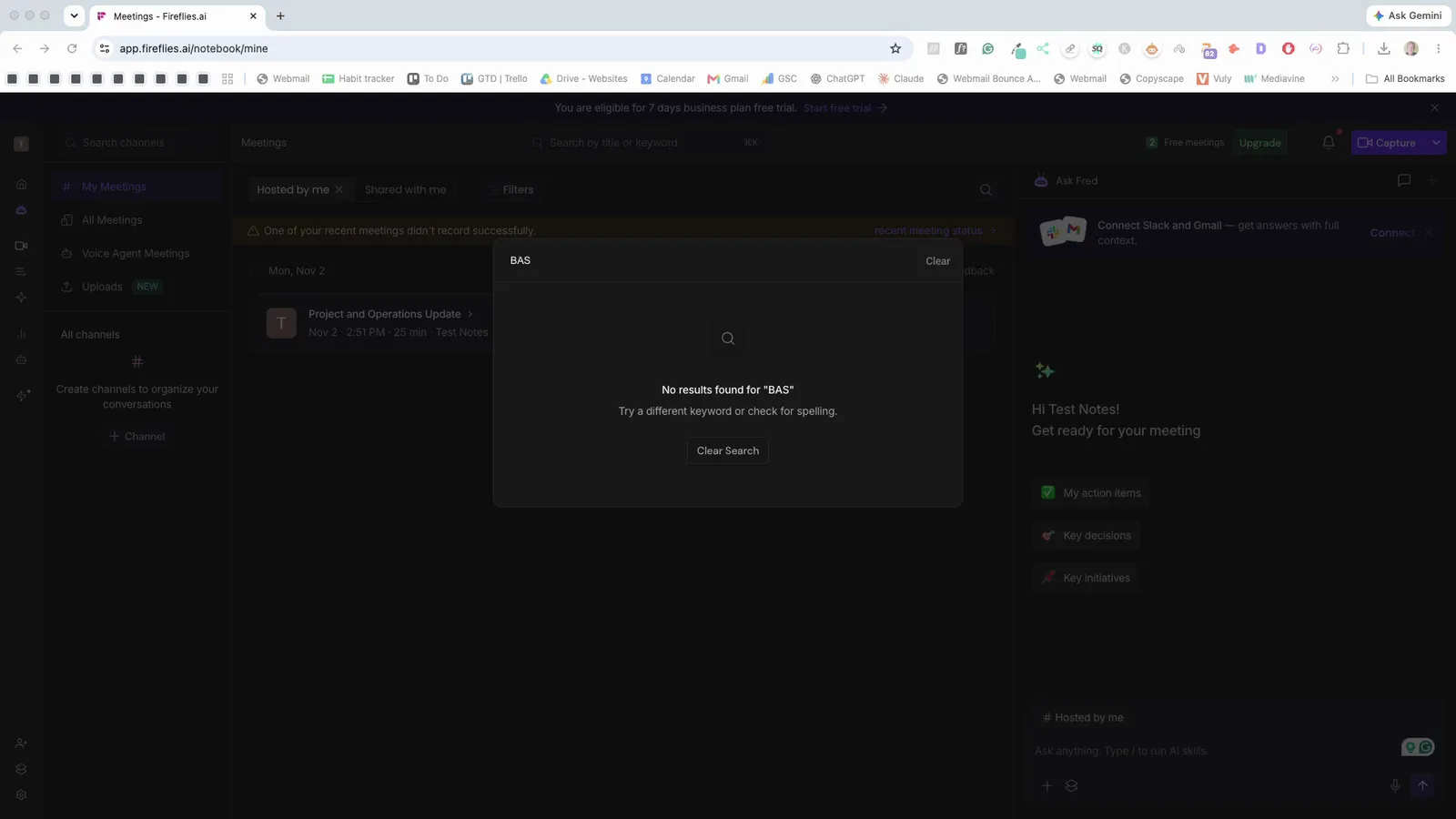
Fireflies' search box only finds words as they were misheard. "Baz" finds the meeting but "BAS" doesn't, and the apprentice's name only turns up under the wrong spelling. BAS is an Australian tax term, so the mishearing isn't surprising.
 (enlarge)
Both vendors say their assistants can search across all your calls (Fathom, Fireflies). Both list connections to Slack, HubSpot, Zapier and task apps such as Asana for passing notes on (Fathom, Fireflies).
Catching every meeting
Both tools recorded the same Google Meet call. Fathom used its desktop app, so no bot joined, which some people prefer. Fireflies sent its bot. Nothing else was recorded live, so Zoom, Microsoft Teams, phone calls and meetings across a desk weren't tested in either tool.
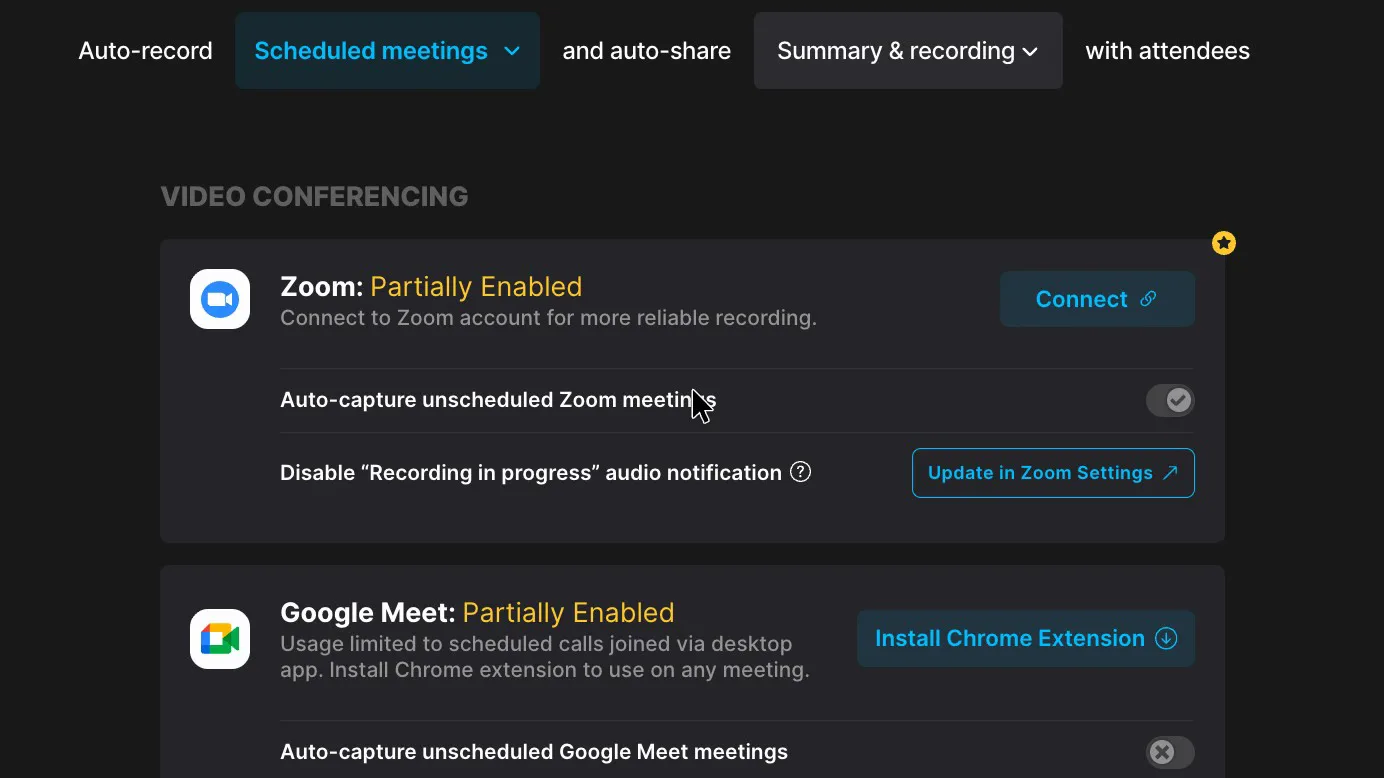
Fathom's bot-free mode only covers every meeting if you install its extra apps and keep them running. Its settings showed Google Meet and Zoom as "Partially Enabled". Meet needs the Chrome extension and Zoom needs a connected Zoom account, while Teams was fully enabled. Fathom's pricing page lists a choice of bot or bot-free recording on every plan, but the bot option wasn't tested. Fathom's help pages say it doesn't record phone calls.
 (enlarge)
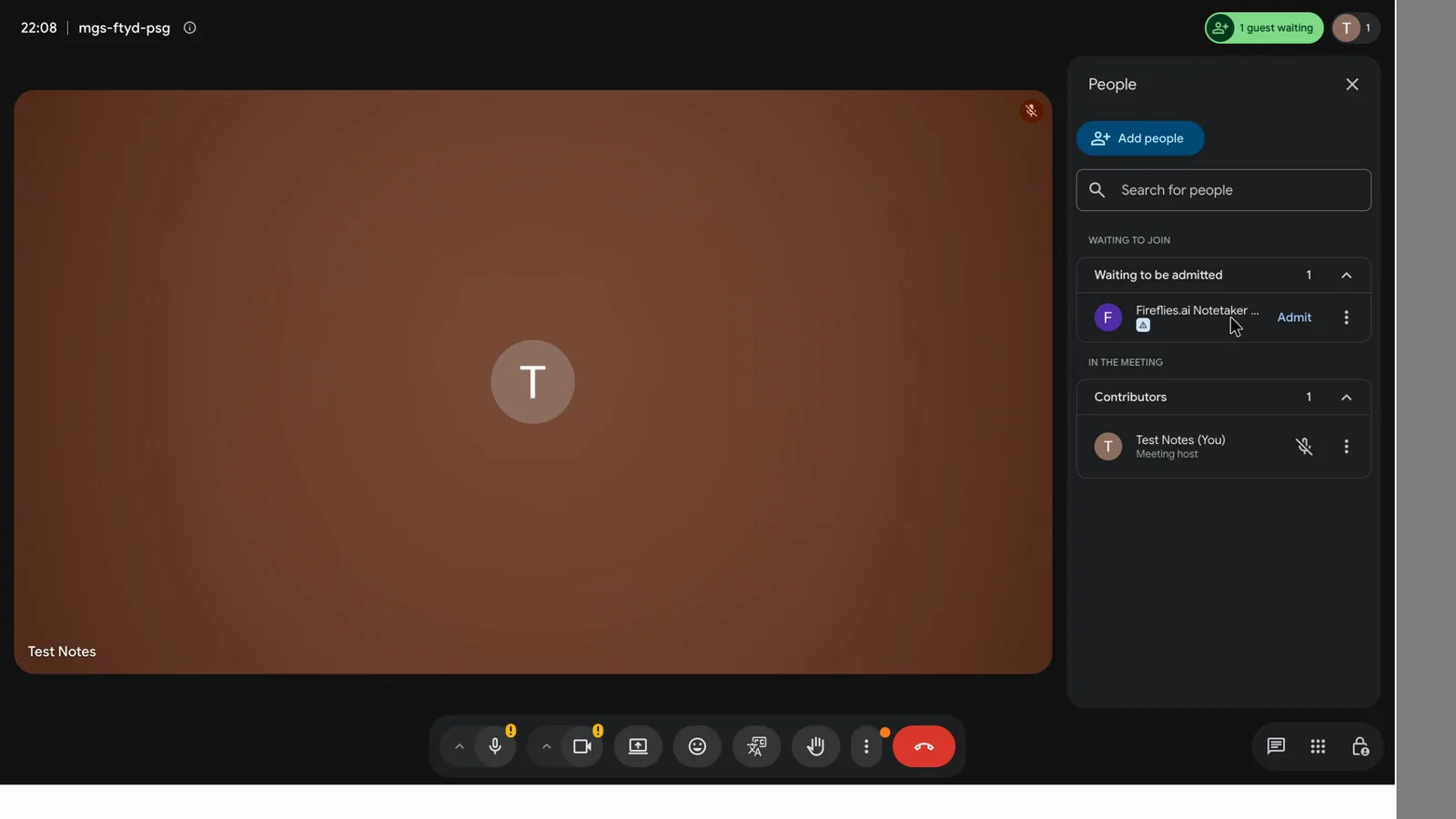
Someone in the call has to let Fireflies' bot in. Fireflies says its desktop app can record without a bot, including meetings in a room. However, that mode has no speaker labels and doesn't save the audio or video. Phone calls weren't tested in either tool. Fathom's help pages say it doesn't record them, while Fireflies' mobile app guide says its iOS and Android apps record in person, and its blog describes recording a speakerphone call on an iPhone.
 (enlarge)
Who knows it's recording
Fireflies makes itself obvious in the call. Fathom's bot-free recording shows no bot, but its help pages say it posts a recording notice in the meeting chat, or shows consent prompts if that notice is switched off.
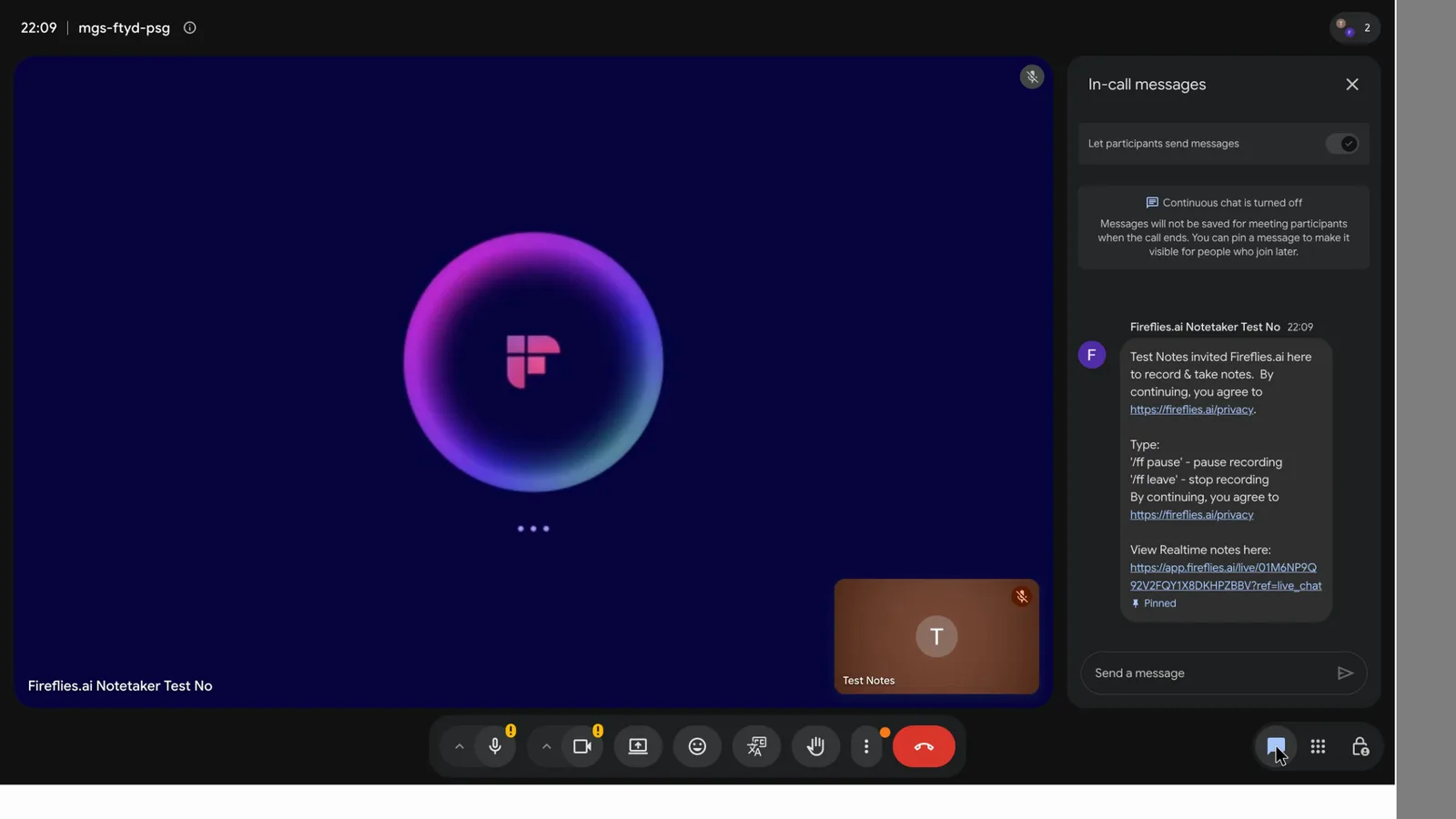
Fireflies' bot joins under its own name and posts a chat message saying who invited it, with "/ff pause" and "/ff leave" commands. Typing "/ff pause" paused it straight away. The message says "By continuing, you agree", so Fireflies treats staying on the call as agreeing.
 (enlarge)
With Fathom's desktop app, no Fathom bot appears in the call. Its recording notice banner was switched on in settings. Paid plans can turn the banner off, with a warning that consent is then your job. Fathom can email attendees to ask for consent.
NSW law generally needs everyone's consent to record a private conversation, and Fireflies' terms put getting consent on you. A bot tile or a chat message isn't the same as asking, so with either tool I'd ask people at the start of each call if they're happy to be recorded.
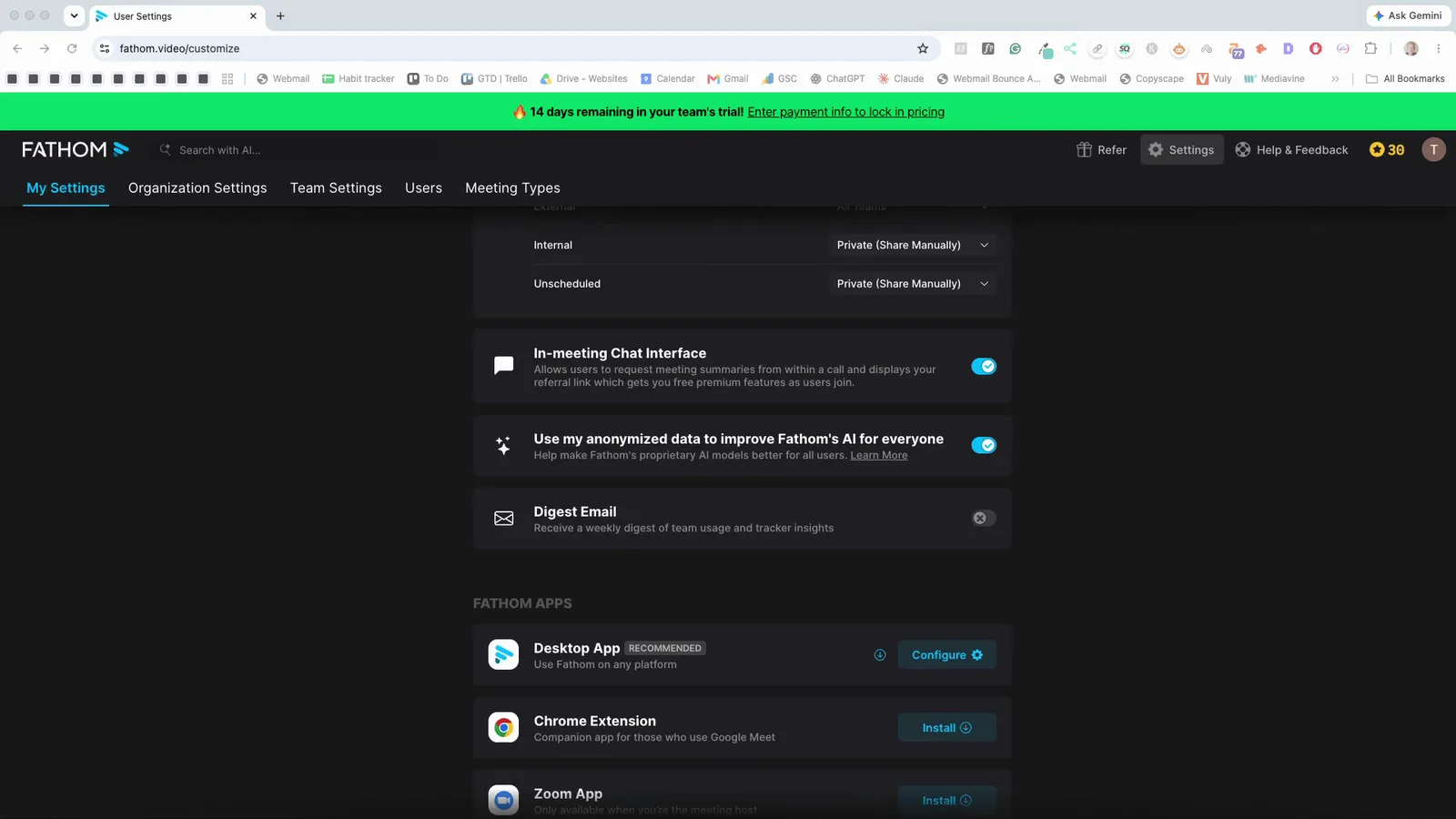
Fathom's "Use my anonymized data to improve Fathom's AI" switch was on in the account. Fathom's security page says it uses de-identified data to improve its own models unless you opt out.
 (enlarge)
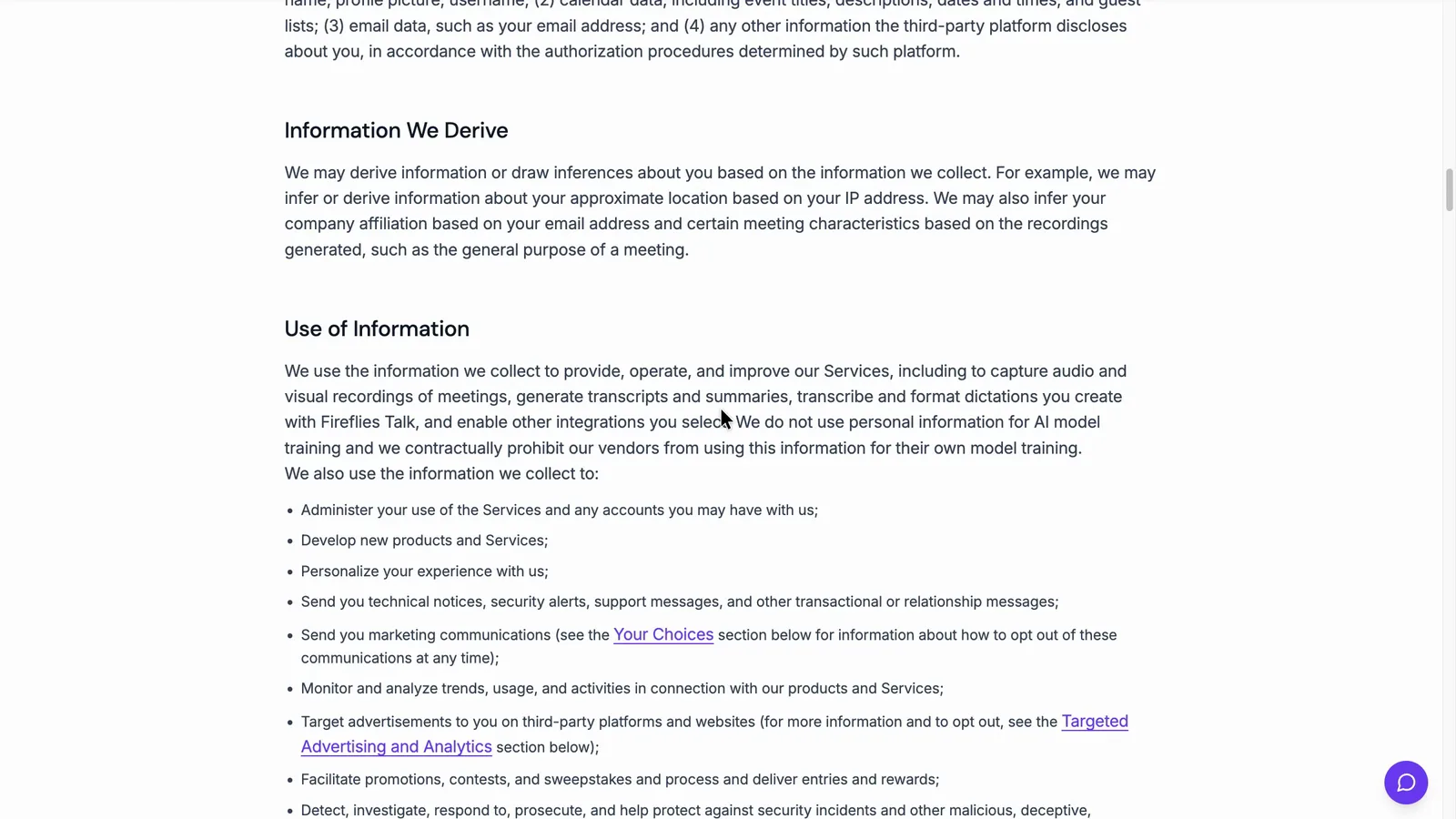
Fireflies' privacy policy says "We do not use personal information for AI model training".
 (enlarge)
Control over joining and sharing
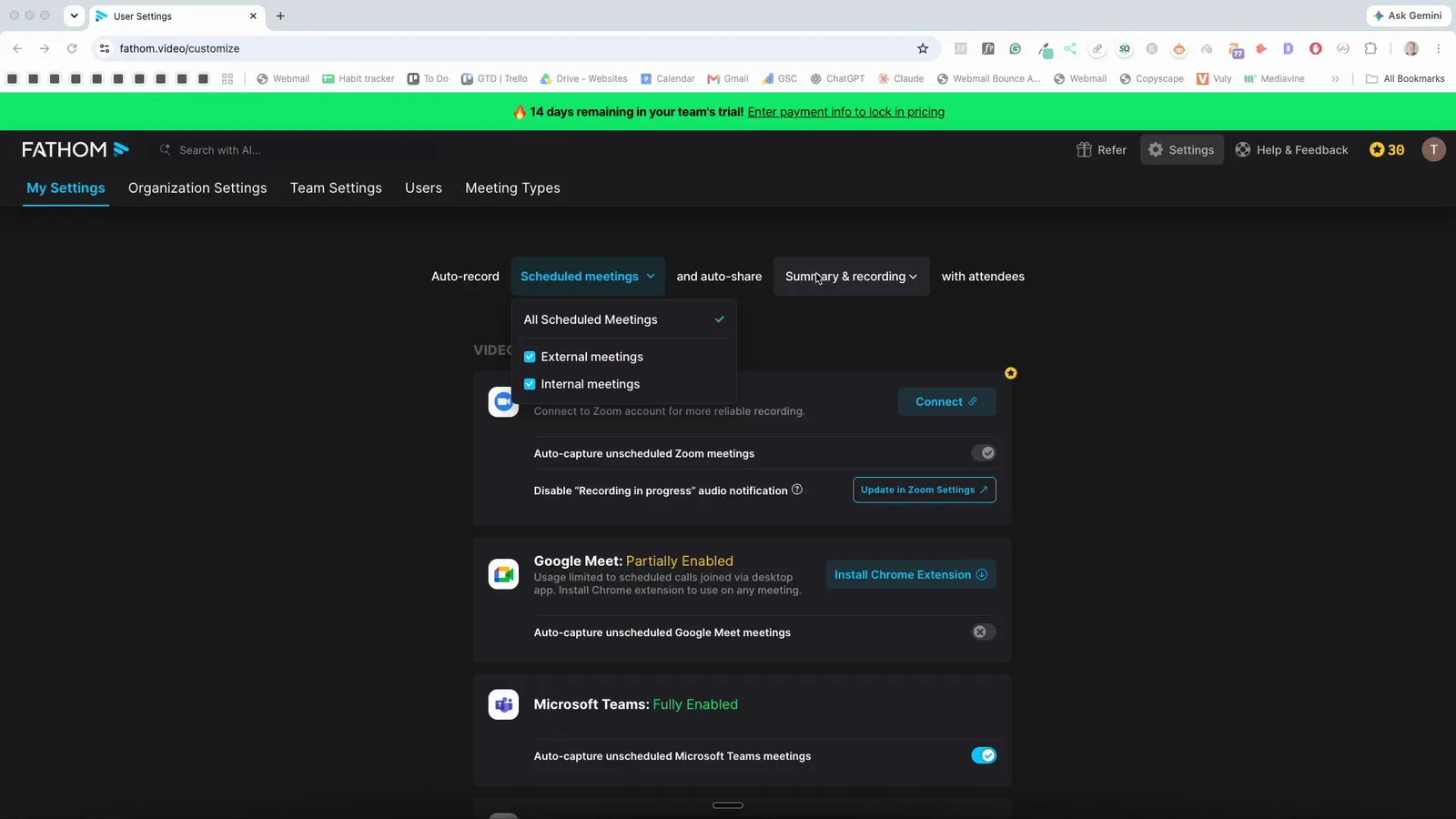
Fireflies lets you choose who gets the notes. As the Fathom account stood, it was set to record every scheduled meeting, internal and external, and to email the summary and recording to everyone on the invite.
 (enlarge)
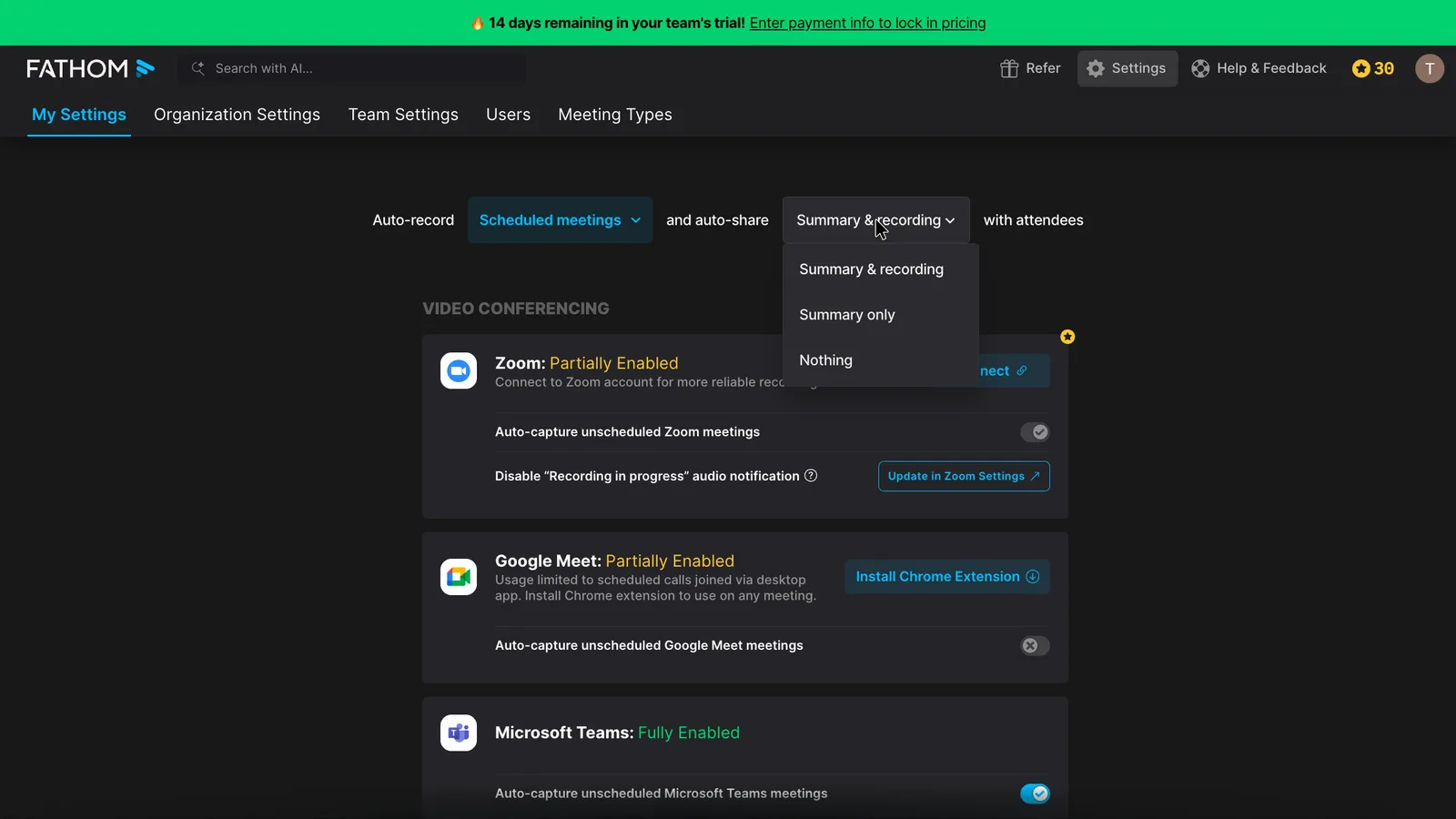
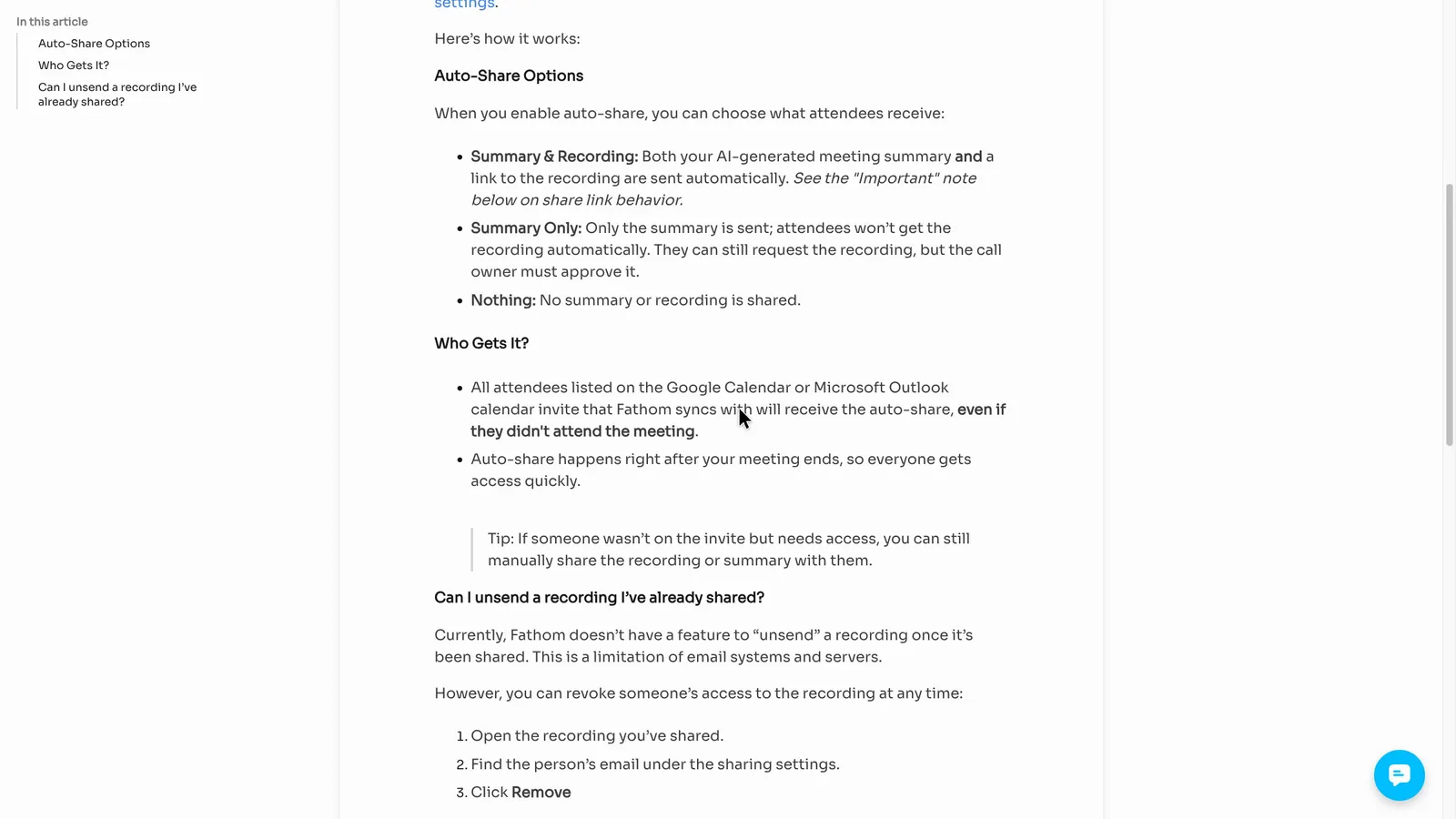
Fathom's auto-share menu sets what gets sent (summary and recording, summary only, or nothing), not who gets it. Fathom's own review noted a separate team-only option on its team plans, which wasn't shown here.
 (enlarge)
Fathom's help page says everyone on the invite gets the recap "even if they didn't attend".
 (enlarge)
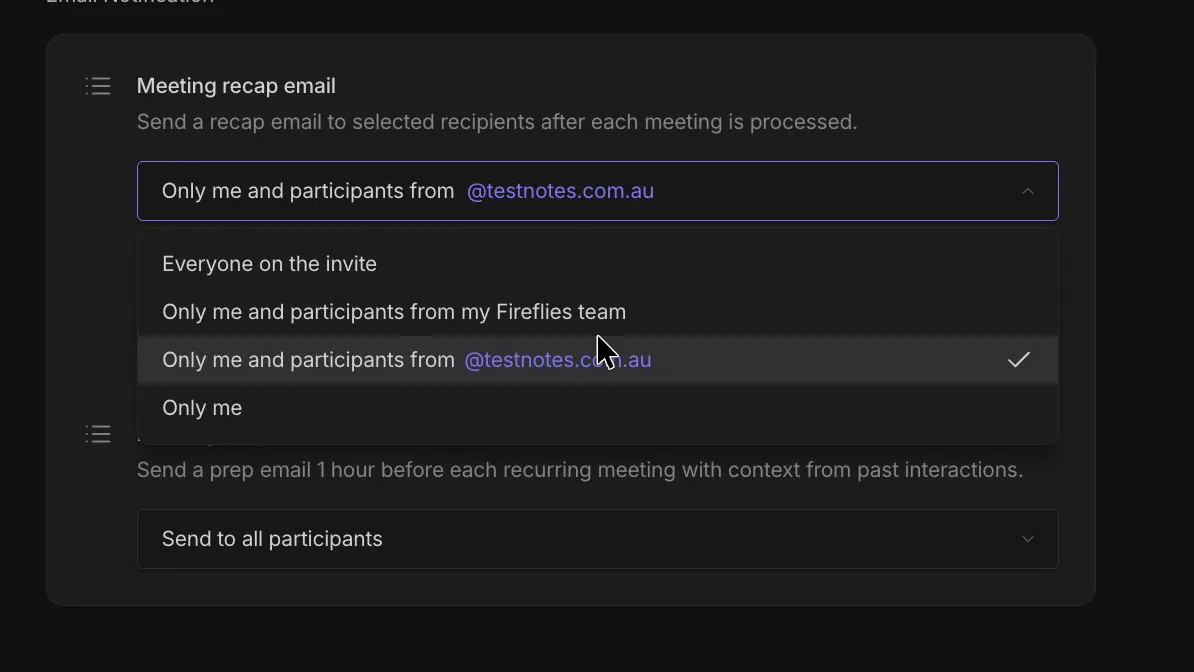
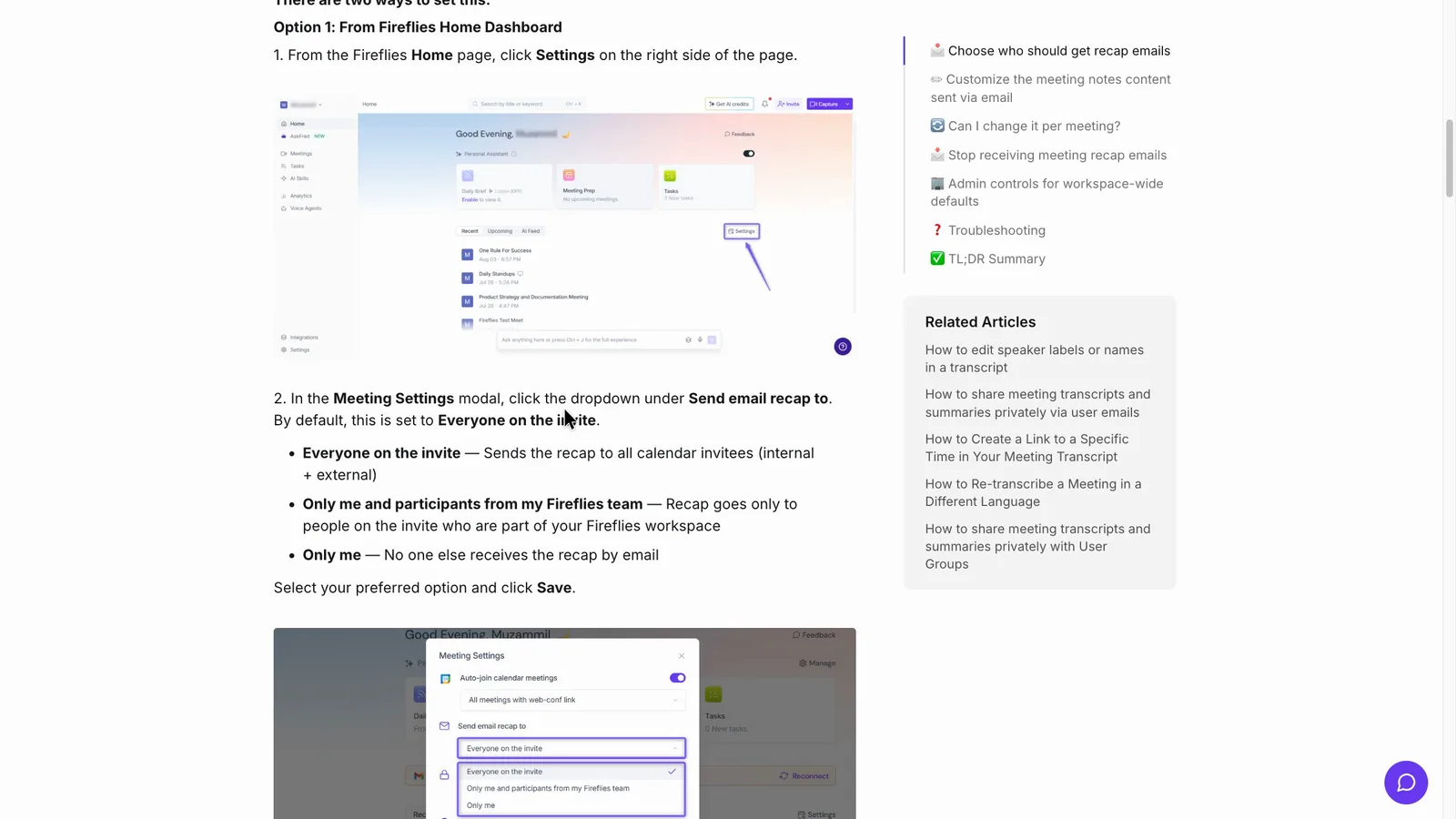
Fireflies' recap menu runs from "Everyone on the invite" down to "Only me", and it's quick to change on Free, as is narrowing or turning off auto-record. Fireflies' guide says the recap goes to everyone on the invite by default.
 (enlarge)
 (enlarge)
| Sharing | Fathom (as the account stood) | Fireflies.ai |
|---|---|---|
| What it records | Every scheduled meeting, internal and external | Calendar events with a meeting link |
| Who gets the recap | Everyone on the invite, including no-shows | Your choice, from everyone to only you |
| The recap menu sets | What's sent | Who gets it |
| Locking one recording's link | Your business's domain, or named people | Only the owner |
Before the first client call, I'd set Fireflies' meeting recap to "Only me" and Fathom's auto-share to "Nothing". That way nothing reaches a client until someone has read and fixed it.
True cost and getting out
Fireflies is cheaper per seat and has no minimum number of users. However, it charges in US dollars and can add credit charges. Fathom costs more and its Team plan needs at least two users, but its checkout charged in Australian dollars and it keeps recordings forever, even on Free.
| A year, billed annually, before GST | Fathom | Fireflies.ai |
|---|---|---|
| 1 user | Premium, about A$280 | Pro, US$120 (about A$174) |
| 3 users | Team, about A$785 | Pro, US$360 (about A$523) |
| 8 users | Team, about A$2,094 | Pro, US$960 (about A$1,396) |
Fathom's pricing page shows its prices as "$" without naming a currency, and its checkout converted at 1 USD = 1.5021 AUD on 10 November 2026. The Australian-dollar figures in this table are converted at the RBA rate for 11 November 2026 (A$1 = US$0.6878), for comparison only. Your bank may add an international transaction fee on either charge, because both companies are based overseas. Monthly billing costs more on both. For one person, that's around A$280 to A$290 a year for Fathom Premium, depending on the rate, against under A$200 for Fireflies Pro.
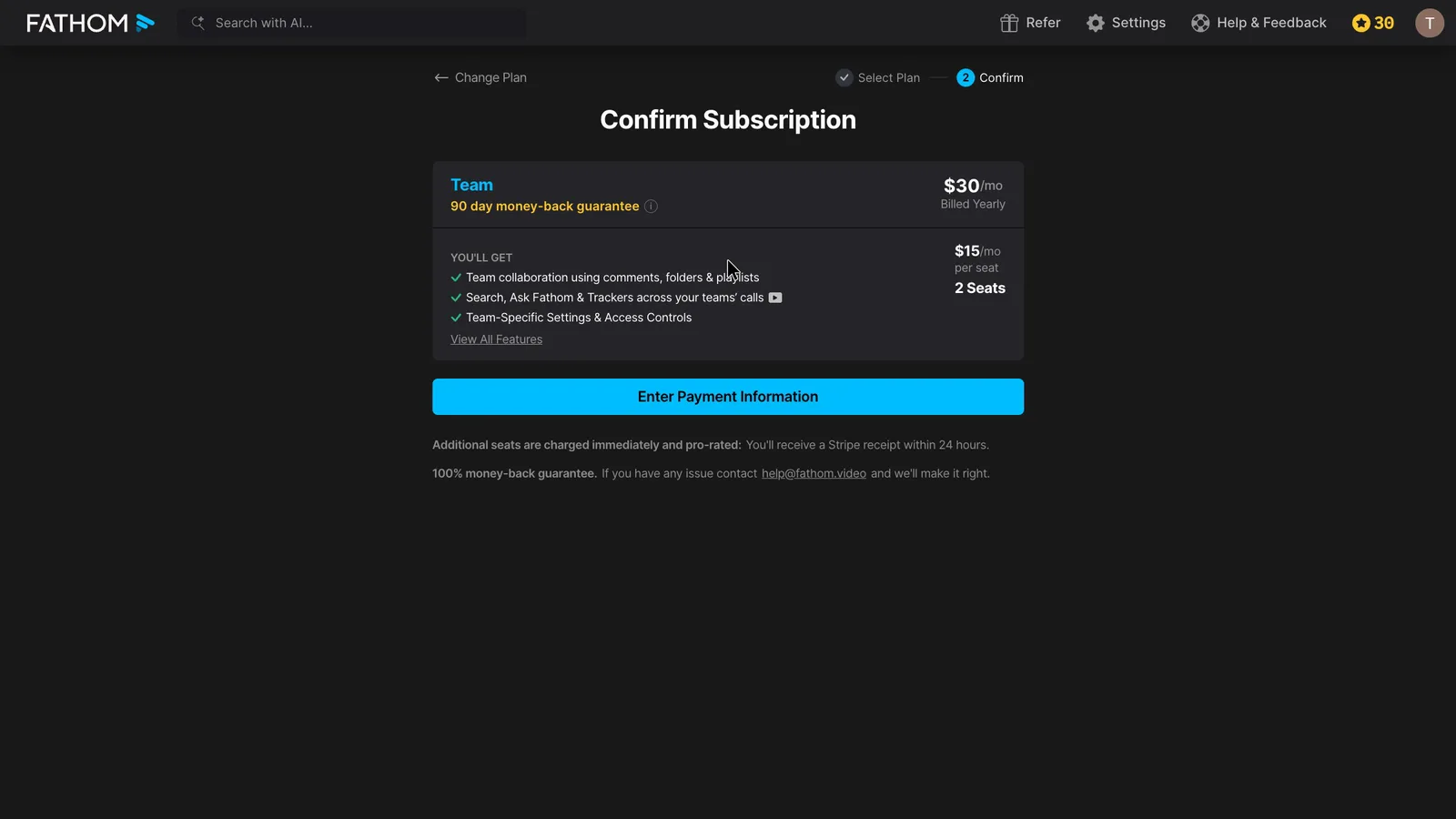
Fathom's checkout charged a little over A$540 a year for the two-user minimum on Team.
 (enlarge)
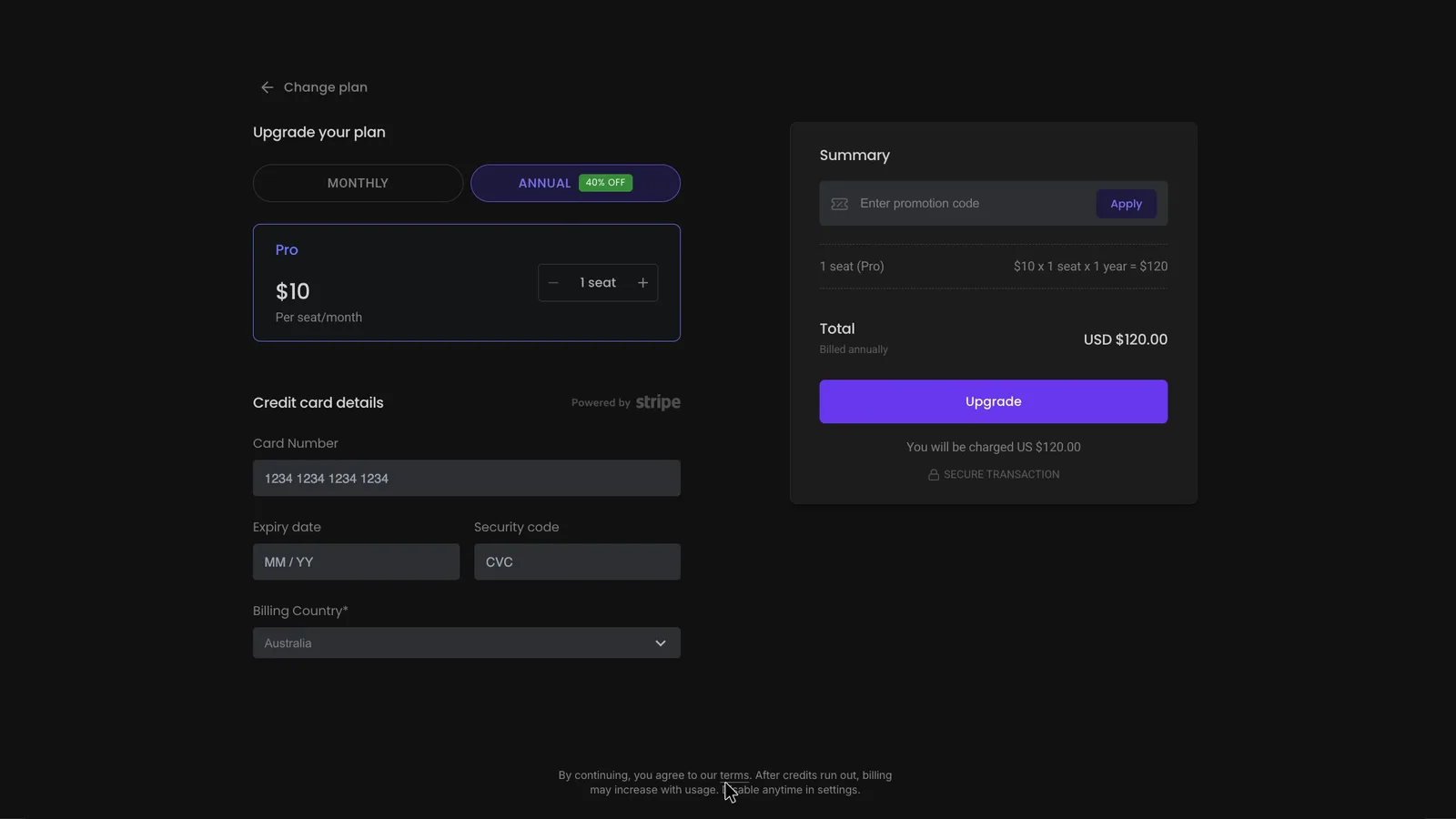
Fireflies' checkout charged the annual Pro rate for one seat. Its small print says "After credits run out, billing may increase with usage".
 (enlarge)
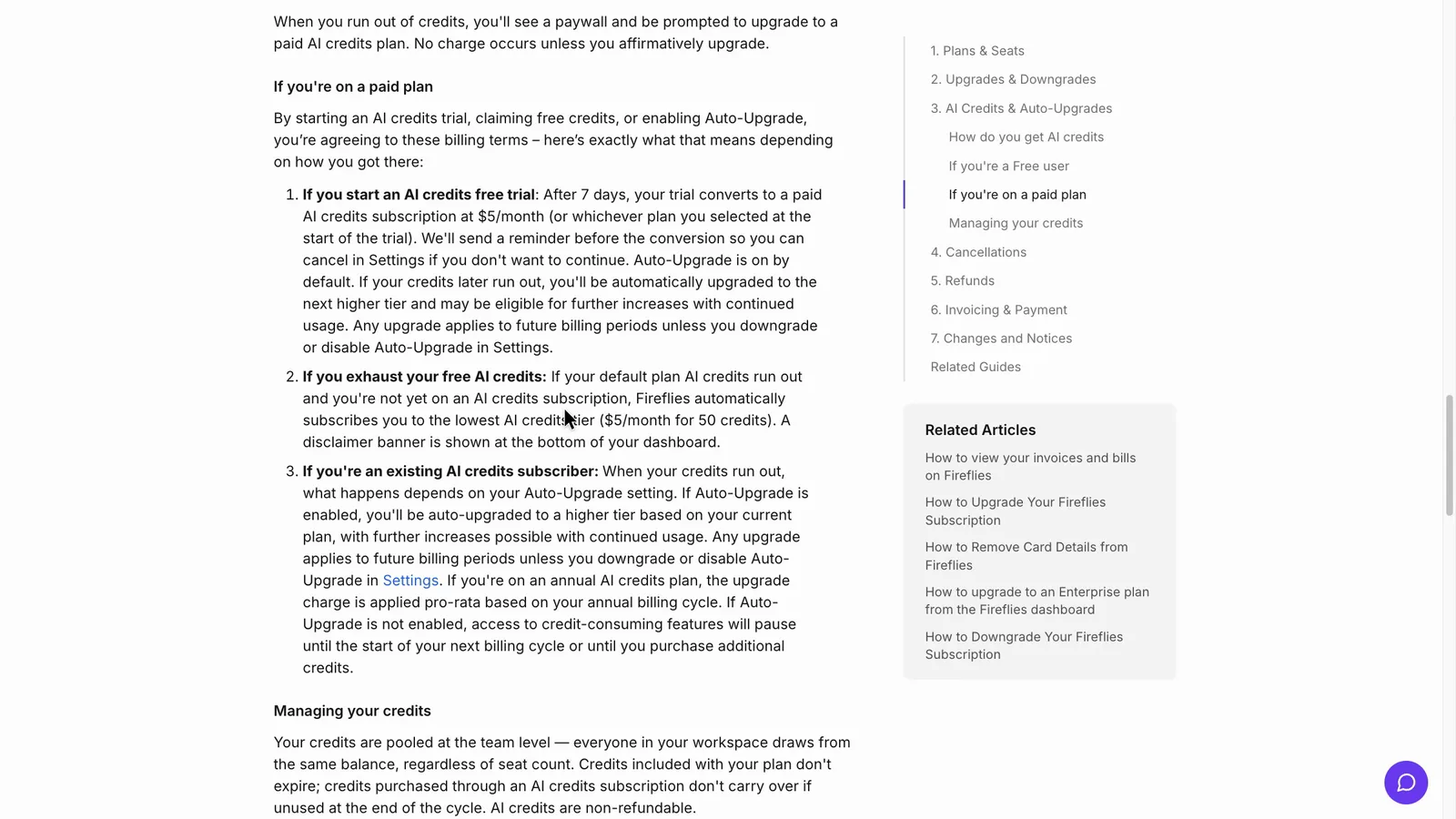
Fireflies' billing guide says paid plans start a monthly US-dollar credit subscription automatically when the AI credits run out. Its billing terms list the plan, an AI credit trial, the credit subscription and Auto-Upgrade as separate charges.
 (enlarge)
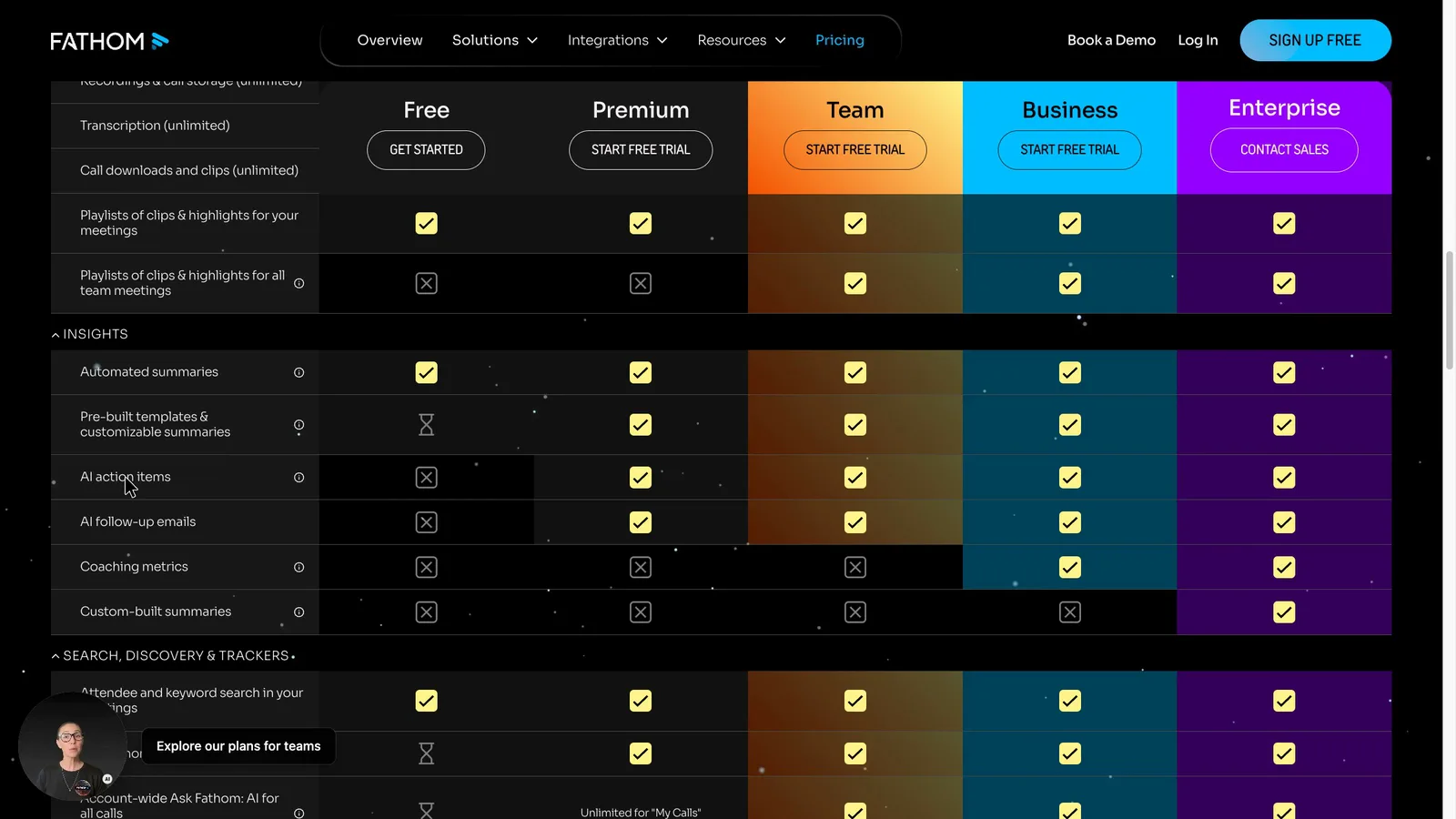
When the test was recorded, Fathom's pricing table didn't include AI action items or follow-up emails on Free. Its Free vs Premium page gives Free advanced summaries for the first five calls each month. The pricing page wasn't compared line by line again after the recording.
 (enlarge)
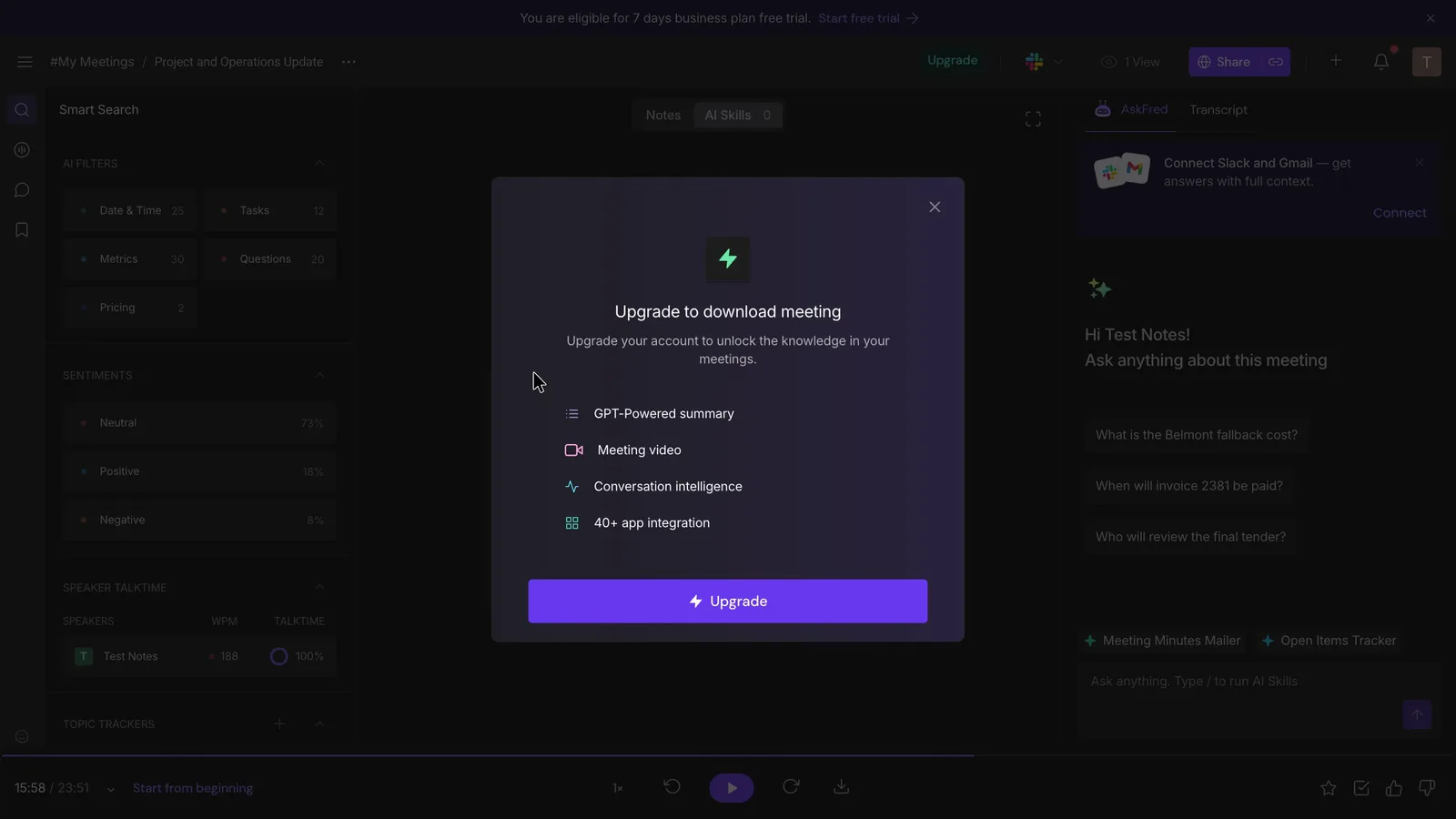
Getting your records out works differently in each tool. On Fireflies' Free plan, every download option brings up "Upgrade to download meeting". Its Free plan guide caps storage at 400 minutes a seat. Pro includes downloads.
 (enlarge)
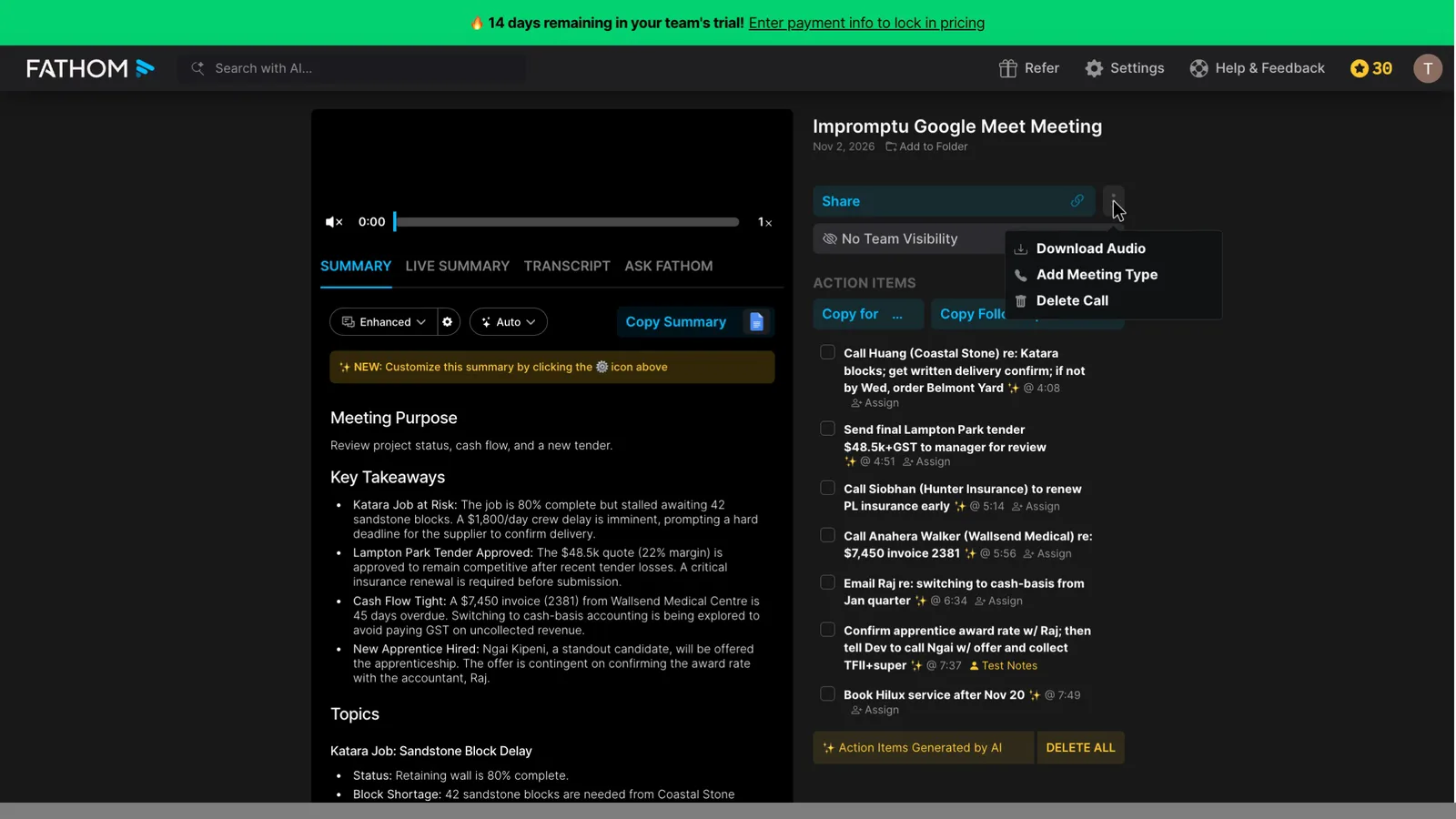
Fathom's help centre says Free and Premium keep recordings "forever". You download audio one call at a time from a menu that only appears when you hover over the call. The transcript copies to the clipboard rather than saving as a file. Both tools have an API (Fathom, Fireflies), so someone technical can still get your data out of either.
 (enlarge)
Who each one suits
Fireflies Pro suits a business that will pay. It's US$120 a year per seat with no seat minimum, and it used both corrections in the test. Its Free plan is a poor place for client records, because nothing can be downloaded and storage stops at 400 minutes.
Fathom suits a sole trader or small team that meets online from a computer and wants a free plan that keeps every recording, billed in Australian dollars. It needs auto-share set to "Nothing" and every summary read before it goes out.
Pricing
| Plan | Price | Per | Includes | Checked |
|---|---|---|---|---|
| Free | Free | Unlimited recordings and transcripts, basic summaries; detailed summary templates on the first 5 calls a month; no AI action items or follow-up emails | ||
| Premium (billed yearly) | US$16 ex tax | per user per month | Detailed summaries on every call, AI action items, follow-up emails, Ask Fathom (limited use on Free), custom bot name, option to turn off the recording notice | |
| Premium (billed monthly) | US$20 ex tax | per user per month | As Premium yearly | |
| Team (billed yearly) | US$15 ex tax | per user per month | Minimum 2 users; shared workspace, team settings, Ask Fathom across team calls | |
| Team (billed monthly) | US$19 ex tax | per user per month | Minimum 2 users; as Team yearly | |
| Team, 2 users, yearly (checkout total) | $540.77 ex GST | per year | Checkout total for the 2-user minimum after a 14-day free trial, at 1 USD = 1.5021 AUD; tax shown as A$0.00; ABN field for business buyers | |
| Business (billed yearly) | US$25 ex tax | per user per month | Minimum 2 users; CRM field sync, deal view, coaching scorecards, custom summaries | |
| Business (billed monthly) | US$34 ex tax | per user per month | As Business yearly | |
| Enterprise (billed yearly) | US$35 ex tax | per user per month | SSO/SCIM, custom data retention, organisation-wide link restrictions; sold through sales |
Fathom charges in US dollars. Your bank converts the price and may charge a foreign transaction fee. Source: fathom.ai/pricing
| Plan | Price | Per | Includes |
|---|---|---|---|
| Free | Free | Bot recording on Zoom, Google Meet and Teams, transcript, notes and action list; 400 minutes of storage per seat; no downloads; custom vocabulary not available | |
| Pro (annual billing) | US$120 ex tax | per user per year | Everything in Free plus downloads of transcripts, summaries and recordings; larger storage allowance |
| Pro (monthly billing) | US$18 ex tax | per user per month | Same as Pro on annual billing |
| Business (annual billing) | US$228 ex tax | per user per year | Everything in Pro plus unlimited storage and team analytics |
| Business (monthly billing) | US$29 ex tax | per user per month | Same as Business on annual billing |
Fireflies.ai charges in US dollars. Your bank converts the price and may charge a foreign transaction fee. Checked 5 Nov 2026. Source: fireflies.ai/pricing
Integrations
| Connects to | What syncs | Direction | Checked |
|---|---|---|---|
| HubSpot | Call notes to the CRM; field-level sync on the Business plan | Fathom → HubSpot | |
| Salesforce | Call notes to the CRM; field-level sync on the Business plan | Fathom → Salesforce | |
| Slack | Not stated | Not stated | |
| Zapier | Not stated | Fathom → Zapier | |
| GoHighLevel | Not stated | Not stated |
| Connects to | What syncs | Direction | Checked |
|---|---|---|---|
| Google Meet | Bot joins calls from the linked calendar, records and writes notes | Google Meet → Fireflies.ai | |
| Zoom | Bot joins and records meetings | Zoom → Fireflies.ai | |
| Microsoft Teams | Bot joins and records meetings | Microsoft Teams → Fireflies.ai | |
| Google Calendar | Calendar events tell the bot which meetings to join | Google Calendar → Fireflies.ai | |
| Asana | Action items | Fireflies.ai → Asana | |
| HubSpot | Meeting notes | Fireflies.ai → HubSpot | |
| Slack | Meeting notes | Fireflies.ai → Slack |
What I didn't test (11 things)
- Zoom, Microsoft Teams, phone calls and meetings in a room, in either tool. Only Google Meet was recorded live.
- What a guest sees in the call. That needs a second person, Fathom's test used no bot and Fireflies was filmed from the host's side only.
- Searching across months of calls. Neither account had a long history of meetings.
- Sending notes to Slack, Notion, a CRM or a task app. Nothing was connected in either account.
- Fathom's free plan in use, including its five-call summary limit. The account was on a Business trial.
- Fireflies' paid plan, including downloads on Pro and the credit top-up. The account stayed on Free.
- Cancelling either tool, and what's left afterwards.
- A brand-new Fireflies account's default recap and auto-record settings.
- Fireflies' desktop and phone apps, and Fathom's desktop app settings.
- Speaker labels. Every voice in the test came through one participant.
- How GST appears on the final invoice from either tool.
Video transcript
Fathom vs Fireflies
I played the same pre-recorded team meeting into Fathom and Fireflies, and neither wrote notes I'd send to a client without checking them. They're both AI notetakers that record your online meetings and write up the notes. If you're happy to pay, I’d start with Fireflies, because it’s cheaper per seat and its recap lets you choose who gets the notes. Fathom’s sends them to everyone on the invite or no one, unless you’re on a team plan. I used my AI review agent to put both through the same tests, and checked the key differences myself. Fathom was on a Business trial, which is a paid plan, and Fireflies was on its Free plan, but I've still aimed to compare like-for-like plans.
Notes you can send as they are
The test is a pre-recorded meeting played into one Google Meet call, with seven AI notetakers listening at once. It's a five-minute weekly catch-up with four people, Australian names, prices and dates, and two corrections partway through. Then each notetaker's notes are compared with what was actually said.
Notes you can send as they are
Fathom and Fireflies are the first two rows in the table here. Both got every number right and found nearly all nine tasks. Fireflies used both corrections and added fewer details nobody said. But its action list has no due dates, so you'd have to add them by hand.
Notes you can send as they are
Partway through, one of the team gives the wrong due date for a BAS filing and then corrects herself. Fathom's summary has no due date at all, even though its transcript has it. For comparison, Fireflies wrote the corrected due date and noted the earlier quarter was already lodged.
Notes you can send as they are
Early on, one of the team is asked to chase a late delivery, with a backup plan. Fireflies turned that backup into a firm task, so the list just says to order replacement blocks. For comparison, Fathom's action list kept the condition: order from Belmont only if delivery isn't confirmed by Wednesday. So someone reading Fireflies' notes could order blocks the team might not need.
Notes you can send as they are
Near the end, the team picks the new apprentice and says it out loud as a decision. Fathom headed this "New Apprentice Hired", when she was only being offered the job. It also says the business will pay for her forklift ticket, which nobody said. For comparison, Fireflies only calls her the interview standout, and never quite says she gets the offer.
The differences at a glance
Away from the notes, the biggest differences are who gets the recap and how much the free plan keeps.
Finding old calls and passing notes on
So what happens when you ask each tool's assistant about something nobody discussed? Fireflies' assistant said it couldn't find any mention of it, which is what you'd want. Fathom's gave another job's price the first time. Asked again, it gave a different answer: no price, but it mixed up two jobs. And Fireflies' search box only finds the misheard spelling, so "Baz" finds the meeting and "BAS" doesn't, but I don't think that's surprising given it's an acronym specific to Australian tax reporting. To pass notes on, both connect to apps like Slack, HubSpot, Zapier and Asana.
Catching every meeting
Both tools recorded the same Google Meet call, but Fathom used its desktop app, so no bot joined, which I know some people prefer. Its settings show Zoom and Google Meet as "Partially Enabled" until you add more apps. Fireflies says its desktop app can record without a bot too, but it doesn't save the audio, so in this test it sent its bot, and someone had to let it into the call. I only recorded Google Meet, so I didn't test Zoom, Microsoft Teams or phone calls in either tool. If a recording does go wrong, Fathom's support appears to be written only, and its published hours don't seem to cover an Australian Monday, at least in summer time.
Who knows it's recording
So how do people on the call know they're being recorded? Fireflies' bot turns up under its own name, and a chat message says who invited it and how to pause it. Typing "/ff pause" in the chat pauses it straight away. Fathom's desktop app records without joining the call, so nobody sees a bot. Its settings do have a recording notice switched on, but I didn't see what other people on the call see. Fathom also had a setting switched on that lets it use your meetings, with personal details removed, to improve its own AI, though you can turn it off. Fireflies' privacy policy says it doesn't train its AI on personal information. Either way, Fireflies' own guide says getting people's consent is up to you, so I'd ask people at the start of each call if they're happy to be recorded.
Control over joining and sharing
Fathom's settings here are set to record every scheduled meeting and send the summary and recording to everyone on the invite. Its menu chooses what gets sent, not who gets it, and its help page says even people who didn't turn up get it. Fireflies' recap menu lets you choose, all the way down to "Only me". Its guide says the default is everyone too, but it's quick to change.
True cost and getting out
Fireflies charges in US dollars, and one Pro seat is 120 US dollars a year. Fathom charges in Australian dollars, and its Team plan needs at least two people, which comes to about $541 a year. If it's just you, Fathom's Premium plan is about $290 a year. Fireflies' checkout also warns the bill can go up once the AI credits run out.
True cost and getting out
Getting your records out is different with the two tools. On Fireflies' free plan you can't download anything, because every option brings up an upgrade prompt. Fathom keeps recordings forever, even on its free plan, but you download each recording one call at a time.
Who each one suits
Going by my test, I'd start with Fireflies if you're happy to pay for Pro. It's cheaper per seat, it caught both corrections in my test, and its recap lets you choose who gets the notes, not just whether they're sent. I wouldn't keep client records on its free plan, because you can't download anything. Fathom suits someone who wants a free plan that keeps every recording. But I'd set its auto-share to "Nothing" first, and check every summary, because with my call it dropped a date and added details nobody said. With either one, I'd look over the notes before anyone else sees them.
Who each one suits
I hope that helps you decide which option is right for your business. Comparison tables are available in the full write-up, which is linked below. Thanks for watching.