Squarespace vs Wix: which is better?
Verdict: Wix suits businesses whose customers book appointments, because booking comes with its Core plan at under A$500 a year, while Squarespace needs a separate Acuity subscription billed in US dollars. Squarespace suits a site with more than five people working on it and no bookings, or a business that wants card payments built in, because its Core plan at under A$350 a year allows any number of contributors and Wix has no payments of its own in Australia. On Wix, a classic site can't switch template or move to Wix's newer editor. On Squarespace, booking always costs extra.
Who each one suits
- Squarespace: businesses with more than five people working on the site and no bookings, and shops that want card payments from the same company at a published Australian rate
- Wix: service businesses where customers book appointments, with up to five people working on the site
How it was tested
I used my AI review agent to go through their templates, bookings, payments and what they really cost, then checked the key differences myself. Everything came from public pages: both companies' template demos, pricing pages and help centres, plus Acuity's pricing. No account was opened, so no site was built or edited. Prices were read from an Australian connection on 31 October 2026. All yearly figures are on yearly billing and before GST.
Design freedom or guardrails
Neither platform lets you switch a finished site to a different template, but both let you restyle a lot, and a classic Wix site lets you drag almost anything anywhere on the page. Both companies' help warns that the phone layout can need fixing after you edit, so you have to spot a broken layout and fix it yourself.
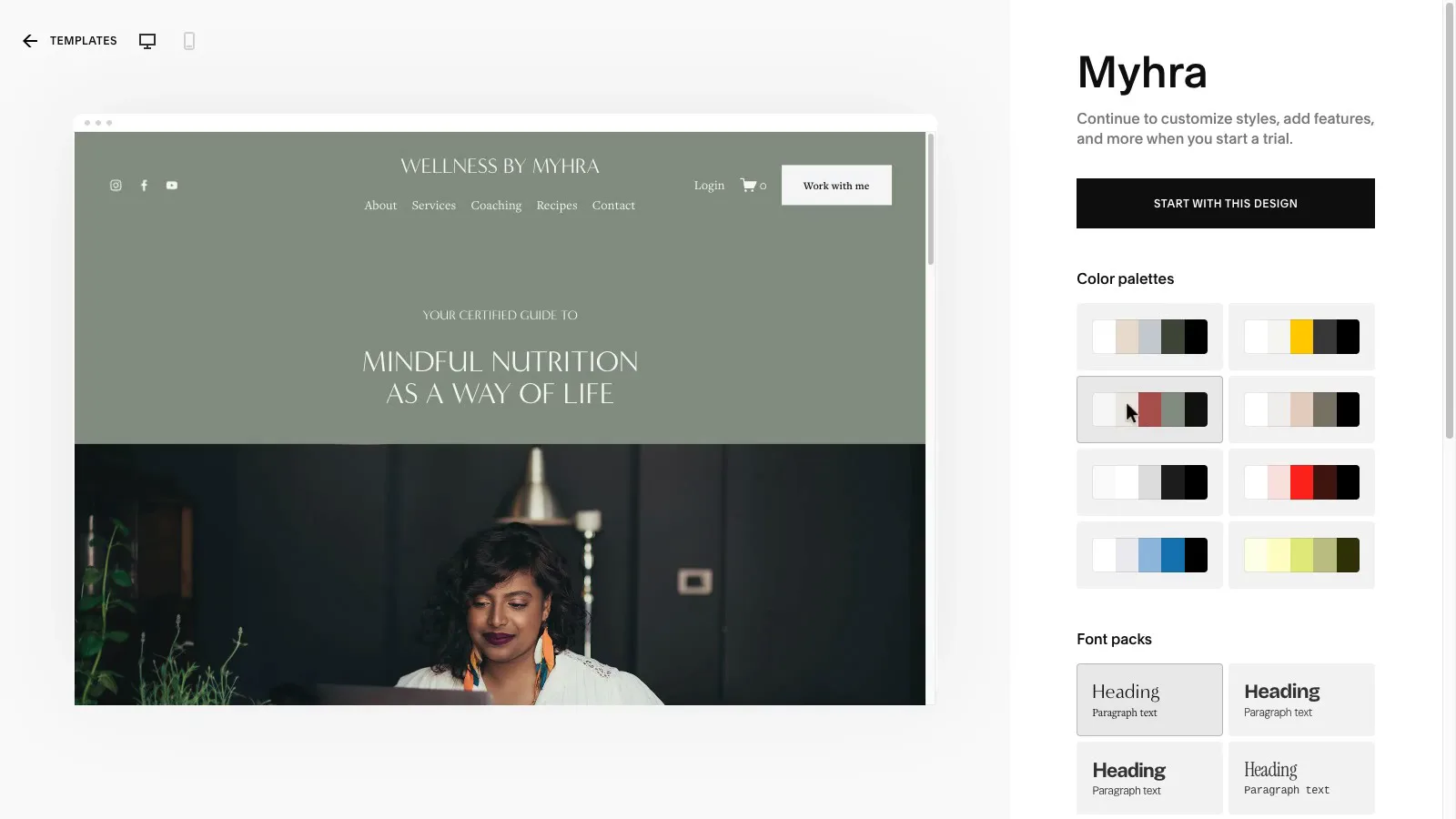
Both companies' template demos open without an account and stack into one column at phone width. On Squarespace's Myhra template, one palette click recoloured the whole preview, and the phone view stacked with no overlapping text.
 (enlarge)
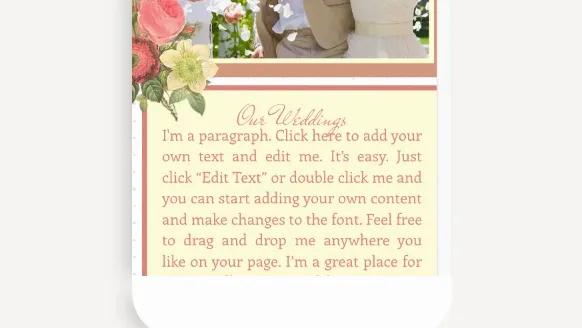
On the Wix wedding-planner demo, the "Our Weddings" heading appears to crowd the first line of text under it at phone width. That's one sample from each platform, and it isn't known which Wix editor the demo was built in, so it's a hint rather than proof.
 (enlarge)
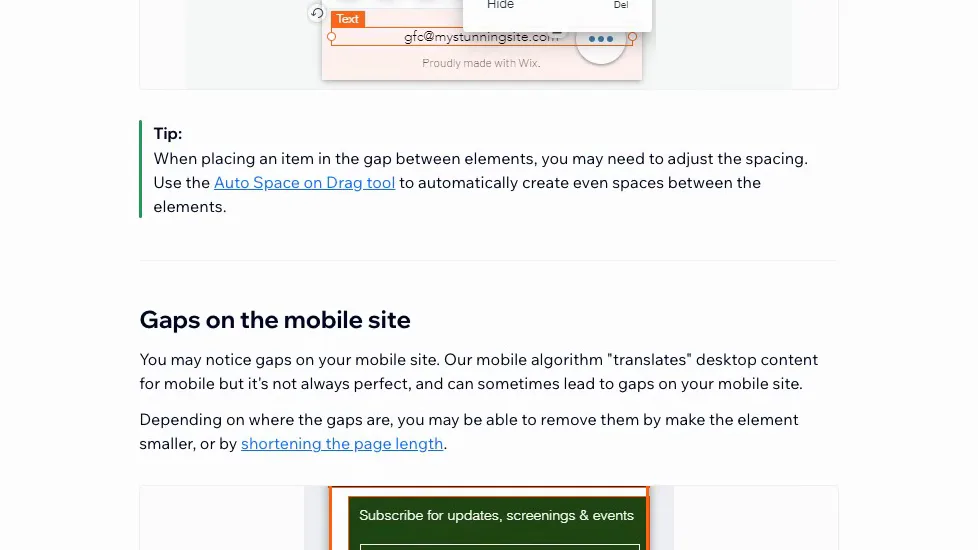
Wix's help on fixing mobile layouts says its automatic phone layout is "not always perfect, and can sometimes lead to gaps". Most fixes are done by hand, though the classic editor also has tools such as Zoom Out & Reorder and an automatic Page Layout Optimizer.
 (enlarge)
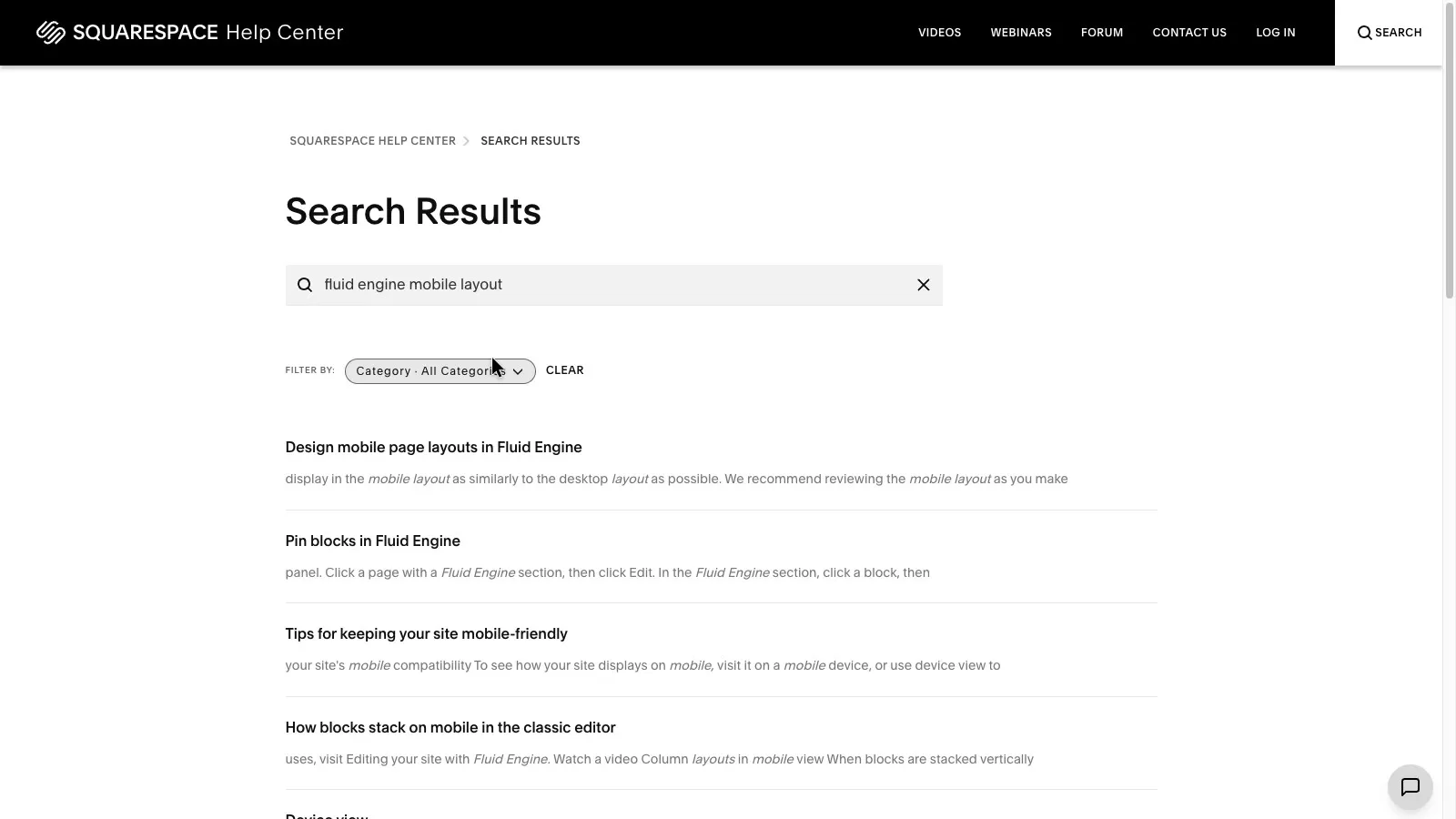
Squarespace has the same issue. Its Fluid Engine help recommends reviewing the phone layout as you make changes, and it lists problems to look for, such as overlapping text and banners cropped on phones. Blocks can be arranged and hidden separately for phones, but a change to a block's content shows up on both layouts.
 (enlarge)
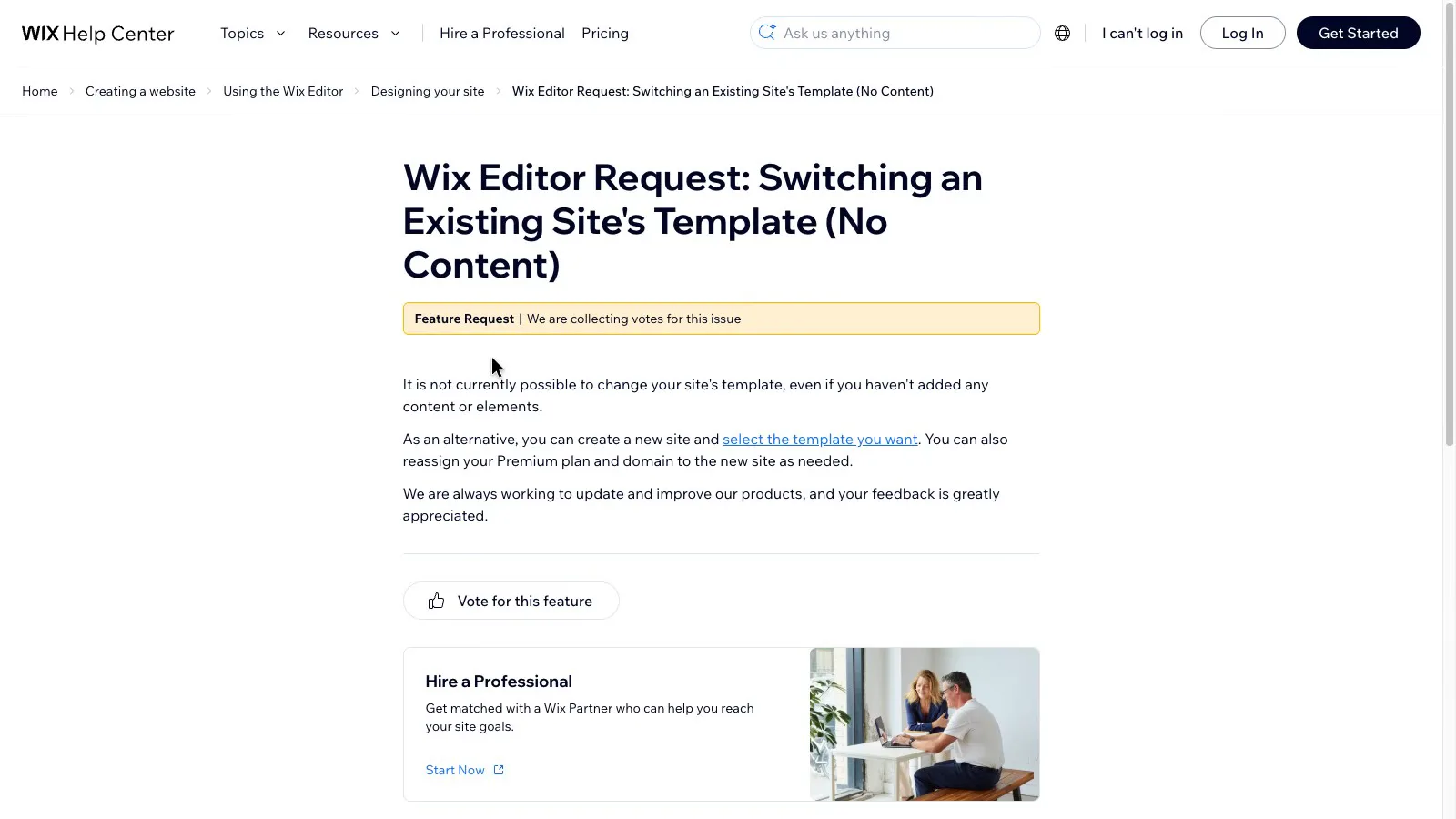
Changing the look of a finished site is where the two differ. Wix's feature-request page says "It is not currently possible to change your site's template", and suggests starting a new site and moving the paid plan and domain across to it.
 (enlarge)
Squarespace's current version doesn't swap templates either. However, its site styles change colours, fonts, buttons and spacing across the whole site, and you can move sections around. Wix also lets you restyle a finished site, through its Site Design panel for colours, text and transitions, and a classic Wix site can be rearranged freely. Only a different Wix template means building a new site.
Many Wix templates now use the newer Harmony editor, which adjusts the layout to screen size automatically. Its phone layouts weren't tested, so the classic-editor problems may not apply to a Wix site started today.
Does it run my business
For a business that takes appointments, Wix comes out ahead because booking is part of its Core plan. On Squarespace, booking is a second subscription priced in US dollars, so its cost moves with the exchange rate. When added through Squarespace, Acuity uses your Squarespace login and is billed under Squarespace's Billing panel.
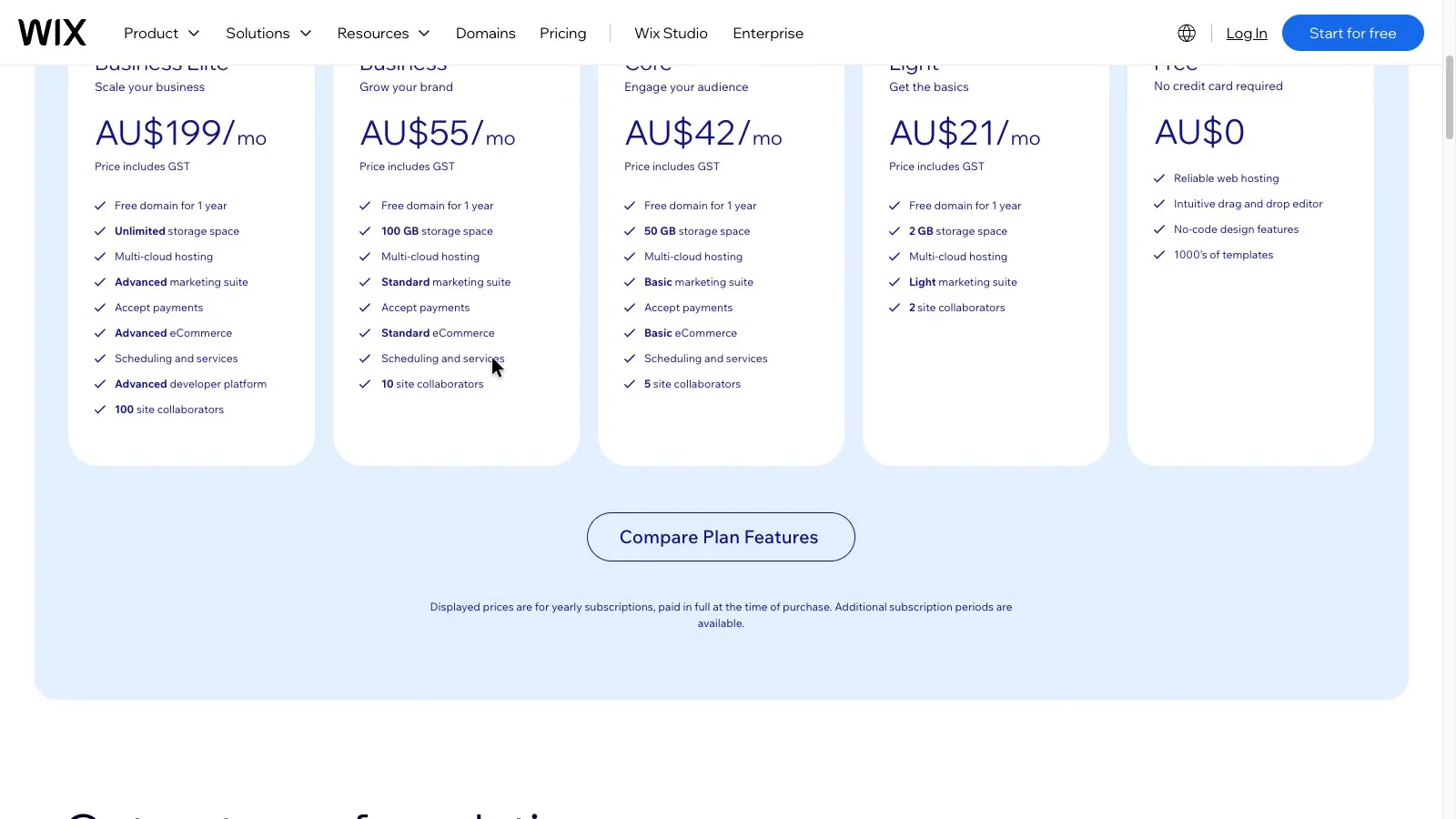
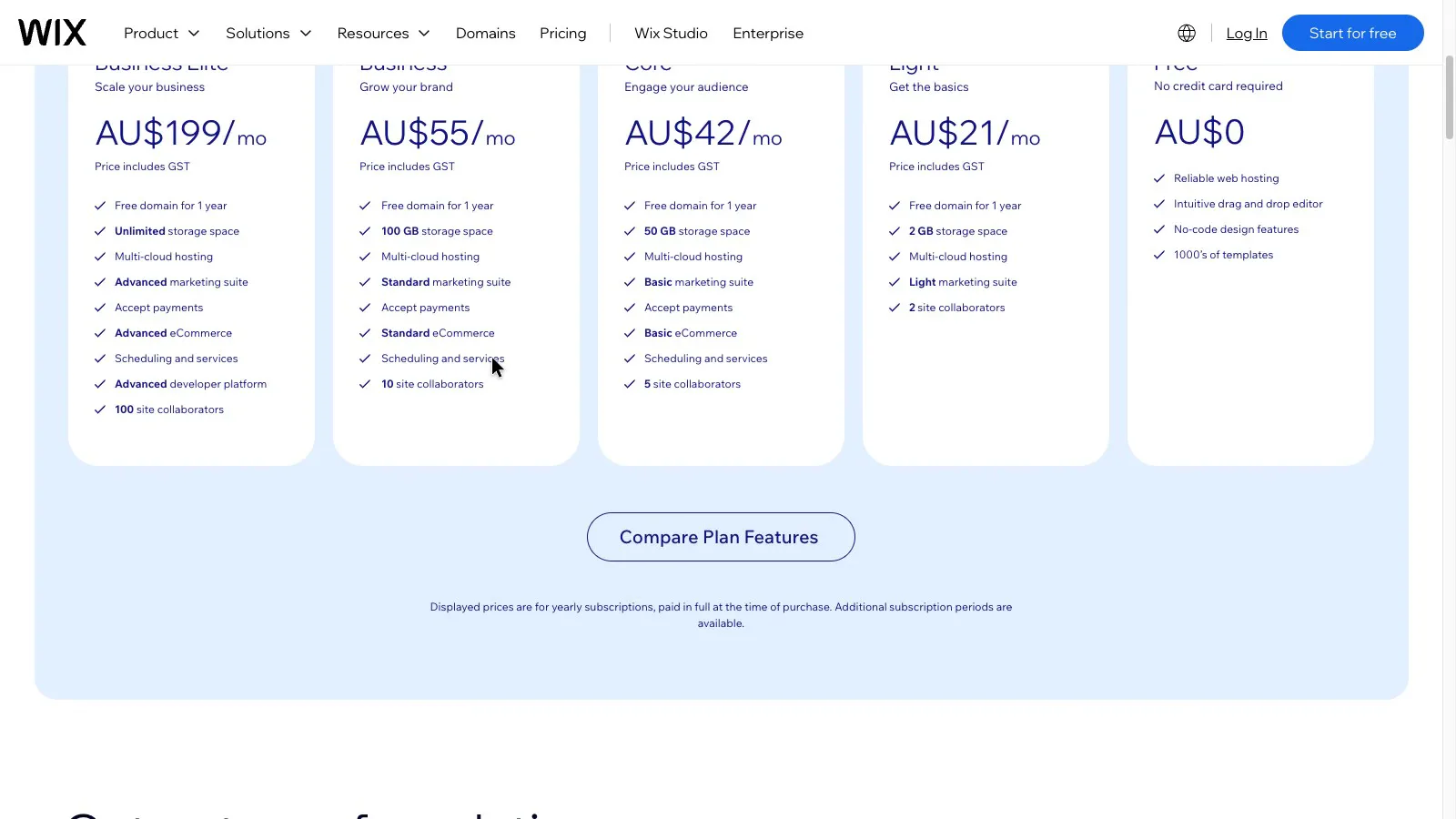
Wix's plans page lists "Scheduling and services" on Core and every plan above it, but not on the cheaper Light plan.
 (enlarge)
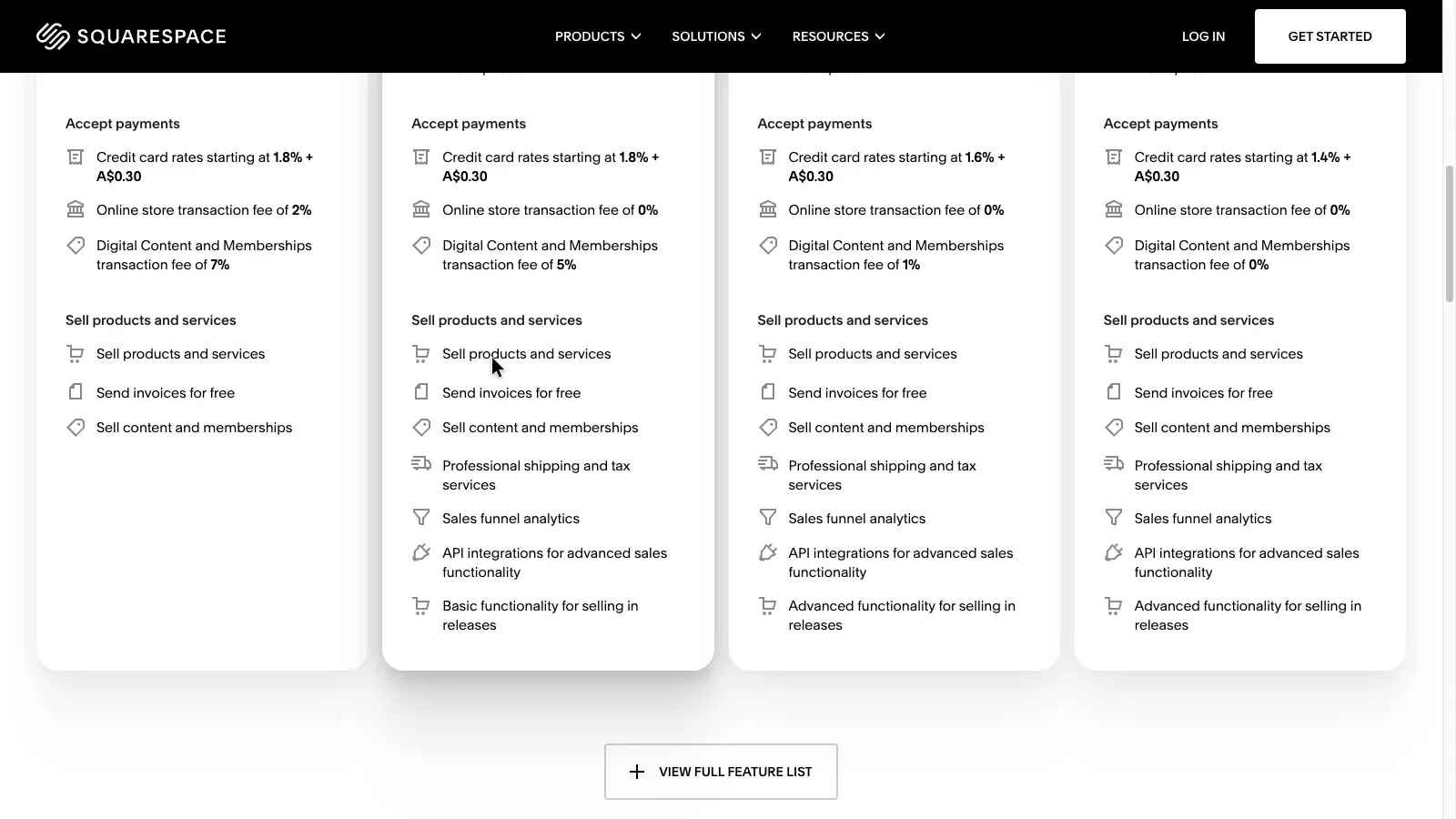
None of Squarespace's plans includes booking. They cover selling products and services, sending invoices and running memberships.
 (enlarge)
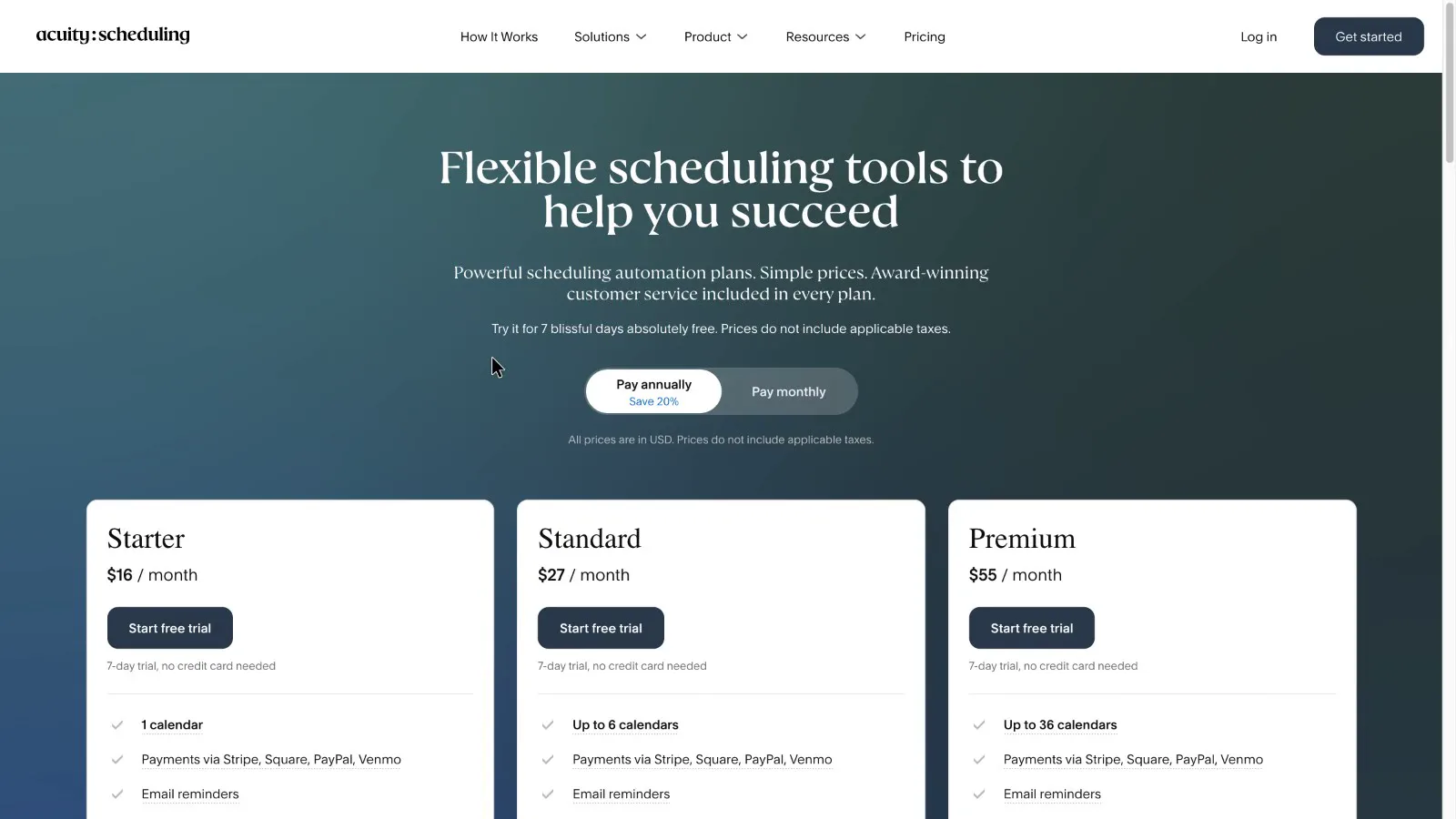
For booking, Squarespace sells Acuity Scheduling as a separate product. Acuity's pricing is in US dollars with tax extra. Its middle plan, Standard, costs around US$27 a month on yearly billing and covers up to six staff calendars. Acuity has a 7-day trial.
 (enlarge)
Wix doesn't say how many staff can take bookings on Core. If a busy clinic's team is over that limit, the next step up is Business, which costs more.
 (enlarge)
Real yearly cost
Neither is cheaper across the board. Wix costs less once you need bookings for a team of up to ten. Squarespace costs less for a team of more than five with no bookings, and the gap gets much bigger past ten people. With bookings, Squarespace also needs Acuity (Standard up to six calendars, Premium beyond that), which narrows the gap. Both show the yearly price as a monthly amount, but on both you pay the whole year upfront.
| Setup (yearly, before GST) | Squarespace | Wix |
|---|---|---|
| One person, simple site | Basic, about A$200 | Light, about A$230 |
| Clinic taking bookings, up to five people on the site | Core about A$340, plus Acuity Standard about US$320 and tax | Core about A$460, booking included |
| Six to ten people on the site, no bookings | Core about A$340 | Business about A$600 |
| 11 or more people on the site, no bookings | Core about A$340 | Business Elite about A$2,170 |
For one person with a simple site, the cheapest paid plans are close. For the clinic, Squarespace Core on its own is only about A$120 a year cheaper than Wix Core, and Acuity Standard costs more than that at any realistic exchange rate, so Wix is the cheaper of the two once bookings are needed.
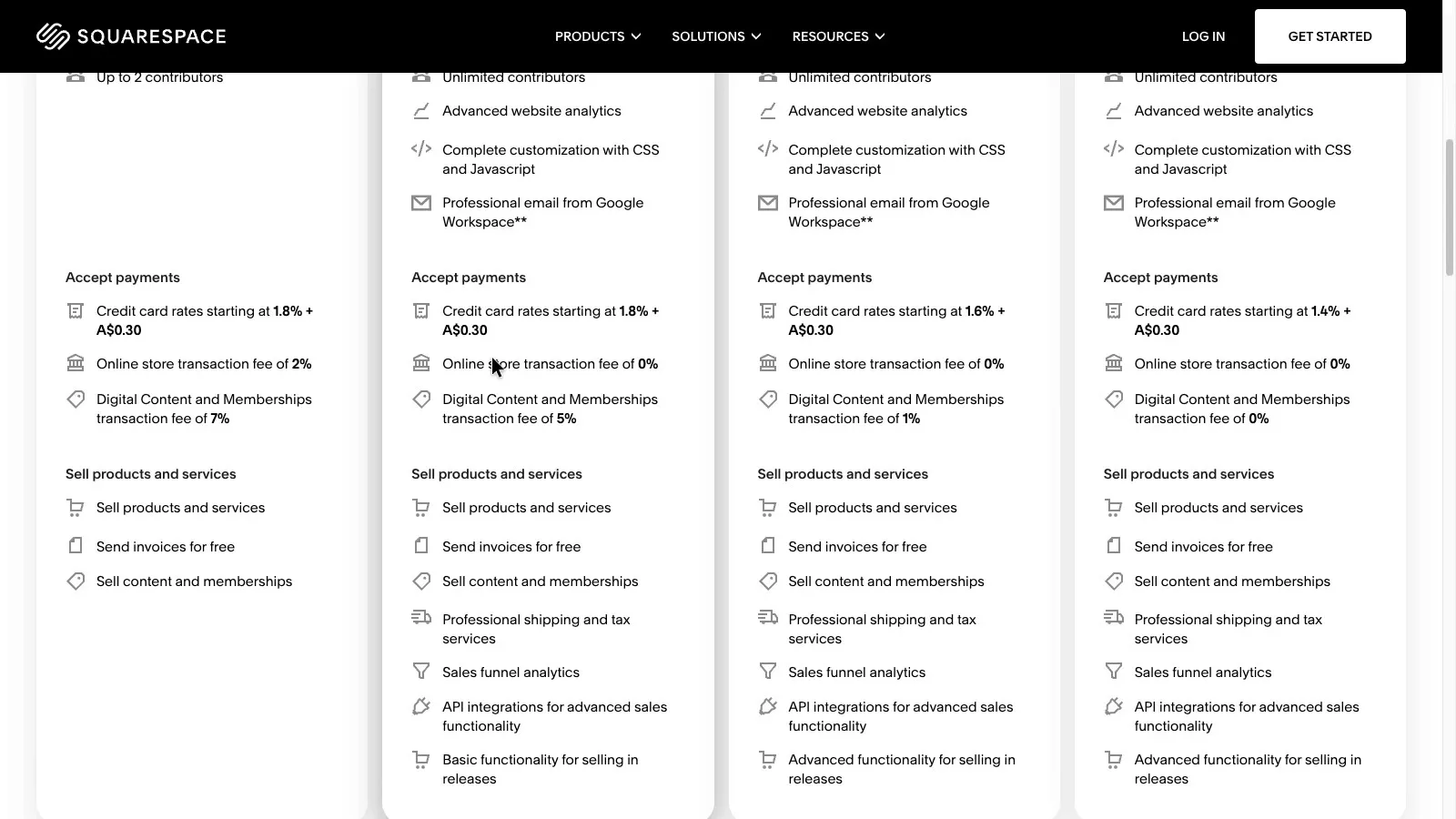
Team size reverses this for sites without bookings. Squarespace allows up to two contributors on Basic and unlimited contributors from Core. Wix's plans page lists two site collaborators on Light, five on Core, ten on Business and 100 on Business Elite. For the website plans alone, a team of 11 pays about A$1,800 a year more on Wix. If that team also needs bookings, Squarespace needs Acuity Premium (around US$55 a month), which cuts the gap to roughly A$800.
 (enlarge)
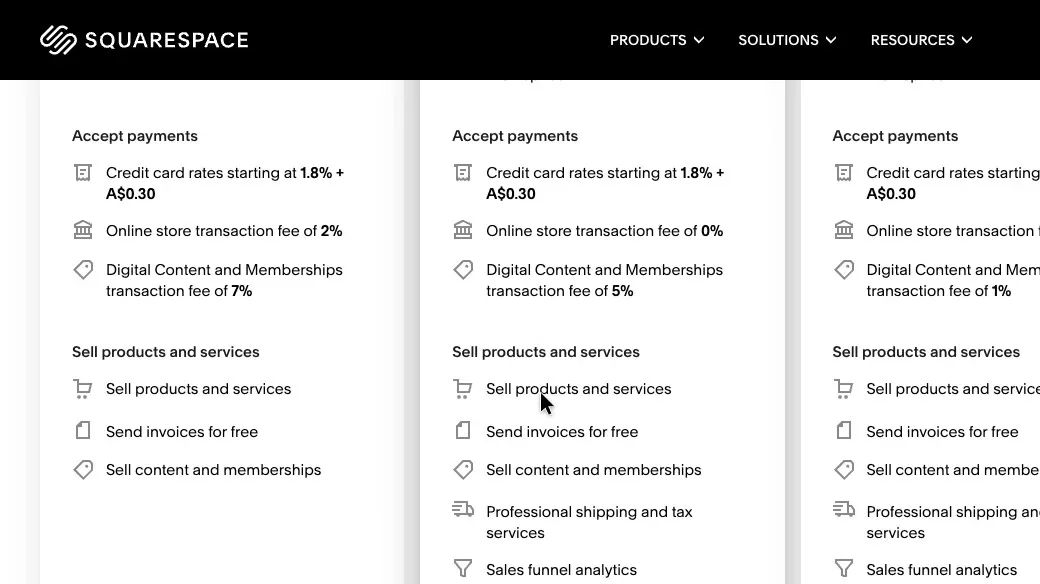
Squarespace Basic also adds a 2% fee on online store sales, and Core has none. Core costs about A$130 a year more than Basic, so it works out cheaper once a shop sells more than about A$6,600 a year.
 (enlarge)
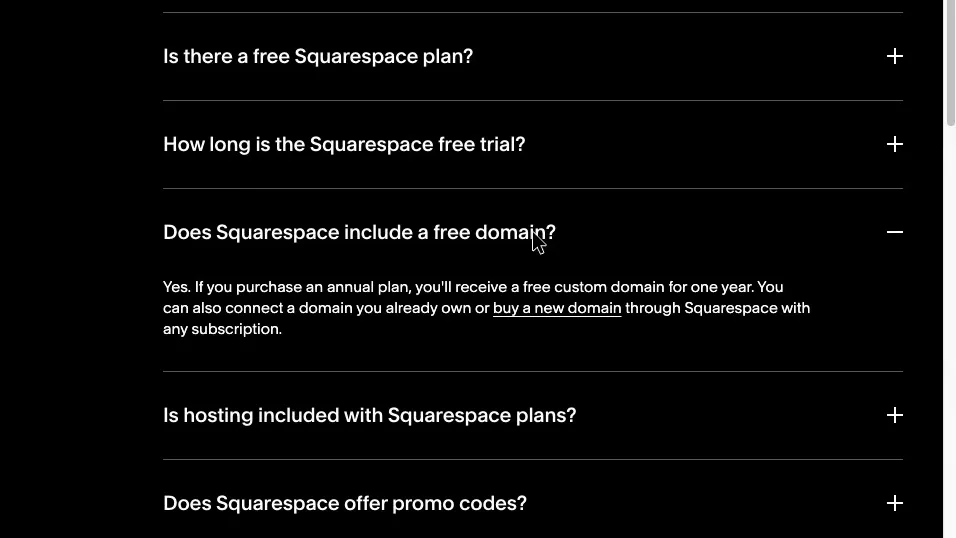
On both platforms the domain is free for the first year only, and neither pricing page shows what it costs from year two.
 (enlarge)
To try them out, Squarespace has a 14-day free trial with no card needed, and Wix has a free plan.
Taking payments here
Squarespace has its own card payments in Australia at a published rate. Wix doesn't offer its own payments, Tap to Pay or in-store system here, so a Wix site connects a separate provider and pays that provider's rate. That means one more account to set up and another set of rates to compare.
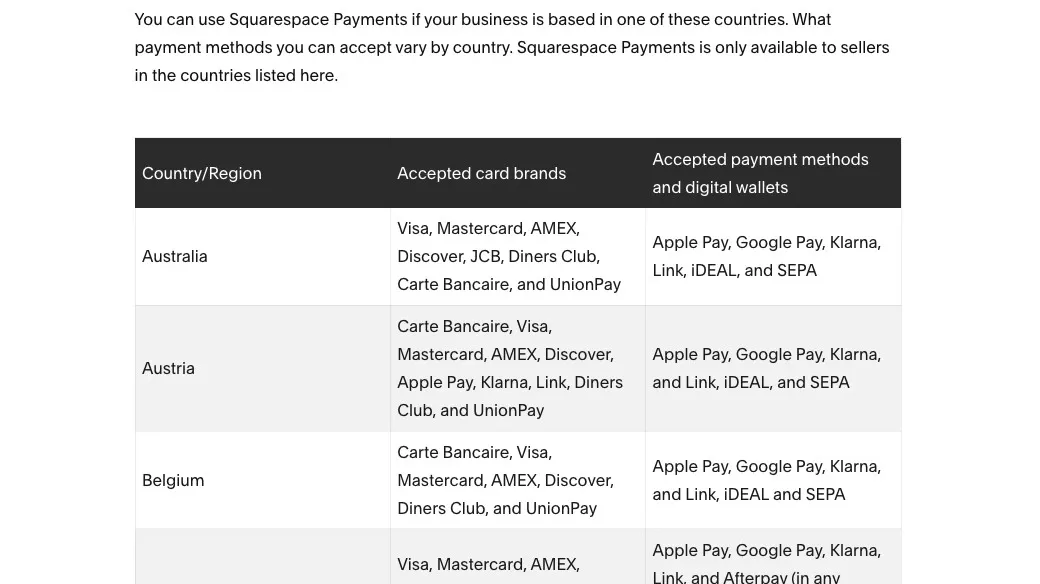
Australia is the first row of Squarespace's payments table, with the main card brands, Apple Pay, Google Pay and Klarna. Afterpay isn't in that row, but Afterpay says it works with Squarespace for Australian businesses through a Stripe connection.
 (enlarge)
On Core, Squarespace's card rate starts at 1.8% plus 30 cents, so a A$100 sale costs about A$2.10. On Basic, the 2% store fee takes that to about A$4.10, assuming the same card rate.
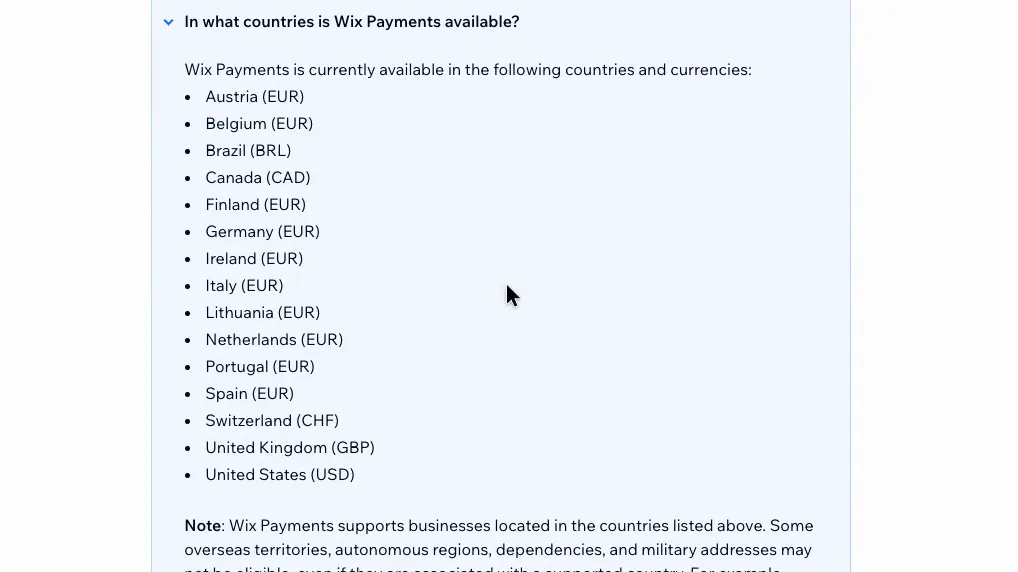
Wix's help lists the 15 countries where Wix Payments works, and Australia isn't one of them. Wix's help describes Tap to Pay as part of Wix Payments, so that isn't available here either.
 (enlarge)
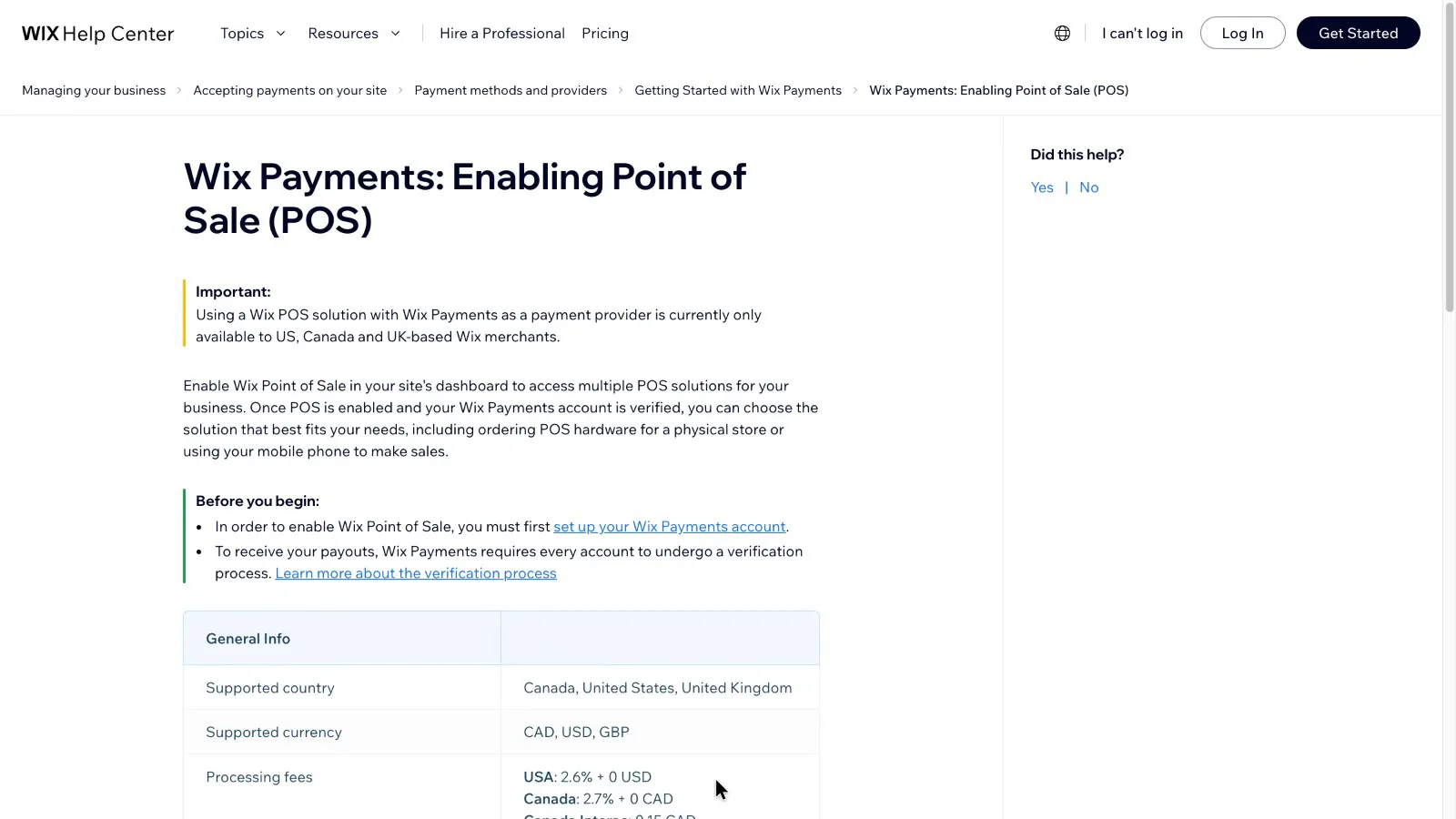
Wix's in-store system is "currently only available to US, Canada and UK-based Wix merchants", so Wix has no built-in system for selling at a shop counter or market stall in Australia. Wix does list Square as a supported payment provider in Australia, which gives Australian Wix users a route for in-person card payments.
 (enlarge)
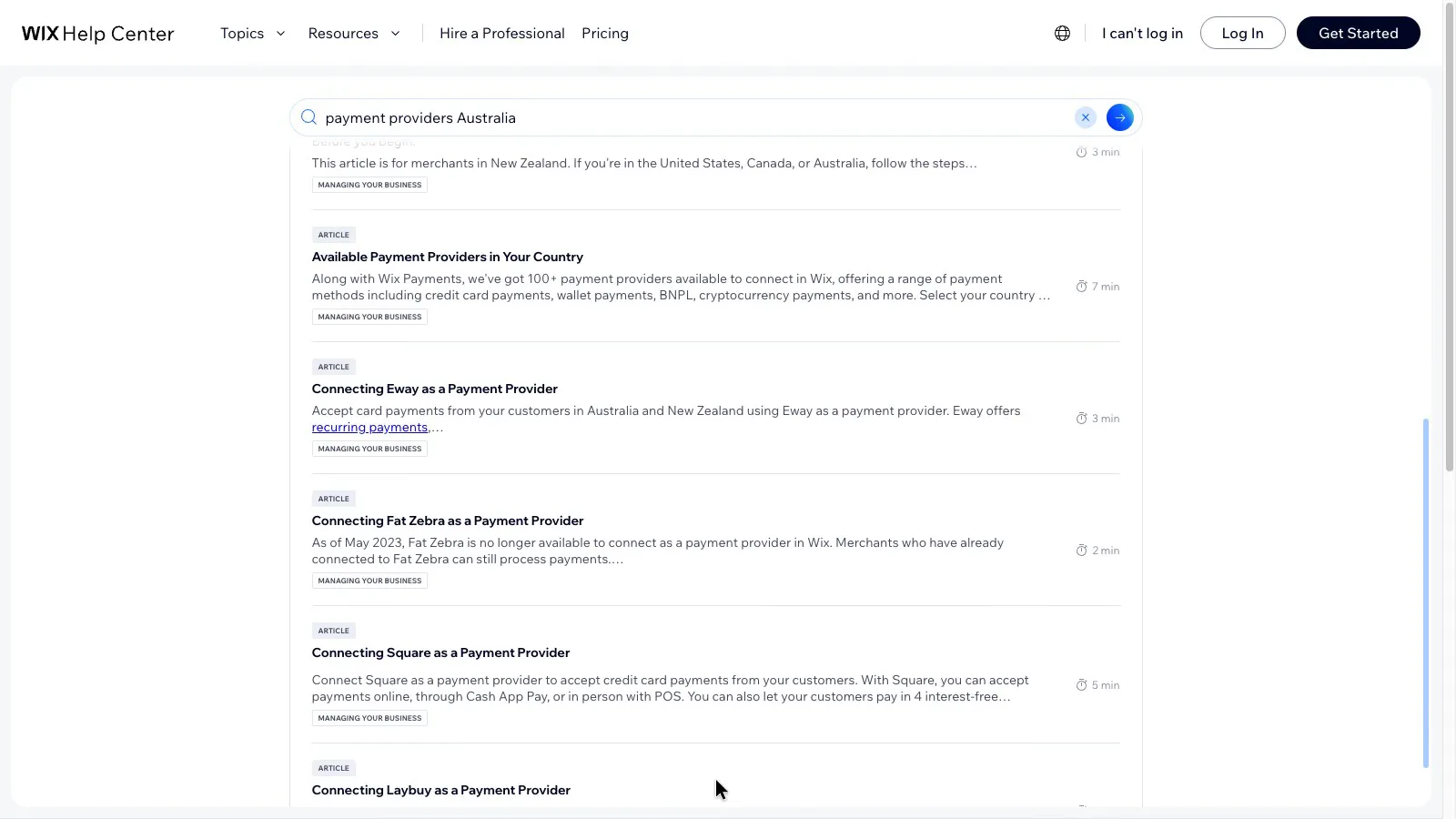
Australian Wix sites use providers such as Eway and Afterpay, and Wix's help says only one provider can process card payments at a time. The fee on each sale depends on the provider you sign up with.
 (enlarge)
Squarespace's payments availability table appears to list Tap to Pay only for the UK and US, and its in-person selling help is written for UK and US sellers, so it doesn't appear to be offered in Australia. Australian sellers who also sell face to face would need something separate, such as Square's own app. This wasn't checked on screen.
Growing or leaving
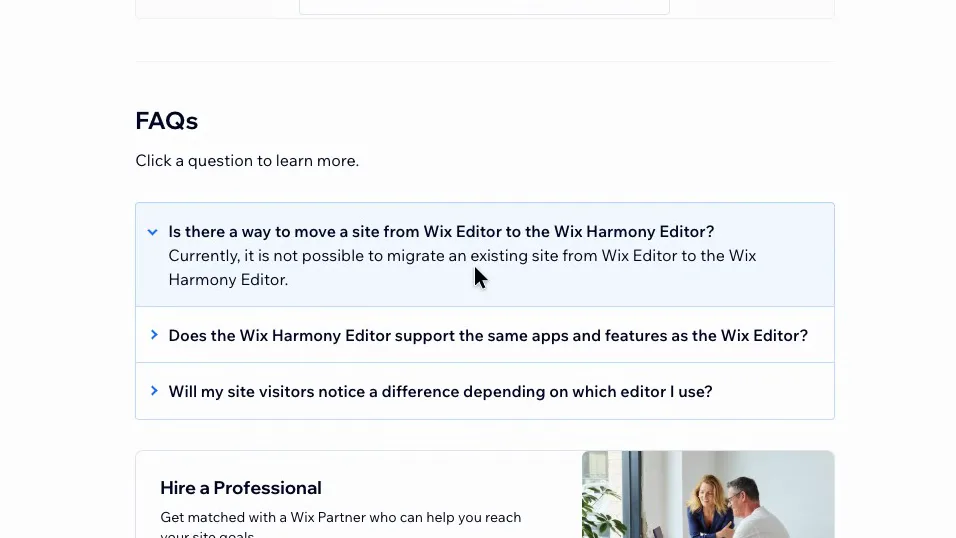
Wix has one lock-in: a site built in the classic editor can't move to the newer Harmony editor. Wix's help says "Currently, it is not possible to migrate an existing site from Wix Editor to the Wix Harmony Editor." Switching means rebuilding the site, which costs your own time or a designer's fee.
 (enlarge)
On accounting, Squarespace's extensions list includes connectors for both Xero and MYOB, while Wix has several Xero apps, including Xero Sync by Amaka, which has a free plan for up to 60 transactions a month. No clear option for MYOB was found on Wix. These came from research and weren't shown on screen. What each platform lets you take with you if you leave wasn't covered.
Pricing
| Plan | Price | Per | Includes |
|---|---|---|---|
| Basic | $17 ex GST | per month | Up to 2 contributors; 2% fee on online store sales; free domain for the first year |
| Core | $28 ex GST | per month | Unlimited contributors; 0% store fee; Squarespace Payments card rates from 1.8% + A$0.30; free domain for the first year |
| Plus | $49 ex GST | per month | Unlimited contributors; 0% store fee |
| Advanced | $109 ex GST | per month | Unlimited contributors; 0% store fee |
| Acuity Scheduling Starter (booking add-on) | US$16 ex tax | per month | 1 calendar; tax extra; 7-day trial |
| Acuity Scheduling Standard (booking add-on) | US$27 ex tax | per month | Up to 6 calendars; tax extra; 7-day trial |
| Acuity Scheduling Premium (booking add-on) | US$55 ex tax | per month | Up to 36 calendars; tax extra; 7-day trial |
Squarespace charges in US dollars. Your bank converts the price and may charge a foreign transaction fee. Checked 31 Oct 2026. Source: squarespace.com/pricing, acuityscheduling.com/pricing
| Plan | Price | Per | Includes |
|---|---|---|---|
| Free | Free | Free plan for trying Wix; not a time-limited trial | |
| Light | $21 | per month | 2 site collaborators; no scheduling; free domain for the first year |
| Core | $42 | per month | 5 site collaborators; Scheduling and services (staff limit not stated); free domain for the first year |
| Business | $55 | per month | 10 site collaborators; Scheduling and services; free domain for the first year |
| Business Elite | $199 | per month | 100 site collaborators; Scheduling and services; free domain for the first year |
AUD, inc GST unless marked ex GST or GST not stated. Checked 31 Oct 2026. Source: wix.com/plans
Integrations
| Connects to | What syncs | Direction | Checked |
|---|---|---|---|
| Acuity Scheduling | Appointment booking on the website (separate subscription) | Both ways | |
| Afterpay | Buy now, pay later at checkout | Not stated | |
| Xero | Sales, payments and tax, via the Amaka extension | Squarespace → Xero | |
| MYOB | Sales, payments and tax, via the Amaka extension | Squarespace → MYOB |
| Connects to | What syncs | Direction | Checked |
|---|---|---|---|
| Eway | Card payments at checkout | Not stated | |
| Afterpay | Buy now, pay later at checkout | Not stated | |
| Square | Card payments, including in person | Not stated | |
| Xero | Sales data, via the Xero Sync by Amaka app | Wix → Xero |
What I didn't test (10 things)
- Building or editing a real site on either platform. The brief allowed public pages only, with no sign-up, so how the phone layout holds up after edits comes from the vendors' help pages and two template demos.
- How Wix's newer Harmony editor handles phone layouts. Wix's Harmony mobile help page returned 'page not found'.
- How many staff can take bookings on Wix Core. The plans page doesn't say.
- Either booking tool from the customer's side, including reminders and calendar sync.
- The per-sale fees of Wix's Australian payment providers, such as Eway and Afterpay.
- The Xero and MYOB add-ons on each platform, what you can export when leaving, and moving a .com.au domain. These were left out to stay within the session budget.
- Domain renewal prices after the free first year. Neither pricing page shows them.
- Monthly billing prices. Wix doesn't publish monthly AUD prices on its plans page.
- Support hours in Australian time and where each company keeps your data.
- The Squarespace and Wix phone apps.
Video transcript
Squarespace vs Wix
Today we're looking at Squarespace and Wix, which are both website builders. You choose a template, fill in your own pages, and they host the site. If customers book appointments with you, I'd choose Wix, because booking comes in its Core plan. If more than five people work on the site, or you want card payments built in, I'd start with Squarespace, because its Core plan takes any number of people and Wix doesn't have its own payments in Australia. I used my AI review agent to go through their templates, bookings, payments and what they really cost, then checked several of its findings myself.
Key features
To start with, the key features side by side. Wix includes booking from Core, and Squarespace has its own card payments in Australia. Both let you try them free.
Design freedom or guardrails
Next, how the templates look on a phone. Both stack into one column at phone width. On the Wix demo the heading appears to sit on the text underneath it, while the Squarespace template recoloured with one click and looked tidy. Wix's help says the phone layout on a classic Wix site is "not always perfect, and can sometimes lead to gaps". Squarespace's help also recommends reviewing the phone layout as you make changes.
Design freedom or guardrails
Then, changing the look later. Wix doesn't let you change a finished site's template, and suggests starting a new site instead. On Squarespace you restyle the site you already have. Site styles change colours, fonts, buttons and spacing across the whole site, and you can move sections around. Wix's classic editor lets you drag almost anything anywhere on the page. Many Wix templates now use its newer Harmony editor, which adjusts to screen size automatically, so the phone problems may not apply to a Wix site started today.
Does it run my business
Next, bookings, which matter most if clients book appointments with you. Wix lists scheduling and services on its Core plan and every plan above it, though not on the cheaper Light plan. Squarespace's plans cover selling, invoices and memberships, but none of them lists booking. For that, Squarespace sells Acuity, a separate subscription in US dollars. Its middle plan is 27 US dollars a month for up to six staff calendars. Wix doesn't show how many staff can take bookings on Core.
Real yearly cost
Next up, what it costs, on yearly billing. For one person with a simple site, the cheapest paid plans are close. A clinic that takes bookings pays less on Wix, because Core includes booking and Squarespace needs Acuity on top, even once Acuity is converted to Australian dollars. With six to ten people working on the site it flips, because Squarespace Core takes any number, while Wix needs its dearer Business plan. From 11 people Wix needs Business Elite, which costs far more than Squarespace Core.
Real yearly cost
Still on cost, Squarespace's cheapest plan also takes a 2% fee on store sales. Core costs about 130 dollars a year more, so it's cheaper once a shop sells more than about 6,600 dollars a year. The year is paid upfront on both, and the domain is free for the first year only.
Taking payments here
Now, taking payments. Squarespace's own payments take cards, Apple Pay, Google Pay and Klarna in Australia. Afterpay isn't on that list, though you can add it through Stripe instead. On Core the card rate starts at 1.8% plus 30 cents, so a 100 dollar sale costs about two dollars ten. Wix's own payments don't work in Australia, and its in-store system is only for the US, Canada and the UK. So on Wix you connect a separate provider such as Eway or Afterpay, and pay that provider's rate.
Growing or leaving
Thinking ahead, a classic Wix site can't currently be moved to the newer Harmony editor, so moving to Harmony later means rebuilding the site.
Who each one suits
For a business where clients book appointments, I'd choose Wix, because booking comes in its Core plan at about 458 dollars a year. Squarespace needs Acuity on top, which costs more. If more than five people work on the site, or you want card payments built in, I'd choose Squarespace, at 336 dollars a year on Core, which takes any number of people. I hope that helps you choose between these two website builders.